
At first glance, OpenClaw and Claude Code look like they belong in the same category. Both use modern AI models. Both automate work. Both promise to save time. That is usually where the confusion starts.
The reality is simpler once you step back. These tools were built for different moments in your day. Claude Code sits inside your development workflow and helps you move faster when you are actively building software. OpenClaw lives outside that environment, closer to your messages, tasks, and ongoing routines, handling things that continue long after a coding session ends.
This article is not about declaring a winner. It is about understanding what each tool is actually designed to do, where they overlap, and why many developers end up using both without thinking of them as alternatives at all.
Two Different Ideas of What an AI Assistant Should Be
The easiest way to understand the difference is to stop thinking about features and instead think about environment.
Claude Code is designed for moments when you are actively building something. You open your terminal or IDE, describe what you want, and the agent works directly with your codebase. It reads files, writes code, runs commands, executes tests, and iterates until the task is complete. When the session ends, the work stops.
OpenClaw takes the opposite approach. It is not tied to a development session at all. Once installed, it runs continuously as a background system. You interact with it through messaging platforms such as Telegram, WhatsApp, or Slack. Instead of focusing on a project folder, it focuses on ongoing activity across email, calendars, files, and connected services.
This difference sounds small at first, but it changes everything. Claude Code is a specialist tool. OpenClaw is an orchestration layer for everyday workflows.
Where Claude Code Fits Naturally
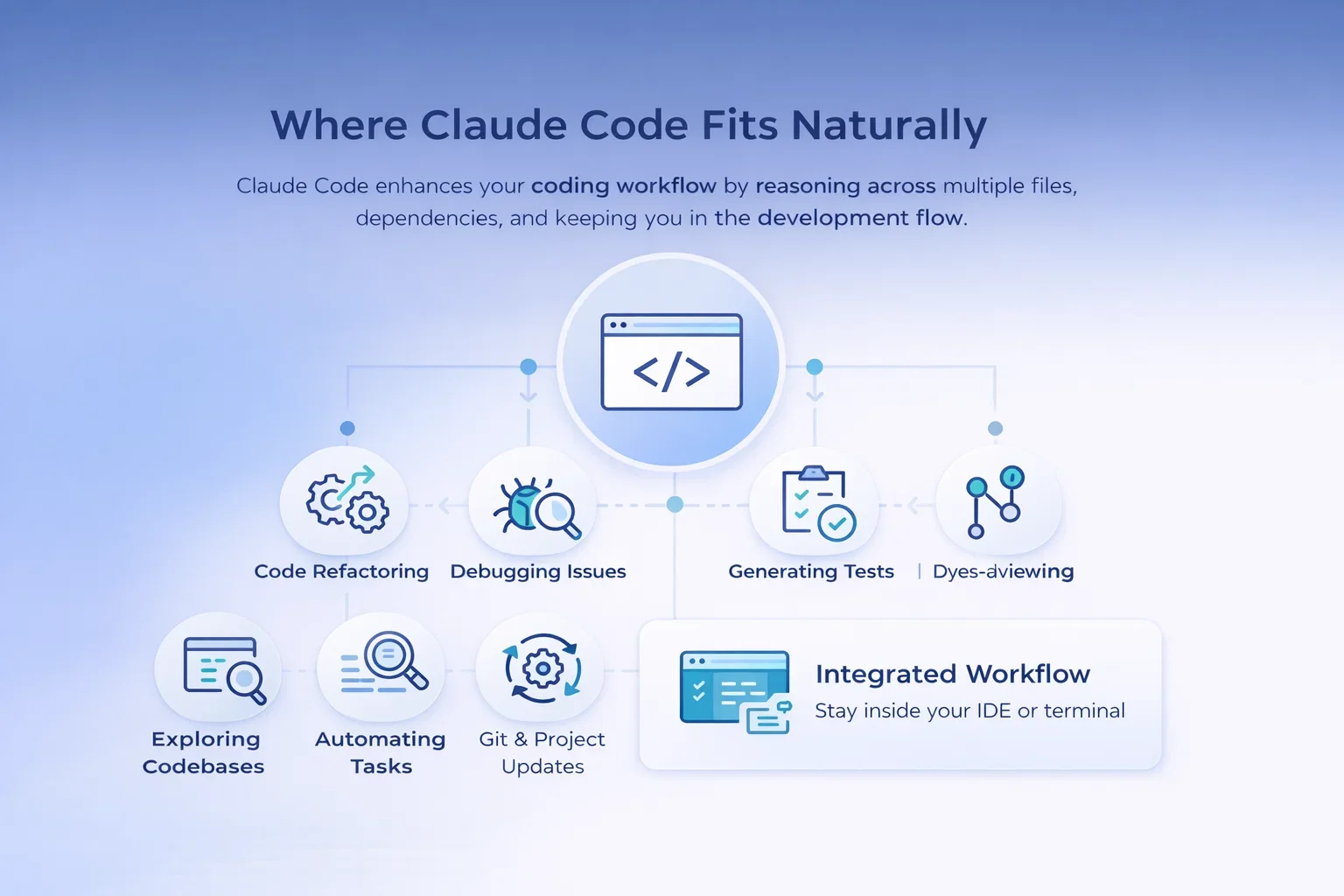
Claude Code makes sense the moment your work revolves around code. Its strength comes from context. Because it can see an entire project, it can reason across multiple files, understand dependencies, and make coordinated changes that would normally require manual effort.
It Excels At
- Refactoring large sections of code
- Debugging issues that span multiple modules
- Generating tests and fixing failures
- Exploring unfamiliar codebases
- Automating repetitive development tasks
- Handling git operations and project updates
Staying Inside the Development Flow
The key advantage is proximity to the development environment. You are already in the terminal or IDE. There is no context switching. The assistant becomes part of the same workflow as your editor, build tools, and version control.
Another important detail is how Claude Code handles iteration. It can write code, execute it, observe results, and adjust its approach. That feedback loop is essential in development work where the first attempt rarely solves the problem completely.
For developers, this feels less like chatting with an AI and more like delegating pieces of implementation.
Where OpenClaw Changes the Picture
OpenClaw operates in a completely different space. Instead of helping you finish a task faster, it tries to remove the need for you to handle certain tasks at all.
Because it runs continuously and maintains persistent memory, it can manage workflows that stretch across hours or days. Email triage, reminders, follow-ups, monitoring tasks, and cross-platform communication become automated processes rather than one-time actions.
Typical Use Cases
- Summarizing incoming emails
- Scheduling meetings through messaging commands
- Managing recurring tasks
- Coordinating across multiple communication channels
- Triggering automation workflows remotely
- Connecting different services into one system
Working Where Communication Already Happens
The messaging interface plays a bigger role than it might seem. You do not open a tool to use OpenClaw. You send it a message where you already communicate. That small change removes friction, which is why many users describe it as feeling closer to a teammate than a software tool.
It is also why OpenClaw works well for asynchronous work. Tasks continue running even when you are offline.

Building AI Systems Beyond Individual Tools With AI Superior
At AI Superior, we often see companies reach the point where individual AI tools are no longer enough. OpenClaw, Claude Code, and similar assistants can significantly improve productivity, but real impact usually happens when AI becomes part of a larger system rather than a standalone tool. That is where our work typically begins.
We focus on designing and building end-to-end AI solutions that fit directly into existing business processes. Our team of data scientists and engineers works closely with clients to identify where machine learning, automation, or generative AI can create measurable value, whether that means developing custom AI software, integrating language models into internal workflows, or building predictive systems that support better decision-making over time. The goal is not to introduce AI for its own sake, but to make it useful in day-to-day operations.
In practice, this means starting with discovery and validation before moving into development and scaling. We help organizations move from early experimentation to reliable AI systems that can grow with the business. For teams exploring tools like OpenClaw or Claude Code, this often becomes the next step – turning isolated automation into structured, secure, and maintainable AI-driven solutions that actually support long-term growth.
The Architecture Difference That Actually Matters
Most comparisons focus on capabilities, but architecture is the real dividing line.
Session-Based vs Persistent Systems
How Claude Code Operates
Claude Code is session-based. You start it when needed and stop when finished. Memory exists within the session or through project files, but the agent itself is not always active.
This makes it well suited for focused work. You open a task, solve it, and move on. The assistant exists only while the work is happening.
How OpenClaw Operates
OpenClaw is persistent. It runs as a daemon, maintaining state over time. It remembers conversations, preferences, and unfinished workflows. That persistence allows it to handle ongoing processes rather than isolated requests.
This distinction changes expectations. A session-based agent is ideal for focused problem solving. A persistent agent is better for coordination and automation.
Neither approach is inherently better. They solve different problems.
Specialist vs Generalist Thinking
Depth vs Breadth of Responsibility
Another way to look at this comparison is through specialization.
Claude Code is intentionally narrow in scope. It does not try to manage your inbox or schedule meetings. That limitation is a strength. By focusing on development tasks, it can provide deeper understanding of code structure and workflow.
OpenClaw moves in the opposite direction. It connects to many systems and handles a wide range of actions. It can write code if needed, but that is not its primary purpose. Its strength comes from connecting tools rather than mastering one environment.
In practice, specialists tend to outperform generalists within their domain. That is why Claude Code remains the better choice for active development even when OpenClaw can technically execute similar tasks.
Interface Changes Behavior More Than Features
One of the more interesting differences between the two tools is how interface shapes usage.
Claude Code lives where developers already think. The terminal encourages focused interaction. You start a task, work through it, and close the session when done. The workflow is intentional and contained.
OpenClaw lives where attention already flows during the day. Messages arrive continuously. Tasks are triggered casually. The assistant becomes part of everyday communication rather than a separate environment.
This affects how people use AI without realizing it. Terminal tools encourage deep work. Messaging tools encourage ongoing automation.
Understanding this helps explain why users often adopt both without conflict.
Security and Control Considerations
Security is one area where the differences become more practical than philosophical.
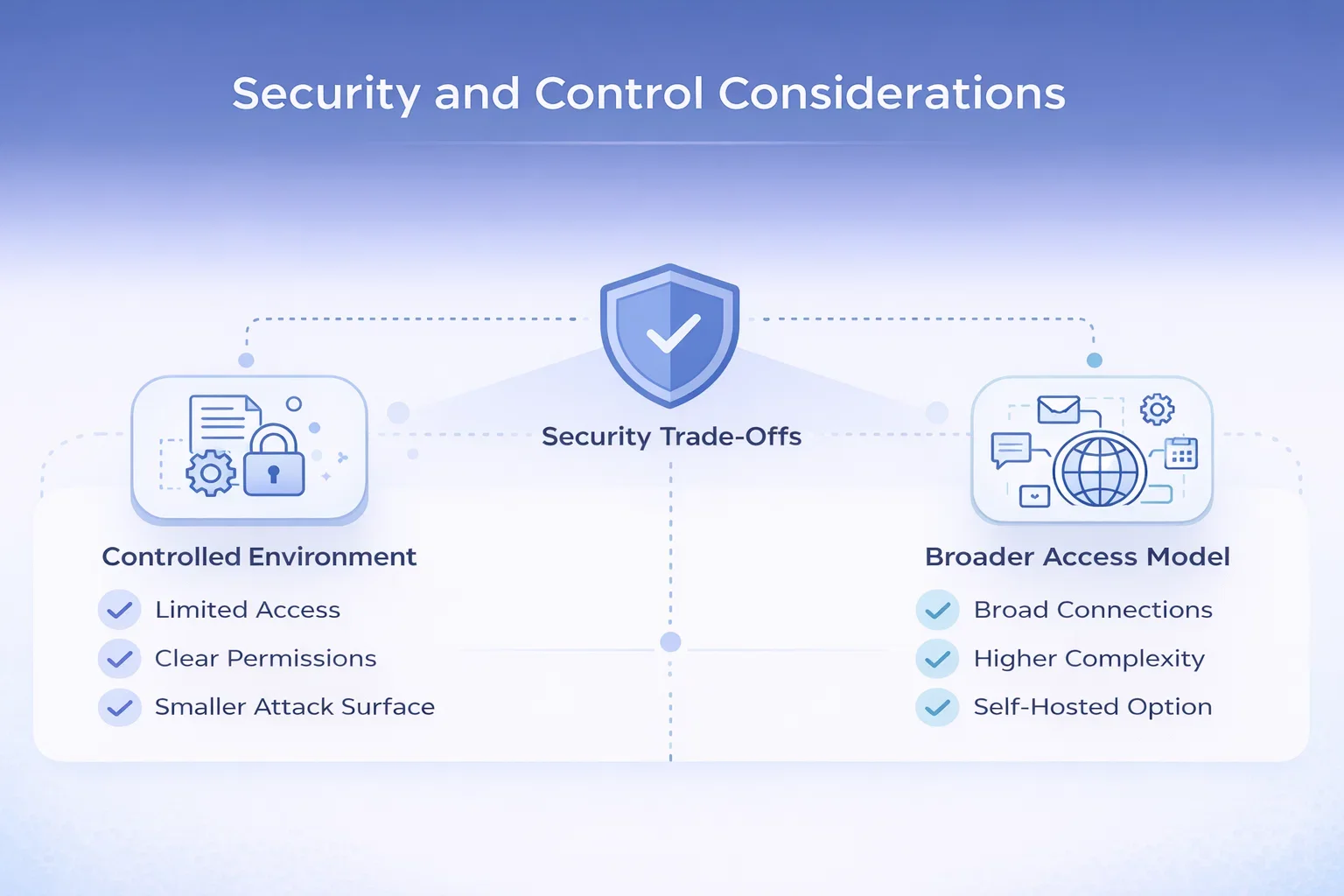
Claude Code’s Controlled Environment
Claude Code operates within a relatively limited environment. Access is usually restricted to your project files and commands you explicitly allow. The attack surface is smaller by design, which makes it easier to reason about what the agent can and cannot do.
Because it stays inside the development workflow, permissions tend to be clearer and easier to manage.
OpenClaw’s Broader Access Model
OpenClaw, by contrast, can connect to email accounts, messaging platforms, calendars, and system-level actions. That flexibility introduces more responsibility. Running a persistent agent with broad permissions requires careful configuration, proper access controls, and attention to updates.
Self-hosting gives users control over data and infrastructure, but it also shifts responsibility onto the user. For experienced developers or technically comfortable users, this trade-off can be worthwhile. For others, it adds complexity that should not be ignored.
The important point is not that one is safe and the other is risky. It is that the security models are fundamentally different.
When Claude Code or OpenClaw Makes More Sense
Sometimes the easiest way to decide is to look at where friction appears during your day. The two tools solve different kinds of slowdowns, so the choice usually becomes clear once you frame it around actual work rather than features.
| Situation or Need | Claude Code Is the Right Choice | OpenClaw Is the Better Fit |
| Main bottleneck | Development speed or technical complexity | Accumulation of small tasks across tools |
| Typical environment | Terminal or IDE | Messaging apps and connected services |
| Best suited for | Working inside large or unfamiliar codebases | Managing high volumes of communication |
| Type of work | Handling multi-file changes and refactoring | Coordinating schedules and reminders |
| Problem solving style | Debugging complex technical issues | Running ongoing automation workflows |
| Automation focus | Automating development tasks | Automating everyday operational tasks |
| Interaction style | Focused development sessions | Messaging and asynchronous interaction |
| Common outcome | Faster implementation and cleaner code | Fewer manual tasks to manage daily |
If your day is primarily spent writing or reviewing code, Claude Code tends to deliver value immediately because it removes friction inside the development process itself.
OpenClaw becomes useful when work starts fragmenting across email, messaging, calendars, and small recurring actions. Instead of accelerating a single task, it reduces the number of tasks you need to handle manually in the first place.
Why Many Developers End Up Using Both
After spending time with both tools, the comparison usually disappears. They occupy different layers of productivity.
A common setup looks something like this. Claude Code handles development sessions during focused work. OpenClaw manages communication, reminders, and automation in the background. One helps you build faster. The other helps you think about fewer things.
The combination works because there is very little overlap. One is triggered intentionally. The other operates continuously.
This layered approach is becoming more common as AI tools mature. Instead of one assistant doing everything poorly, multiple assistants handle specific responsibilities well.
Final Thoughts
AI assistants are gradually moving away from being general chat interfaces and toward becoming parts of specific workflows. OpenClaw and Claude Code represent two early examples of that shift.
One focuses on execution inside a technical environment. The other focuses on orchestration across everyday activity. Neither replaces the other because they were never designed to compete.
The more useful question is not which assistant to choose, but which part of your work you want to stop doing manually. Once that becomes clear, the choice usually makes itself.
Frequently Asked Questions
What is the main difference between OpenClaw and Claude Code?
The main difference comes down to purpose and environment. Claude Code is a coding assistant designed for software development inside a terminal or IDE. OpenClaw is a persistent automation agent that operates through messaging platforms and connected services, handling tasks across communication, scheduling, and daily workflows.
Can OpenClaw replace Claude Code for developers?
Not really. OpenClaw can trigger development-related tasks, but it does not provide the same level of codebase understanding, file control, or development workflow integration. Claude Code is built specifically for writing, debugging, and managing code, which makes it more effective for active development work.
Can Claude Code handle automation outside coding?
Claude Code is primarily focused on development tasks. It does not manage emails, calendars, or messaging workflows on its own. For automation that extends beyond software development, a tool like OpenClaw is better suited.
Is it common to use both tools together?
Yes. Many users end up using both because they solve different problems. Claude Code handles focused coding sessions, while OpenClaw manages ongoing automation and coordination across tools and communication channels.
Which tool is easier to set up?
Claude Code is usually easier to start with because it runs within a familiar development environment and requires less system configuration. OpenClaw often requires more setup, especially when connecting multiple services or configuring security properly.
 English
  German
  Arabic
  French
  Dutch
Dutch  Spanish