
Here’s what nobody tells you upfront: OpenClaw doesn’t cost anything. The software is free forever.
But that’s not the whole story. While the personal AI assistant platform itself costs exactly $0 to download and use, you’ll still spend money to actually run it. And according to community discussions, some users have reported unexpectedly high bills.
So what’s the real deal with OpenClaw costs? Let’s break down every expense you’ll encounter, from the obvious to the hidden.
The Software Cost: Actually Free (No Catch)
OpenClaw is open-source software. You can download it, modify it, and run it on as many machines as you want without paying a cent.
No subscription fees. No premium tiers. No “enterprise edition” upsells.
The catch? OpenClaw is just the gateway. It’s the interface that connects you to AI models, but it doesn’t include the AI itself. That’s where the real costs begin.
AI Model Costs: Where Your Money Actually Goes
This is the big one. OpenClaw needs an AI model to function, and most of the powerful models charge per token (essentially per piece of text processed).
When you ask OpenClaw to write an email, organize files, or build an application, it’s making API calls to services like Anthropic’s Claude or OpenAI’s GPT models. Every interaction costs money.
Typical Model Pricing Breakdown
| Model Provider | Model | Cost per Million Input Tokens | Cost per Million Output Tokens | Best For
|
|---|---|---|---|---|
| Anthropic | Claude Opus 4.6 | $5.00 | $25.00 | Complex tasks, best quality |
| Anthropic | Claude Sonnet 4.6 | $3.00 | $15.00 | Balanced performance/cost |
| OpenAI | GPT-5.3 | $2.50 | $10.00 | General purpose |
| Gemini Flash 3 | $0.50 | $3.00 | Budget-friendly, good instruction following | |
| Minimax | Minimax 2.5 | $0.30 | $1.20 | Ultra-low cost option |
Real talk: most people start with Claude Opus because it’s what everyone recommends. Then they get their first bill.
According to community discussions, users have reported significant variation in costs after model optimization, with some reporting substantially lower monthly expenses after switching to cheaper alternatives.
What Does This Mean in Real Dollars?
Let’s translate those per-million-token prices into actual monthly costs:
- Light usage (10-20 tasks per day, simple requests): $5-10/month with mid-tier models
- Moderate usage (50+ tasks daily, some complex automation): $15-30/month
- Heavy usage (constant automation, long-context tasks, file operations): $50-150/month
Community discussions suggest most people land in the $10-30/month range once they optimize their model choices.
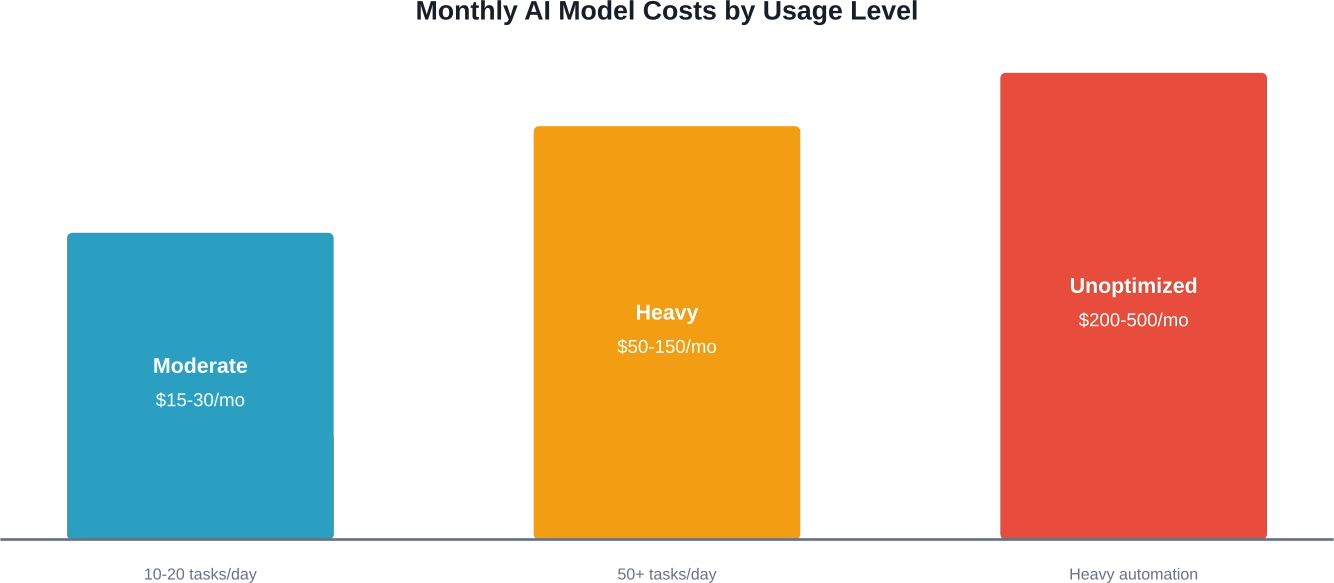
Most OpenClaw users spend $15-30/month on AI model APIs with optimized settings, though unoptimized configurations can cost significantly more.
Hosting Costs: From Zero to Reasonable
OpenClaw runs as software on a computer somewhere. That computer might be your laptop, a dedicated server, or a cloud instance. Each option has different cost implications.
Option 1: Run It on Your Existing Computer ($0)
If you have a Mac, PC, or Linux machine that’s already running, you can install OpenClaw there for free. It uses minimal resources when idle.
Requirements are modest: Node.js 22+ and enough RAM to run the software (typically 2-4GB). Most modern computers handle this easily.
Option 2: Cloud Hosting ($0-12/month)
Want OpenClaw running 24/7 without keeping your personal computer on? Cloud hosting is the answer.
| Provider | Service | Monthly Cost | Notes
|
|---|---|---|---|
| Oracle Cloud | Always Free Tier | $0 | Generous free tier, popular with OpenClaw users |
| Railway | Starter Plan | $5 | One-click templates available |
| DigitalOcean | Basic Droplet | $6 | Simple setup, reliable |
| AWS Lightsail | Micro Instance | $3.50 | Good for light usage |
Community discussions frequently mention Oracle Cloud’s free tier as a popular choice for running OpenClaw without hosting costs.
Option 3: Local Models ($0 API costs, but…)
You can run AI models locally using Ollama, completely eliminating API costs. Sounds perfect, right?
Community feedback indicates that local models require serious hardware to run effectively.
For local models to be practical, you need:
- At least 16GB RAM (32GB+ recommended)
- A modern GPU (for acceptable speed)
- Patience with slower responses and lower quality
If you don’t already own this hardware, you’re looking at $1,000-3,000 in upgrades. That’s 3-5 years of API costs paid upfront.
The Subscription Workaround: ChatGPT Plus and Claude Pro
Here’s an interesting approach some users take: subscribe to ChatGPT Plus ($20/month) or Claude Pro ($20/month) and use OpenClaw with those subscription-based APIs instead of pay-per-token.
But there’s a catch. Subscription services have rate limits and usage caps. If you hit those limits, you’re back to paying per-token or waiting for resets.
Hidden Costs and Gotchas
Beyond the obvious expenses, several hidden costs can sneak up on you.
Runaway Background Processes
OpenClaw supports cron jobs and automated tasks. If you set these up without proper cost monitoring, they can silently drain your API credits.
Community discussions mention users experiencing unexpected high bills from automated background processes.
Model Selection Defaults
OpenClaw often defaults to premium models like Claude Opus. If you don’t manually configure cheaper alternatives, you’ll overpay significantly on routine tasks that could run on Gemini Flash or Minimax.
Security Concerns
According to research from Northeastern University, OpenClaw requires full computer access to function, which creates significant security risks.
While not a direct monetary cost, data breaches or compromised systems carry serious financial implications. Some users invest in additional security measures, VPNs, or sandboxed environments, adding costs to their total setup.
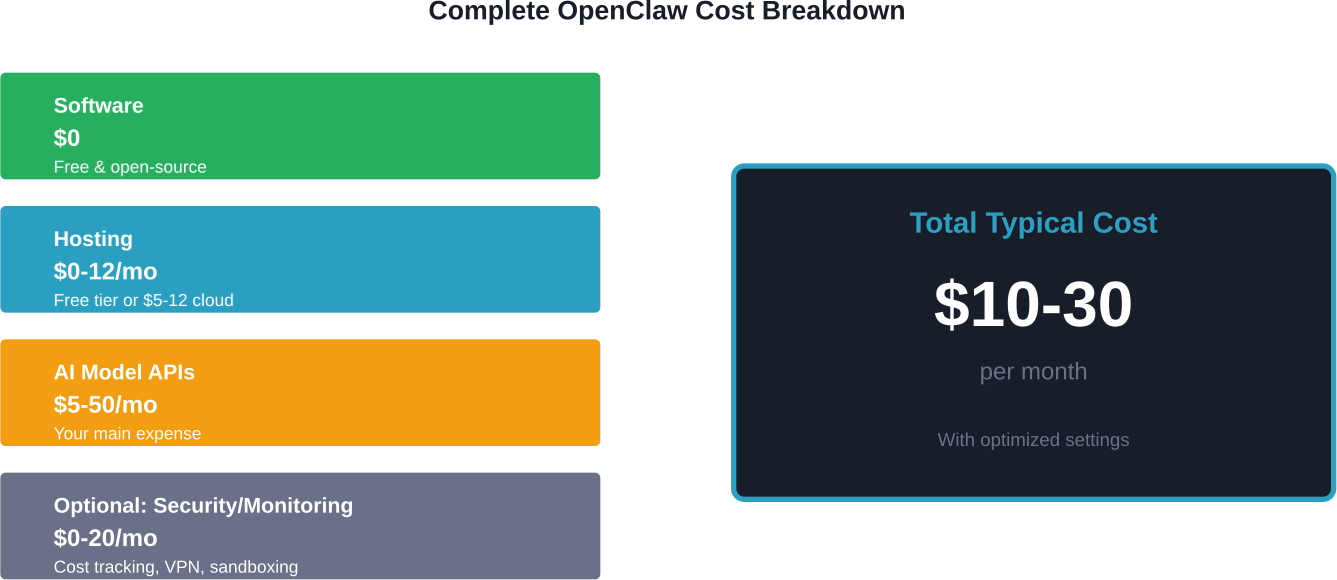
Complete monthly cost breakdown for running OpenClaw with typical usage patterns and optimized configurations.
How to Actually Run OpenClaw for $0 (Yes, Really)
It’s technically possible to run OpenClaw without spending anything.
Here’s how:
- Use Oracle Cloud’s Free Tier for hosting (genuinely free, not a trial)
- Run Ollama with local models (no API costs, uses your existing hardware)
- Alternative: Use free API tiers — budget-friendly approaches with rate limit considerations
But wait. The performance trade-offs are significant. Local models are slower and less capable. Free API tiers have strict rate limits. Sustaining zero-cost operation long-term can be challenging.
For most people, spending $10-20/month delivers dramatically better results than trying to keep everything at $0.
Real User Cost-Cutting Strategies
Community discussions reveal several practical ways users reduce their OpenClaw expenses:
- Use model routing: Configure OpenClaw to use cheap models (Gemini Flash, Minimax) for simple tasks and reserve expensive models (Claude Opus) for complex ones. This can significantly reduce costs.
- Deploy cost monitoring: Community members frequently mention cost tracking tools like ClawWatcher and TokenMeter to avoid unexpected bills.
- Set API spending limits: Most providers let you set hard caps. If OpenClaw hits your monthly limit, it stops working instead of racking up charges.
- Disable or limit cron jobs: Automated tasks are convenient but expensive. Review what’s actually necessary.
- Use OpenRouter: OpenRouter aggregates multiple AI providers and helps route requests to the cheapest available model that meets your requirements. Community members frequently recommend this approach.
OpenClaw vs. Managed Alternatives
How does OpenClaw’s cost structure compare to alternatives?
| Platform | Monthly Cost | Setup Complexity | Data Privacy
|
|---|---|---|---|
| OpenClaw (optimized) | $10-30 | Moderate | Full control (self-hosted) |
| GitHub Copilot | $10 | Easy | Cloud-based |
| Cursor IDE | $20 | Easy | Cloud-based |
| Replit Ghostwriter | $20 | Easy | Cloud-based |
| Custom GPT agents | $20-100 | Easy to Hard | Depends on setup |
OpenClaw’s advantage is flexibility and data control. The trade-off is complexity and cost management responsibility.
Is OpenClaw Worth the Cost?
Look, OpenClaw isn’t for everyone. If you want an AI assistant with zero setup and predictable costs, ChatGPT Plus or Claude Pro are simpler choices at $20/month.
OpenClaw makes sense if you want:
- Full control over your data (self-hosted)
- Ability to switch between any AI model
- Deep customization and automation capabilities
- Learning experience with AI agents
The cost advantage only materializes if you optimize your setup. Out of the box with default settings, OpenClaw can easily cost more than managed alternatives.
But with smart model selection, cost monitoring, and thoughtful automation design? You can build a powerful personal AI assistant for $10-20/month that offers different capabilities than ChatGPT.

Optimizing Enterprise Value with AI Superior
While managing your own OpenClaw instance offers flexibility, navigating the “hidden” costs of API optimization and security hardening can quickly become a full-time engineering challenge for most businesses. Our team at AI Superior specializes in moving organizations past the trial-and-error phase by developing custom, end-to-end AI applications that are pre-optimized for both performance and cost-efficiency. Our Ph.D.-level data scientists don’t just set up an interface; we build robust, scalable architectures that integrate deeply with your existing data, ensuring that your investment in AI translates into measurable ROI rather than unpredictable API bills.
We understand that for professional environments, “free” software often comes with the high price of technical oversight. Whether you are looking to implement advanced Natural Language Processing for customer insights or require high-security Computer Vision solutions, we provide the expert consulting and R&D needed to bypass the common pitfalls of self-hosted setups. From initial discovery to scaling your MVP, we ensure your AI infrastructure is reliable, secure, and perfectly tailored to your specific industry requirements.
Final Thoughts: Budget Smart, Build Smart
OpenClaw’s free software model is both its greatest strength and its biggest gotcha. You’re not paying for a product—you’re paying for the infrastructure that powers it.
Most users spend $10-30/month once they optimize their setup. That’s comparable to single AI subscriptions but with significantly more flexibility and control. The key is understanding where your costs come from and configuring accordingly.
Start with free hosting (Oracle Cloud), use budget-friendly models (Gemini Flash), implement cost monitoring from day one, and upgrade selectively based on your actual needs. Don’t fall into the trap of defaulting to premium models for everything.
Want to try OpenClaw? Set a $20 monthly spending cap on your AI provider, deploy a cost tracking solution, and run it for a month. You’ll quickly discover whether the cost-benefit equation works for your use case.
Frequently Asked Questions
Is OpenClaw completely free?
The OpenClaw software itself is free and open-source. However, you’ll need to pay for AI model APIs (typically $5-50/month) and possibly hosting ($0-12/month). The software costs nothing, but running it requires paid services.
Why do some users report high bills?
Unexpectedly high bills usually result from: 1) using expensive models like Claude Opus on default settings, 2) runaway background cron jobs making constant API calls, 3) not setting spending limits, or 4) using OpenClaw for extensive file operations and long-context tasks. Cost monitoring tools and proper configuration prevent this.
Can I run OpenClaw with local models to avoid API costs?
Yes, using Ollama with local models eliminates API costs entirely. However, you’ll need substantial hardware (16GB+ RAM, preferably a modern GPU) and should expect slower performance and lower quality compared to cloud-based models like Claude or GPT-4.
What’s the cheapest AI model that works well with OpenClaw?
Gemini Flash 3 offers excellent value at $0.10 per million input tokens with good instruction-following capabilities. Minimax 2.5 is even cheaper at $0.30 per million tokens. For budget-conscious users, these models handle most tasks adequately while keeping costs under $10/month.
How do I track my OpenClaw costs in real-time?
Community discussions mention several tools for monitoring spending, including community-built dashboards and cost tracking solutions. Many users also recommend using OpenRouter, which shows real-time costs across multiple AI providers.
Can I use my ChatGPT Plus or Claude Pro subscription with OpenClaw?
You can configure OpenClaw to work with subscription-based APIs, but results vary. Subscriptions have rate limits and usage caps that may restrict OpenClaw’s functionality. Pay-per-token APIs generally work better for agent-based automation.
Is OpenClaw safe to use given the security concerns?
According to Northeastern University research, OpenClaw requires full computer access to function. To use it safely: run it in a sandboxed environment, use a dedicated machine or virtual machine, carefully review automated tasks, and consider security hardening tools. The convenience comes with genuine security trade-offs that require careful consideration.
 English
  German
  Arabic
  French
  Dutch
Dutch  Spanish