
OpenClaw has evolved from a chatbot experiment into something way more useful: a personal AI assistant that actually does things. According to the official OpenClaw GitHub repository, it’s designed to run on “any OS, any platform.
But here’s where it gets interesting. The real power isn’t in the chat interface—it’s in the automations.
When you set up OpenClaw automations properly, you’re not just getting a conversational AI. You’re building a system that handles recurring tasks, monitors data sources, processes information on a schedule, and executes multi-step workflows without you touching anything. That’s the difference between a toy and a tool.
What Makes OpenClaw Automations Different
Most AI assistants wait for you to ask. OpenClaw automations flip that model completely.
The platform uses what’s called the “cron scheduler” approach—borrowed from Unix systems—to trigger tasks at specific times or intervals. You tell it what to do and when to do it. Then you walk away.
Real talk: this isn’t new technology. What’s new is having an AI agent that can reason about complex tasks, access multiple tools, and execute them autonomously based on a schedule. The OpenClaw skill ecosystem continues to grow with community-built automation capabilities.
The Architecture That Makes It Work
OpenClaw uses a skill-based system. Each skill is essentially a plugin that gives the AI new capabilities—web scraping, email access, API integrations, file manipulation, whatever you need.
When you combine skills with the cron scheduler, you get automations. The scheduler triggers the task, OpenClaw loads the relevant skills, executes the workflow, and logs the results. All without your main chat session being involved.
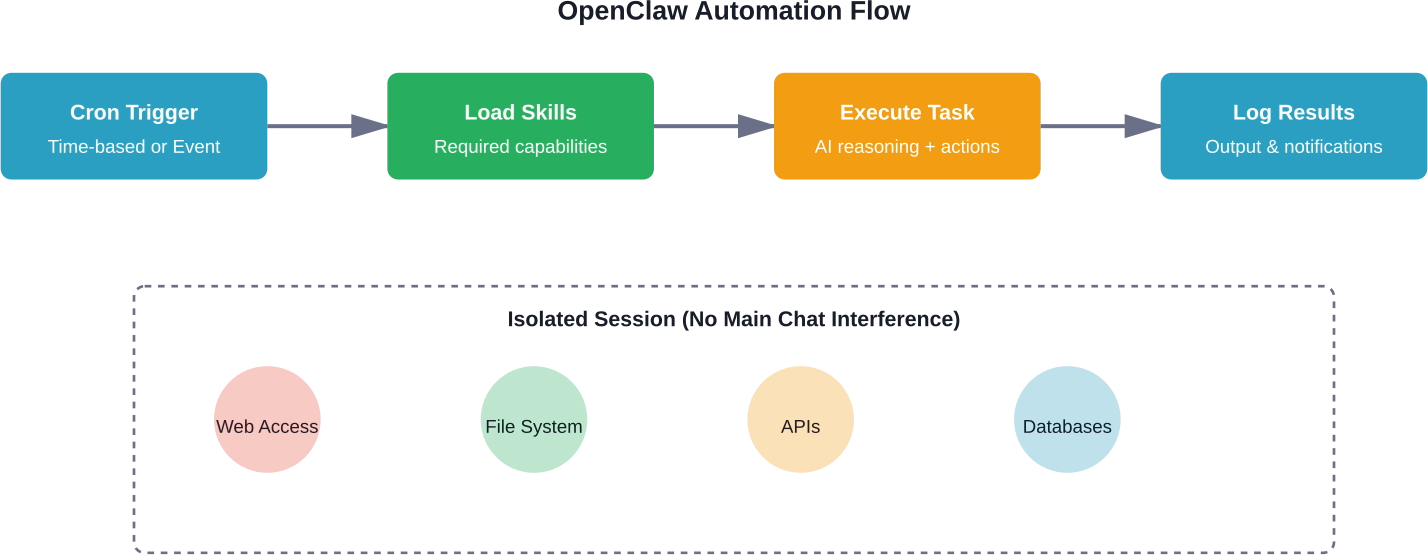
How OpenClaw processes automated tasks independently from your chat sessions
That isolated session model is crucial. Your automations run separately from your main interaction with the assistant. So if you’re in the middle of a conversation, a scheduled automation won’t interrupt or pollute your context.
Setting Up Your First Automation
Okay, so what does the actual setup look like?
According to the OpenClaw documentation on GitHub, you need three things: the OpenClaw server running, the skills you want to use installed, and a cron configuration file that defines your automation schedule.
The server part is straightforward if you’ve got basic command line skills. You can run it on your local machine, a VPS, or even a Raspberry Pi. Some people in community discussions mentioned running OpenClaw on retired Mac minis or dedicated Linux boxes.
Installation Basics
First, you’ll clone the repository and install dependencies. The process varies slightly by platform, but the GitHub getting-started guide covers Windows, macOS, and Linux.
Once the server is running, you access the web interface to configure your assistant. This is where you add skills from ClawHub or install custom ones. Each skill comes with its own configuration—API keys, endpoints, file paths, whatever it needs to function.
Then comes the automation part. You create a cron file (usually YAML or JSON format) that specifies when tasks should run and what they should do.
Sample Automation Configuration
Here’s what a basic automation looks like in practice:
| Element | Description | Example Value
|
|---|---|---|
| Schedule | Cron expression for timing | “0 7 * * *” (daily at 7 AM) |
| Task Name | Identifier for the automation | “morning_briefing” |
| Skills Required | Which capabilities to load | [“web-search”, “email”, “weather”] |
| Prompt | Instructions for the AI | “Summarize news, check emails, get weather” |
| Output | Where results go | “slack”, “email”, or “file” |
You save this configuration, restart the automation service, and you’re done. The next time that cron schedule triggers, OpenClaw will execute your task.
Real-World Use Cases That Actually Work
Let’s cut through the hype and talk about what people are actually using OpenClaw automations for. Based on community discussions and multiple sources covering practical implementations, here are the workflows that deliver real value.
Daily Briefings and Information Aggregation
This is a common automation use case. Every morning at a set time, OpenClaw pulls data from multiple sources—news sites, your email, calendar, weather services, specific RSS feeds—and generates a summary.
What makes this useful is the AI’s ability to filter and prioritize. It’s not just dumping raw data. It’s reading through everything and pulling out what’s actually relevant to you based on your preferences.
Monitoring and Alerting Systems
Several developers mentioned using OpenClaw to monitor brand mentions on social media, track package deliveries, or watch for specific keywords in news feeds. The automation checks these sources on a schedule and only notifies you when something matches your criteria.
One user in community discussions described setting up an automation that monitors GitHub issues for their projects and sends a digest of new activity every evening. No more compulsively checking—the information comes to you when you want it.
Data Processing Pipelines
This is where OpenClaw automations get interesting for developers and business users. You can set up workflows that extract data from one system, transform it, and load it into another.
Examples from real implementations include: scraping receipts from email and adding them to expense spreadsheets, pulling KPIs from various dashboards and compiling them into a single report, or extracting action items from meeting transcripts and creating tasks in project management tools.
Content Creation and Documentation
Some people automate content workflows. Voice notes get transcribed and turned into journal entries. Meeting recordings become summarized documents with extracted action items. Screenshots of handwritten notes get converted to typed text.
One particularly creative automation mentioned in discussions: automatically generating property listing videos by feeding OpenClaw property details and having it orchestrate the entire video creation pipeline using AI video generation tools.
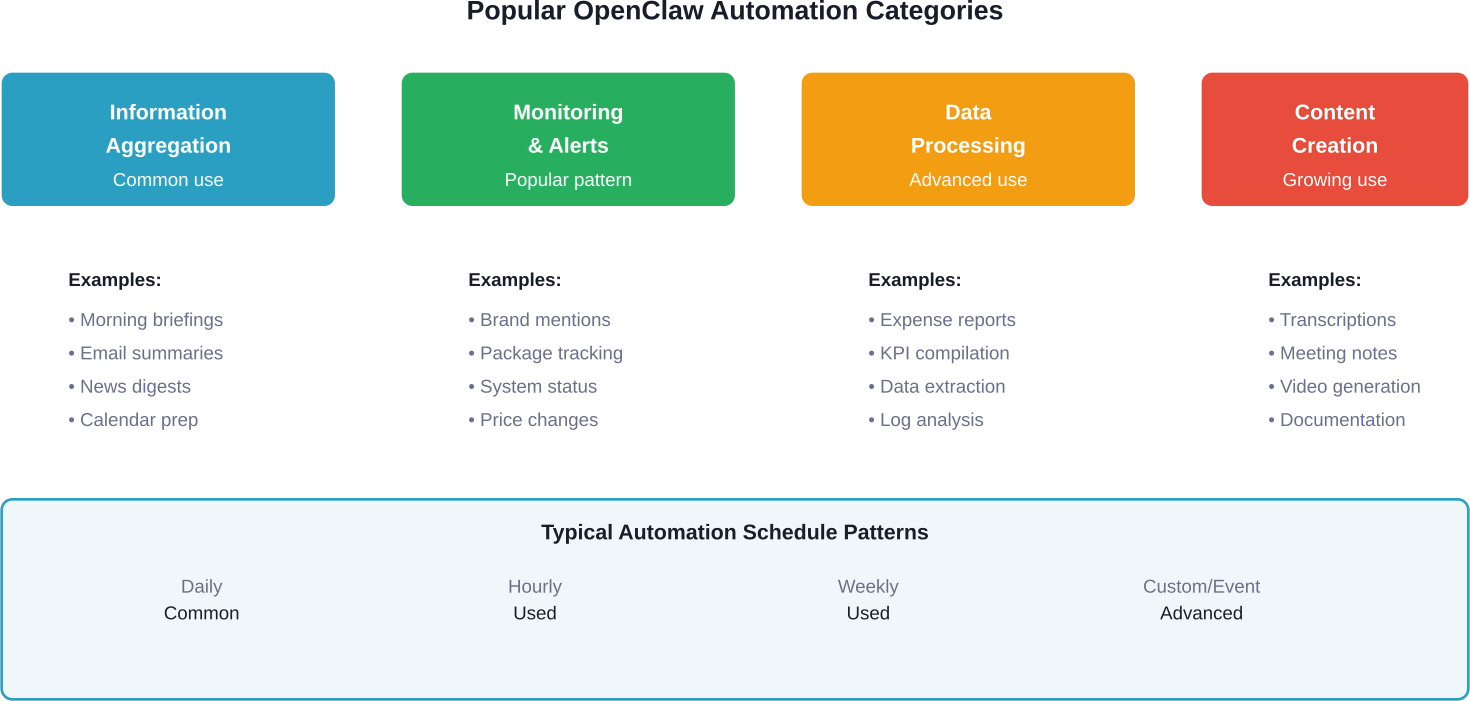
Distribution of OpenClaw automation types based on community usage patterns
The Security Problem Nobody Talks About (Until Now)
Here’s where things get real. OpenClaw automations are powerful. But they’re also a significant security consideration if you don’t set them up correctly.
Multiple users in community discussions raised serious concerns. One comment stated: “OpenClaw is a security nightmare. Not saying it can’t be implemented securely but the defaults are wide open and plugins are absolutely riddled with malicious actors trying to gain access to your system.”
Another user who works in AI expressed strong caution: “You do NOT want to give OpenClaw access to anything. You should NOT run OpenClaw unless you have access to a sandboxed ‘airgapped’ PC on a well defined network.”
These concerns reflect real architectural considerations, not unique failures of OpenClaw.
What Makes OpenClaw Risky
The problem is architectural. OpenClaw skills can access your file system, make network requests, execute system commands, and interact with any service you’ve given it credentials for. That’s the whole point—it needs those permissions to automate tasks.
But if a malicious skill gets installed, or if a legitimate skill has a vulnerability, you’ve essentially given an attacker access to whatever OpenClaw can touch. And because it’s designed to run autonomously on a schedule, the attack surface is always exposed, not just when you’re actively using it.
How to Run OpenClaw More Safely
If you’re going to use OpenClaw automations in production, here’s what security-conscious users recommend:
- Run it in isolation. Don’t install OpenClaw on your primary work machine. Use a dedicated server, a VM, or a containerized environment. If something goes wrong, the damage is contained.
- Network segmentation matters. Put the OpenClaw server on a separate network segment. Don’t let it have direct access to your personal devices or sensitive internal systems. Use firewall rules to restrict what it can reach.
- Audit every skill before installation. Don’t just grab skills from ClawHub without reviewing the code. Check what permissions they request, what external services they connect to, and who maintains them.
- Use credential management properly. Don’t hardcode API keys in configuration files. Use environment variables or a proper secrets management system. Rotate credentials regularly.
- Monitor everything. Enable logging for all automation runs. Set up alerts for unexpected behavior. If an automation suddenly starts making requests to unfamiliar domains, you want to know immediately.
| Security Practice | Risk Level Without It | Implementation Effort
|
|---|---|---|
| Isolated Environment | Critical | Medium |
| Network Segmentation | High | Medium-High |
| Skill Code Review | High | Low-Medium |
| Secrets Management | Critical | Low |
| Activity Monitoring | Medium | Low-Medium |
| Regular Updates | Medium | Low |
| Access Control | High | Low |
Look, the security issues are real. But they’re not unique to OpenClaw. Any automation platform that has system access creates similar risks. The difference is that OpenClaw’s open architecture and plugin ecosystem make the attack surface larger and more distributed.
You can run it safely. You just can’t be careless about it.
Advanced Automation Patterns
Once you’ve got basic automations working and you’ve addressed the security concerns, there are more sophisticated patterns worth exploring.
Conditional Workflows
Instead of just running tasks on a schedule, you can set up automations that trigger based on conditions. OpenClaw checks for a specific state, and only proceeds if certain criteria are met.
For example: check your email every hour, but only send a summary if there are unread messages from specific senders. Or monitor a price tracking API and only notify you when a target product drops below a threshold.
Multi-Step Pipelines
You can chain multiple skills together in sequence. The output of one step becomes the input for the next. This is where OpenClaw’s AI reasoning really shines—it can make decisions about how to proceed based on intermediate results.
A practical example from community discussions: an automation that scrapes job postings matching certain criteria, uses AI to analyze which ones are genuinely relevant based on nuanced requirements, then drafts customized application emails for the top matches and saves them for review.
Integration with Other Tools
Several developers mentioned combining OpenClaw with workflow platforms like n8n or integration services like Zapier. OpenClaw handles the AI reasoning and complex decision-making, while the other tools manage the connectors to various services.
One particularly elegant setup: n8n handles webhook triggers and service integrations, passes data to OpenClaw for processing and decision-making, then receives the results back and routes them to the appropriate destination.
Cost Considerations
OpenClaw itself is open source and free. But running automations isn’t.
The main cost is the AI model. OpenClaw typically uses Claude, or other commercial LLMs for reasoning. Every time an automation runs, it’s making API calls. If you’re running multiple automations daily, those API costs add up.
One user asked in discussions: “How’s the cost of running this all?” The answer depends entirely on how complex your tasks are and how often they run. Simple data aggregation with short prompts might cost a few cents per run. Complex multi-step workflows with document processing could hit several dollars each time.
You can reduce costs by using cheaper models for simpler tasks, optimizing prompts to be more concise, batching operations instead of running them constantly, and using local models where possible (though this requires more technical setup).
When OpenClaw Automations Don’t Make Sense
Let’s be honest about the limitations.
OpenClaw automations are overkill if you just need simple scheduled tasks. If you’re running a script that doesn’t require AI reasoning, use cron directly or a simpler automation platform. Don’t involve an AI agent.
They’re also not reliable enough for truly critical operations. AI models can misinterpret instructions, hallucinate information, or fail in unexpected ways. Community feedback suggests that OpenClaw performs well for straightforward tasks but can encounter stability issues with long-running, multi-step, or concurrent operations.
And if you’re working with highly sensitive data or in a regulated industry, the security architecture required to safely run OpenClaw might be more trouble than it’s worth. Sometimes a more restrictive, purpose-built tool is the right choice.

Professional Implementation with AI Superior
While the DIY approach to OpenClaw offers incredible flexibility, the security risks and architectural complexities mentioned above often necessitate a more robust, enterprise-grade strategy. At AI Superior, our team of PhD-level data scientists and software engineers specializes in bridging the gap between experimental AI tools and secure, scalable business applications. We understand that “out of the box” automations can sometimes create vulnerabilities, which is why we focus on custom AI software development that prioritizes network segmentation, sandboxed environments, and rigorous code auditing to protect your proprietary data.
Our team doesn’t just provide tools; we partner with you to identify high-value areas where predictive analytics and natural language processing can drive real ROI without compromising your infrastructure. Whether you are looking to replace a “fragile” community plugin with a custom-built solution or need expert guidance to audit your existing AI systems, we provide the technical rigor required for professional deployment. By integrating advanced machine learning models into your workflows, we ensure your automations are not only powerful but also resilient and secure against the evolving threats of 2026.
The Setup Reality Check
Community feedback consistently mentions that setup can be challenging. One user created a wrapper called “easyclaw” specifically to address setup complexity. Another mentioned writing a shell script that automates the entire installation process because they had to recreate their setup multiple times.
The GitHub documentation exists and covers the basics, but it’s written for developers who are comfortable with command line tools, environment configuration, and debugging. If that’s not you, expect to spend significant time troubleshooting.
Several users recommended running OpenClaw on a Linux VPS for the most stable setup. macOS works but has some quirks. Windows support exists but gets less attention from the community.
Building Automation Workflows That Last
The automations that actually stick around long-term have certain characteristics in common.
They solve real, recurring problems—not just things that seemed cool when you set them up. The daily briefing automation survives because people actually use the information every morning. The novelty automation that generates random facts dies after a week.
They’re maintainable. Simple is better than clever. If you have to spend 30 minutes remembering how your automation works every time something breaks, you built it wrong.
They have proper error handling. Automations fail. APIs change. Services go down. Your automation should handle these gracefully, log what went wrong, and notify you if intervention is needed.
And they respect the cost-benefit ratio. If your automation saves you 5 minutes per day but costs $20/month to run and takes an hour per month to maintain, you’re losing. The math needs to work.
Where OpenClaw Automations Are Headed
Based on the activity in the GitHub repository and community discussions, the platform is evolving. The skill ecosystem continues to grow with increasing community contributions.
More sophisticated triggering mechanisms are being developed beyond simple cron scheduling. Integration with workflow platforms is getting smoother. And there’s ongoing work to make the setup process more accessible.
But the core promise remains the same: an AI assistant that can actually do things on your behalf, automatically, on any platform. That’s still relatively novel in 2026, and it’s why OpenClaw continues to attract attention despite its rough edges.
Start Small, Scale Smart
If you’re considering OpenClaw automations, my recommendation is to start with one simple, low-risk workflow. Pick something that runs daily, has clear success criteria, and won’t cause problems if it fails.
Get that working reliably. Learn the system. Understand the security implications for your specific use case. Then expand gradually.
Don’t try to automate your entire workflow on day one. Don’t install every skill that looks interesting. And definitely don’t connect it to critical systems until you’ve tested thoroughly in isolation.
OpenClaw automations can genuinely save time and mental overhead. The AI that actually does things—automatically, on schedule—is a powerful concept. But it requires careful implementation, realistic expectations, and ongoing attention to security.
Done right, it’s one of the most practical applications of AI agents available today. Done carelessly, it’s a disaster waiting to happen. The difference is in how you approach the setup.
FAQs
What’s the difference between OpenClaw automations and the regular chat interface?
The chat interface is for interactive, real-time conversations where you’re giving instructions and getting immediate responses. Automations run in isolated sessions on a schedule without your involvement. They use the same skills and AI models, but they’re designed for recurring tasks that happen automatically.
Can OpenClaw automations run when my computer is off?
Only if you’re running the OpenClaw server on a machine that stays on—like a dedicated server, VPS, or always-on home server. If OpenClaw is installed on your laptop and you close it, the automations won’t run. Most serious automation users run OpenClaw on a cloud server or dedicated hardware specifically for this reason.
How do I know if a skill from ClawHub is safe to install?
Check the skill’s GitHub repository, look at the code to see what permissions it requests and what external services it connects to, check how many stars and forks it has (more popular skills get more scrutiny), look at the commit history and who maintains it, and read any issues or discussions about security concerns. Never install a skill without reviewing its code first.
What happens if an automation fails or produces wrong results?
OpenClaw logs the execution details, including any errors. You should set up notification skills to alert you when automations fail. For critical workflows, include validation steps or human review checkpoints. Remember that AI can make mistakes—design your automations with that assumption.
Can I use OpenClaw automations for business-critical tasks?
Not recommended for anything where failure would cause serious problems. Use OpenClaw automations for tasks where errors are recoverable and where you have monitoring in place. It’s better suited for information gathering, draft creation, and preliminary data processing—not for final decisions or critical operations.
How much does it cost to run OpenClaw automations daily?
The AI API costs vary widely. Simple daily briefings might cost a few dollars per month. Complex data processing workflows running multiple times per day could easily exceed $50-100 monthly. Test your automations and monitor actual usage to estimate costs. You can reduce expenses by optimizing prompts, using cheaper models for simple tasks, and batching operations.
Is there commercial support available for OpenClaw?
OpenClaw is an open source project maintained by the community. There’s no official commercial support, though some consultants and agencies offer setup and integration services. You’ll rely primarily on GitHub documentation, community discussions, and your own technical skills.
 English
  German
  Arabic
  French
  Dutch
Dutch  Spanish