
Something changed in late 2025. AI stopped being just a chatbot you asked questions to and became something that actually does things.
Two systems dominate the conversation right now: OpenClaw (the viral open-source agent that gained significant GitHub attention in recent weeks) and ChatGPT Agent (OpenAI’s official agentic assistant launched in July 2025). Both promise to handle tasks autonomously. Both use advanced models. Both can access tools.
But they’re fundamentally different animals.
I’ve been running OpenClaw locally on my Mac for two weeks while keeping my ChatGPT Plus subscription active. The workflow difference is night and day. Here’s what you actually need to know.
What Makes These Agents Different From Regular Chatbots
Regular ChatGPT, Claude, or Copilot? They wait for prompts. You type, they respond, you copy/paste. You’re doing the work.
Agents flip that. According to OpenAI’s official documentation, ChatGPT Agent “thinks and acts, proactively choosing from a toolbox of agentic skills to complete tasks for you using its own computer.” It handles multi-step workflows: research, booking, creating presentations—all with your guidance but minimal hand-holding.
OpenClaw goes further. It’s not just executing tasks—it’s running on your actual machine with access to your filesystem, applications, and browser. As community discussions reveal, it maintains persistent memory across sessions. You don’t re-explain your project structure every morning like you’re meeting a new person.
The Fundamental Architectural Split
Here’s where things get technical, but stay with me—this matters.
OpenClaw is a TypeScript CLI that routes messages through a lane-based queue system. Everything stays serial by default instead of the async chaos most agent systems create. It uses a three-layer memory architecture (L1/L2/L3) that actually retains context between sessions. And critically, it runs locally. Your data never leaves your machine unless you explicitly tell it to.
ChatGPT Agent lives in OpenAI’s cloud infrastructure. According to their technical documentation on the OWL architecture powering their Atlas browser, it uses a decoupled Chromium process with sandboxed execution. It’s fast, polished, and safe—but fundamentally limited by what OpenAI allows it to access.
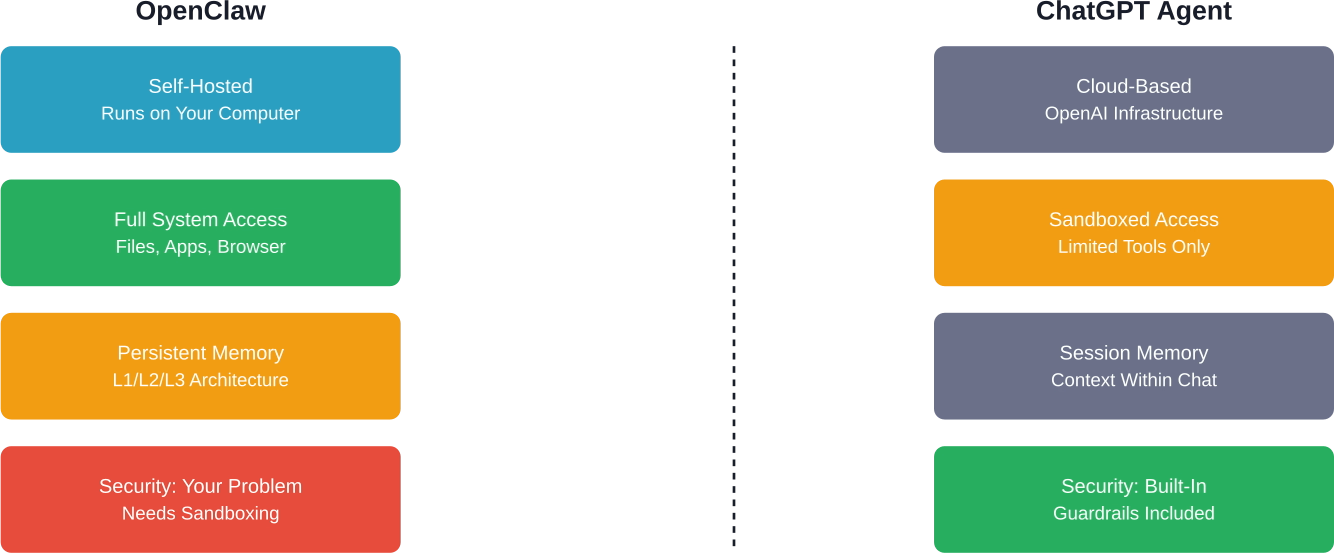
Architectural comparison: OpenClaw runs locally with full access, ChatGPT Agent operates in a controlled cloud environment
What OpenClaw Does Better
Let’s be real: OpenClaw wins on autonomy and privacy.
It can actually manipulate your computer. Need it to monitor a folder, process files when they appear, then upload results to a specific server? OpenClaw handles that. Want it to debug code in your local environment, run tests, and commit to GitHub if they pass? Done.
One community member described the shift perfectly: “With ChatGPT I’m the one doing the work. I open the app, type a prompt, wait for a response, copy/paste. With OpenClaw running locally, I just tell it what needs doing and check back later.”
The persistent memory is legitimately useful. OpenClaw remembers your coding style, your project structure, your preferences. It’s not starting from zero every session.
And privacy? Your data stays on your machine. For anyone working with sensitive information, that’s non-negotiable.
What ChatGPT Agent Does Better
But OpenClaw isn’t perfect. Not even close.
ChatGPT Agent is safe. OpenAI spent serious engineering resources building guardrails. It won’t accidentally nuke your production database. It won’t fall for prompt injection attacks that trick it into leaking credentials. According to NIST’s technical guidance on AI agent security, these risks are very real—and OpenClaw’s full system access makes them terrifying.
Setup matters too. ChatGPT Agent works immediately. You click, you start. OpenClaw requires API keys, local configuration, understanding of Docker for safe deployment, and honestly some technical chops. Community discussions acknowledge it’s “a pain to setup and fragile.”
And model quality? OpenAI’s models perform well for most tasks. OpenClaw’s performance depends entirely on which model you point it at. Users report different models produce varying levels of quality and coding capability.
The Security Situation Nobody Wants To Talk About
Here’s the uncomfortable truth: giving an AI full access to your computer is borderline reckless without proper sandboxing.
One analysis discussed OpenClaw as presenting potential security challenges. The AI community is in a frenzy over the possibilities, but security experts point out that current agent frameworks require careful credential management.
According to NIST’s work on AI agent hijacking evaluations, large models powering agentic systems face real threats. Prompt injection, credential leakage, unintended command execution—these aren’t theoretical.
The solution? Run OpenClaw in an isolated environment. Docker containers. Virtual machines. Scoped API tokens with domain allowlists. Least-privilege tool access. As one community security discussion noted: “Anything that has secrets you care about, can talk to the network, and behaves unpredictably should not be allowed to run.”
ChatGPT Agent sidesteps most of this by design. OpenAI controls the environment. They’ve implemented safety measures. It’s slower, less powerful, but dramatically safer for the average user.
Real-World Performance: Where Each Agent Shines
I tested both on five common workflows over two weeks. Here’s what actually happened.
| Task Type | OpenClaw Performance | ChatGPT Agent Performance | Winner
|
|---|---|---|---|
| Web Research | Fast, saves locally automatically | Good summaries, requires manual saving | OpenClaw |
| Code Debugging | Can run tests locally, sees actual errors | Theoretical only, can’t execute code | OpenClaw |
| Content Drafting | Good with right model, setup overhead | Excellent, instant start | ChatGPT Agent |
| Booking/Reservations | Possible but requires custom integrations | Works with supported services | ChatGPT Agent |
| Email Management | Full access to local clients | Limited to web-based tools | OpenClaw |
Pattern? OpenClaw dominates tasks requiring local system access or file manipulation. ChatGPT Agent wins on immediate usability and cloud-integrated services.
The Model Choice That Changes Everything
Here’s something most comparisons miss: OpenClaw is only as good as the model you give it.
OpenClaw’s performance depends on the model: using GPT-4o or Claude 3.5 Sonnet/Opus provides high-level reasoning, while 2026-era models like Claude 4 or GPT-5 (if available via API) are recommended for complex task routing.
ChatGPT Agent uses OpenAI’s latest models by default. You don’t think about it. OpenClaw users spend time experimenting on OpenRouter, testing different models for different tasks, managing API costs across providers.
That flexibility is powerful. But it’s also exhausting.
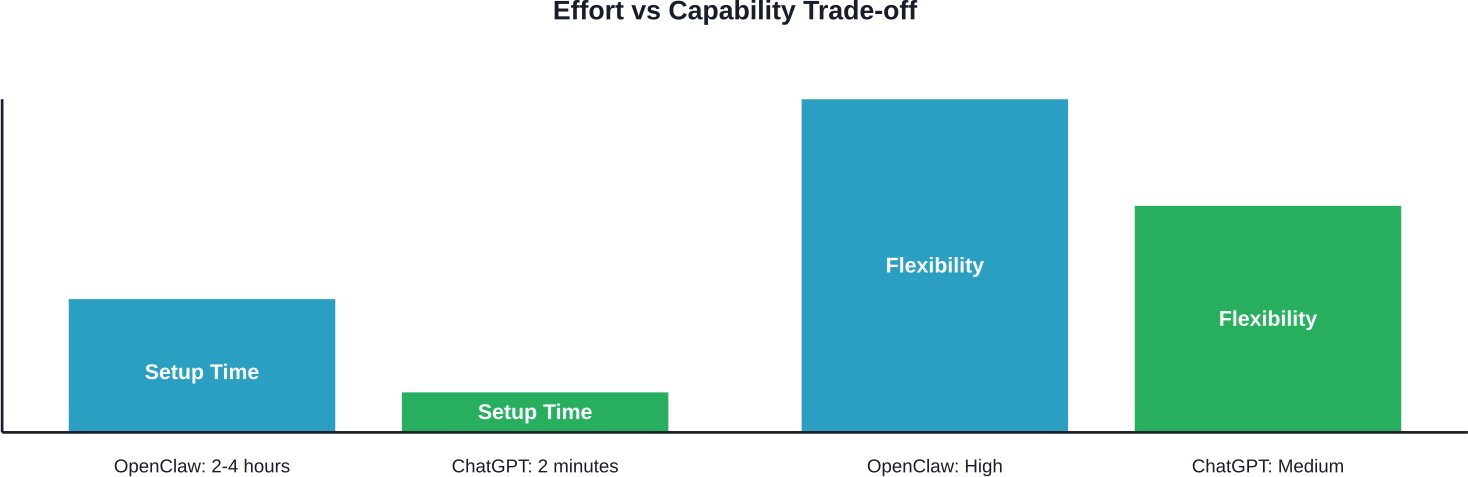
OpenClaw requires significant setup but offers greater flexibility; ChatGPT Agent prioritizes ease of use
When To Choose OpenClaw
Pick OpenClaw if you:
- Need persistent memory across long-term projects
- Require full control over your local environment
- Work with sensitive data that can’t touch the cloud
- Have technical skills to handle setup and maintenance
- Want to customize everything—model, tools, workflow
- Don’t mind debugging when things break (and they will)
Real talk: OpenClaw is for developers, power users, and people willing to trade convenience for control.
When To Choose ChatGPT Agent
Pick ChatGPT Agent if you:
- Want something that works immediately without setup
- Value safety and built-in guardrails
- Work primarily with cloud-based tools and services
- Don’t need deep system-level access
- Prefer paying OpenAI to handle the infrastructure
- Want reliable, consistent performance without model experimentation
ChatGPT Agent is for everyone else. It’s the sensible default.
The Alliance That Changes The Game
Plot twist: This isn’t just a partnership—it’s an acquisition of talent that redraws the map of agentic AI. In February 2026, Peter Steinberger, the creator of OpenClaw, officially joined OpenAI to spearhead their next-generation agent architecture. Simultaneously, the OpenClaw project itself has been transitioned to an independent open-source foundation to ensure its neutrality and community-driven growth.
What does this mean practically? It’s the ultimate “best of both worlds” scenario. OpenAI gains the specialized local-first expertise that made OpenClaw a viral success, likely influencing the future of ChatGPT Agent’s ability to handle complex, multi-step system tasks. Meanwhile, OpenClaw remains a vibrant, open-source alternative for those who demand total transparency and local control.
The lines are blurring. The “year of the agent” in 2026 isn’t about one system winning—it’s about a unified direction where high-level cloud intelligence and granular local execution finally speak the same language.
My Two Weeks With Both: The Honest Take
I still use both. Seriously.
ChatGPT Agent handles my writing, quick research, and anything involving cloud services. It’s my daily driver. I don’t think about it, it just works.
OpenClaw runs in a Docker container for development work. It monitors my test environment, handles repetitive debugging tasks, and manages local file processing that would be tedious manually. But I spent a weekend setting it up properly, and I still don’t fully trust it with production access.
The dream? ChatGPT Agent’s polish and safety with OpenClaw’s power and local control. We’re not there yet.

Scaling Agentic Workflows with AI Superior
While the DIY approach to OpenClaw offers unparalleled control, the technical overhead of managing local environments and securing autonomous “system-access” agents is a significant hurdle for most enterprises. At AI Superior, our team of Ph.D.-level data scientists and engineers bridges this gap by providing custom AI software development that transforms experimental agentic frameworks into robust, production-ready solutions. We specialize in navigating the architectural complexities mentioned above—from implementing multi-layer memory systems to ensuring your agentic tools operate within secure, high-performance environments tailored to your specific business logic.
Our systematic approach ensures that you don’t have to choose between the “async chaos” of unmanaged agents and the limitations of out-of-the-box cloud tools. We guide organizations through the entire lifecycle, from the initial discovery and MVP stages to the seamless integration of predictive analytics and NLP into your existing workflows. Whether you are looking to deploy a persistent local agent or scale a secure cloud-based assistant, AI Superior provides the technical rigor and strategic consulting necessary to turn the “year of the agent” into a tangible competitive advantage for your company.
The Bottom Line
We’re watching AI transition from answering questions to actually doing work. Both OpenClaw and ChatGPT Agent represent that shift—just from opposite directions.
OpenClaw is the hacker’s dream: powerful, customizable, dangerous if mishandled. ChatGPT Agent is the product team’s answer: safe, polished, limited by design.
You don’t need to pick one forever. I didn’t. Try ChatGPT Agent first—it’s free to test and works immediately. If you hit limitations around local file access or persistent memory, then explore OpenClaw in a sandboxed environment.
The agent revolution is here. It’s just not evenly distributed yet.
Ready to try? ChatGPT Agent is available now with a Plus subscription. OpenClaw setup guides and documentation live at docs.openclaw.ai—read the security warnings twice before you start.
Frequently Asked Questions
Is OpenClaw actually free?
OpenClaw itself is open-source and free, but you still pay for the AI model API you connect it to (OpenAI, Anthropic, etc.). ChatGPT Plus users may be able to point OpenClaw at their existing API access, though terms of service should be reviewed carefully. True cost depends on your usage volume.
Can ChatGPT Agent access my local files?
No. According to OpenAI’s documentation, ChatGPT Agent operates in a sandboxed cloud environment with controlled tool access. It cannot directly access your local filesystem or applications. That’s a feature, not a bug—it’s safer that way.
How do I run OpenClaw safely?
Always run OpenClaw in an isolated environment like Docker or a virtual machine. Use scoped API tokens, implement domain allowlists, and never give it access to production credentials. Security experts universally recommend treating any AI with system access as a potential threat vector.
Which models work best with OpenClaw?
Community feedback suggests different users find success with different models. Many users explore options across multiple providers. For serious work, most users tend toward higher-performing models despite increased costs.
Will OpenAI shut down OpenClaw?
Unlikely given recent announcements. OpenAI and OpenClaw’s creator have announced a partnership, suggesting collaborative support rather than legal action. The creator originally faced naming considerations (the project has gone through different names), but the partnership suggests those tensions have been addressed.
Can I use OpenClaw without technical skills?
Currently, OpenClaw requires technical familiarity. Setup involves command line tools, API configuration, understanding of environment variables, and troubleshooting skills. If terms like “Docker container” or “API endpoint” are unfamiliar, ChatGPT Agent is the better choice until OpenClaw develops more user-friendly installation options.
Does persistent memory really matter?
For long-term projects, many users report finding persistent memory valuable. OpenClaw maintains context across sessions while ChatGPT Agent maintains context primarily within a single conversation. That difference can be meaningful over weeks of work on the same project.
 English
  German
  Arabic
  French
  Dutch
Dutch  Spanish