
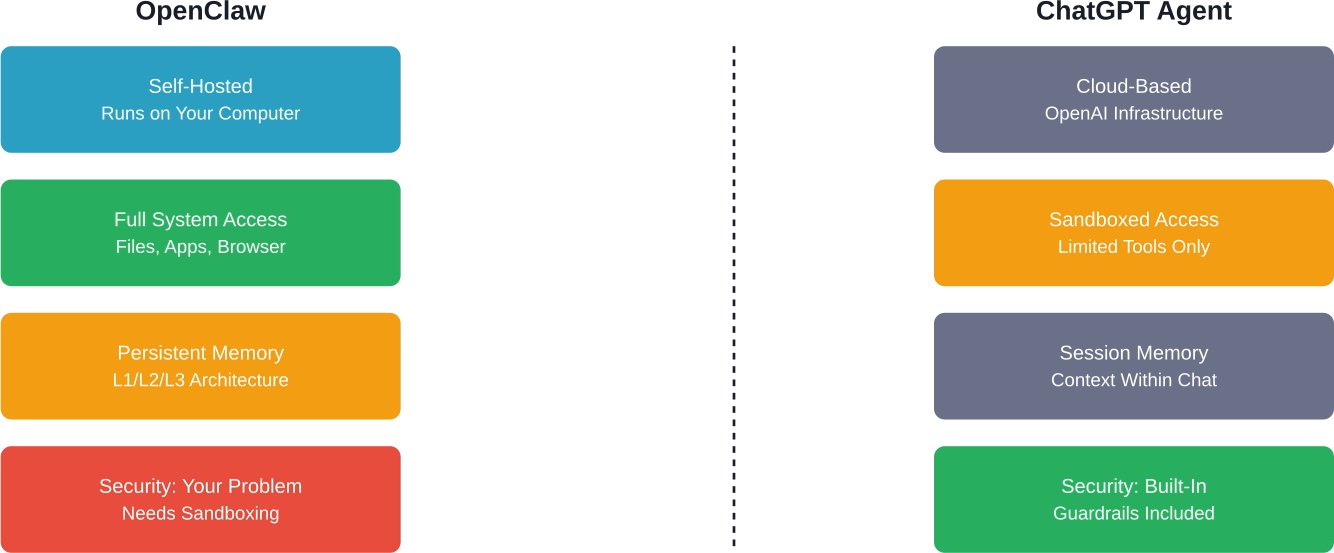
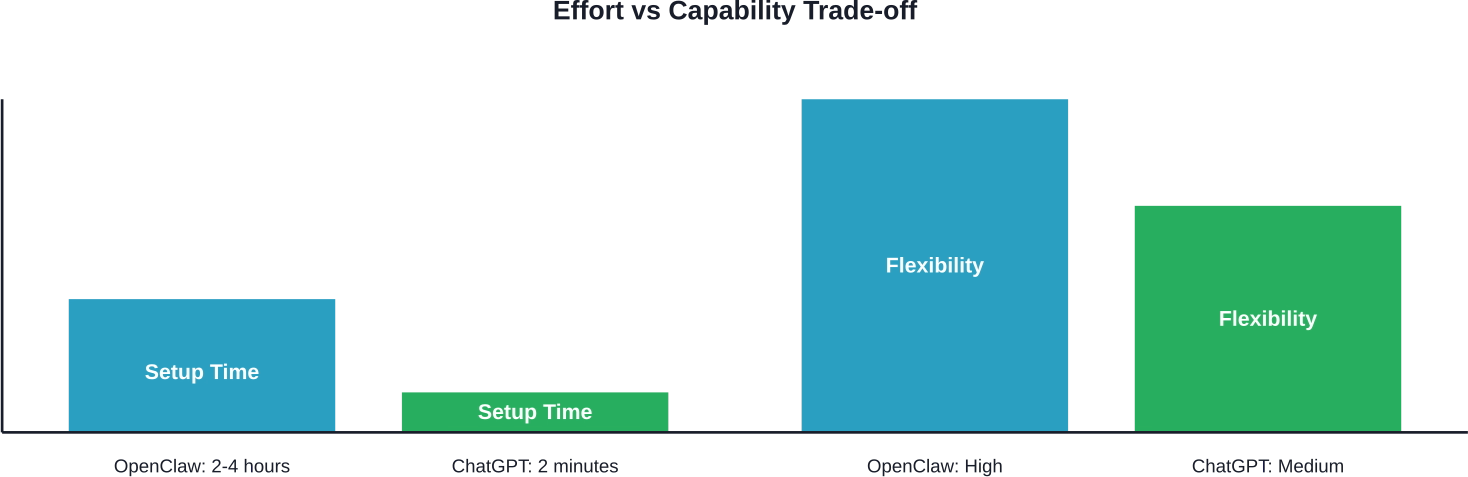
OpenClaw (formerly Clawdbot and Moltbot) represents a fundamental shift in AI assistants. It’s not just a chatbot—it’s an AI with hands. It can execute code, browse the web, install skills from third-party sources, and access your system resources.
That power comes with serious security implications.
If you’re running OpenClaw on your own infrastructure, you’re responsible for securing it. Security oversights in OpenClaw deployments can result in database compromise, credential exposure, and unauthorized access to system resources.
This guide walks through production-ready security practices based on real-world CVEs, community hardening checklists, and security frameworks built specifically for OpenClaw deployments.
Understanding the Threat Model
Before diving into specific hardening steps, you need to understand what you’re protecting against.
OpenClaw’s attack surface is unique because it combines traditional application security risks with AI-specific vulnerabilities. According to the OpenClaw Security Profile proposal, the primary threats include:
- Wallet theft and credential exfiltration through tool abuse
- Database wipes via unrestricted system access
- Cookie theft from browser control tools
- Plugin/skill abuse from malicious third-party code
- Prompt injection attacks that manipulate agent behavior
- Supply chain attacks through unverified skill installation
The Auth0 security guide emphasizes a core principle: access control before intelligence. Don’t rely on the LLM to make security decisions. That’s a recipe for disaster.
The four-layer defense model for OpenClaw security, from network perimeter to AI-specific threats
Critical CVEs You Need to Patch
Let’s start with the basics. OpenClaw has disclosed several high-severity CVEs in early 2026. If you’re running an older version, stop reading and patch immediately.
CVE-2026-24763: Command Injection in Docker Sandbox
According to the National Vulnerability Database, this vulnerability existed prior to version 2026.1.29 due to unsafe handling of the PATH environment variable in Docker sandbox execution.
An attacker could inject arbitrary commands through crafted PATH values. The fix restricts environment variable handling in sandbox contexts.
CVE-2026-27007: Config Hash Collision
The normalizeForHash function in sandbox configuration recursively sorted arrays, causing order-sensitive configurations to hash identically. This was patched in version 2026.2.15.
This might sound minor, but it allowed sandbox escape through configuration manipulation.
CVE-2026-27004: Session Tool Overpermissioning
In shared-agent deployments, session tools allowed broader targeting than intended. If you’re running multi-tenant OpenClaw, this is critical.
Zero-Click RCE Vulnerabilities
Multiple analyses documented WebSocket RCE and Indirect Prompt Injection vulnerabilities. These represent severe attack vectors, enabling remote code execution without user interaction.
The exploitation path involves crafting malicious payloads that bypass sandbox restrictions through WebSocket message handling.
| CVE | Severity | Fixed Version | Impact
|
|---|---|---|---|
| CVE-2026-24763 | High | 2026.1.29 | Command injection via PATH |
| CVE-2026-27007 | Medium | 2026.2.15 | Config hash collision |
| CVE-2026-27004 | Medium | 2026.2.15 | Session overpermissioning |
| WebSocket RCE | Critical | Check current version | Remote code execution |
| Indirect Prompt Injection | High | Check current version | Injection attacks |
Essential Security Frameworks
Don’t reinvent the wheel. The community has built production-ready security tooling specifically for OpenClaw.
ClawSec: Complete Security Suite
The prompt-security/clawsec repository provides a complete security skill suite for OpenClaw’s family of agents. This widely adopted security framework protects critical configuration files with:
- Drift detection for unauthorized modifications
- Live security recommendations during runtime
- Automated security audits
- Skill integrity verification
Installation is straightforward—it’s a single installable suite that integrates directly with OpenClaw’s skill system.
OCSAS: Security Checklist and Hardening Guide
The gensecaihq/ocsas project is a security checklist that tells you exactly what settings to configure and how to verify your setup is secure.
It’s less about tooling and more about operational discipline. Think of it as the CIS Benchmark for OpenClaw.
OpenClaw Security Playbook
The topazyo/openclaw-security-playbook is a production-ready playbook addressing:
- Backup file persistence vulnerabilities
- Authentication bypass risks
- Prompt injection defense strategies
It integrates multiple security components into a cohesive deployment strategy.
Docker Hardening Essentials
Most OpenClaw deployments run in Docker. That’s good—containers provide isolation. But default Docker configurations are nowhere near production-ready.
Run as Non-Root User
Never run OpenClaw containers as root. Create a dedicated user with minimal privileges:
| FROM openclaw/openclaw:latest RUN groupadd -r clawuser && useradd -r -g clawuser clawuser USER clawuser |
Restrict Capabilities
Drop all capabilities and only add back what’s absolutely necessary:
| docker run –cap-drop=ALL –cap-add=NET_BIND_SERVICE openclaw/openclaw |
Read-Only Filesystem
Mount the root filesystem as read-only and use tmpfs for temporary files:
| docker run –read-only –tmpfs /tmp openclaw/openclaw |
Network Isolation
Use Docker networks to isolate OpenClaw from other services. Don’t expose ports directly to the internet—use a reverse proxy with authentication.
Recommended network architecture for production OpenClaw deployments with reverse proxy isolation
Prompt Injection Defense
Here’s where things get tricky. Prompt injection is the AI-specific vulnerability that keeps security researchers up at night.
The basic attack: an attacker embeds malicious instructions in data the agent processes (emails, web pages, files). The agent interprets these instructions as legitimate commands.
Implement Security Gateways
The OpenClaw GitHub proposal for a Security Gateway Framework suggests pre-filtering third-party skill installations. This prevents malicious code injection, supply chain attacks, and backdoor installation.
The framework should check for:
- Code signatures from trusted publishers
- Static analysis for dangerous patterns
- Sandbox execution for behavioral testing
- Community reputation scores
Tool Permission Model
Don’t give OpenClaw unrestricted access to everything. Implement a command authorization model where sensitive operations require explicit approval.
Best practices suggest using dedicated service accounts with minimal permissions scoped to specific credentials or operations, so the agent only accesses what it needs.
Input Sanitization
Sanitize all external input before it reaches the agent. Strip markdown, HTML, and code blocks from untrusted sources. Use content security policies that prevent execution of embedded scripts.
Credential Management Strategy
OpenClaw needs credentials to function—API keys, OAuth tokens, database passwords. How you store them matters.
Never Hardcode Credentials
This should go without saying, but hardcoded credentials in configuration files or environment variables represent a significant risk. Avoid embedding secrets in SOUL.md or Git repositories.
Use Secret Management Services
Integrate with proper secret management:
- HashiCorp Vault for enterprise deployments
- AWS Secrets Manager for cloud-native setups
- 1Password or Bitwarden with service accounts for smaller deployments
Rotate Credentials Regularly
Implement automated credential rotation. If a key gets compromised (and assume it will eventually), rotation limits the damage window.
Monitoring and Audit Logging
Security isn’t just about prevention. You need visibility into what your agent is doing.
Enable Comprehensive Logging
OpenClaw’s session logs live on disk by default. That’s convenient for debugging but problematic for security.
Ship logs to a centralized logging system (ELK stack, Splunk, or even CloudWatch). This prevents attackers from covering their tracks by deleting local logs.
Set Up Alerting
Create alerts for suspicious patterns:
- Unusual tool usage (why is your agent suddenly running database DROP commands?)
- High-frequency API calls
- Failed authentication attempts
- Access to sensitive file paths
Regular Security Audits
Use security audit documentation to verify your configuration hasn’t drifted. Run audits regularly—at minimum weekly. Better yet, integrate them into your CI/CD pipeline.
Production Deployment Checklist
Before you deploy OpenClaw to production, verify every item on this checklist:
| Security Control | Status | Priority
|
|---|---|---|
| Patched to latest version (2026.2.15+) | ✓ | Critical |
| ClawSec or equivalent security suite installed | ✓ | High |
| Running as non-root user | ✓ | Critical |
| Docker capabilities restricted | ✓ | High |
| Reverse proxy with TLS | ✓ | Critical |
| Authentication enabled (not HTTP-only) | ✓ | Critical |
| Prompt injection filters active | ✓ | High |
| Tool permissions configured | ✓ | High |
| Secrets stored externally | ✓ | Critical |
| Audit logging enabled | ✓ | Medium |
| Security alerts configured | ✓ | Medium |

Scaling Secure AI with AI Superior
While community guides and checklists provide a vital foundation for securing OpenClaw, deploying AI agents at an enterprise scale often requires specialized expertise to navigate complex “AI-on-AI” threat vectors. Our team at AI Superior specializes in bridging the gap between experimental AI power and production-grade security. With our Ph.D.-level data scientists and software engineers, we provide end-to-end AI consulting and custom software development that prioritizes architectural integrity and data privacy from the very first line of code.
Whether you are looking to harden your existing agent infrastructure or build a secure, custom-tailored LLM application from scratch, we offer the technical rigor needed to mitigate risks like prompt injection and credential exfiltration. Beyond simple deployment, we help organizations foster a data-driven culture through comprehensive R&D and training. We invite you to explore how our specialized AI development services can transform your security challenges into a robust, competitive advantage for your business.
Common Mistakes to Avoid
Several patterns emerge from production deployments and community discussions.
Treating It Like a Toy
Bypassing security controls for convenience is how breaches happen. Resist the temptation to disable protections to simplify development or debugging.
Over-Trusting the LLM
Don’t assume the language model will “know” not to do dangerous things. It won’t. Implement hard security boundaries at the code level.
Ignoring Skill Supply Chain
Third-party skills from repositories can contain malicious code. The Security Gateway proposal exists for a reason—use it to evaluate third-party skills before installation.
Inadequate Testing
Test your security configuration thoroughly before deploying to production. Ensure your hardening steps don’t break legitimate functionality.
Final Thoughts
OpenClaw is powerful because it breaks the traditional chatbot mold. But that power requires responsibility.
The security frameworks exist. The CVEs are documented. The hardening guides are available. What’s missing is the discipline to actually implement them before something goes wrong.
Start with the essentials: patch to the latest version, install ClawSec, restrict Docker permissions, and implement proper credential management. You can add more sophisticated defenses later, but those four things will eliminate the majority of real-world risk.
And here’s the thing—security isn’t a one-time setup. It’s ongoing maintenance. Schedule regular audits. Stay current with CVE disclosures. Update your threat model as OpenClaw evolves.
Ready to secure your OpenClaw deployment? Start with the OCSAS checklist, implement the production deployment controls listed above, and test your configuration thoroughly before going live.
Frequently Asked Questions
How do I check if my OpenClaw version is vulnerable?
Run openclaw –version and compare against the CVE disclosure dates. Versions prior to 2026.1.29 have the command injection vulnerability. Versions before 2026.2.15 have config hash and session vulnerabilities. Always run the latest stable release.
Should I disable Elevated Mode entirely?
Elevated Mode gives OpenClaw system-level access. Unless you have a specific use case that requires it, disable it. If you need it, implement strict approval workflows and audit every elevated operation.
Can I run OpenClaw on a VPS safely?
Yes, but secure it properly. Use firewall rules to restrict network access, implement TLS with valid certificates, enable fail2ban for brute force protection, and never expose the raw OpenClaw port directly to the internet. Always use a reverse proxy.
What’s the difference between ClawSec and OCSAS?
ClawSec is an automated security toolkit that actively monitors and protects your deployment. OCSAS is a checklist and hardening guide—more like documentation that tells you what to configure manually. Use both: OCSAS for initial setup, ClawSec for ongoing protection.
How do I protect against indirect prompt injection?
Implement input sanitization on all external data sources. Use the security gateway framework to filter untrusted content. Consider running sensitive operations in a separate, more restricted agent instance that doesn’t process arbitrary external input.
Are there security differences between Docker and bare metal installations?
Docker provides better isolation by default, but both can be secured properly. Docker makes it easier to implement least-privilege principles and filesystem restrictions. Bare metal requires more manual configuration of user permissions, chroot jails, and system hardening.
What should I do if I suspect my OpenClaw instance was compromised?
Immediately disconnect it from the network, rotate all credentials it had access to, review audit logs for suspicious activity, scan for unauthorized file modifications, and rebuild from a known-good backup. Don’t just patch and continue—assume full compromise until proven otherwise.
 English
  German
  Arabic
  French
  Dutch
Dutch  Spanish