
Quick Summary: Big data analytics solutions help organizations process, analyze, and extract meaningful insights from massive datasets. Leading platforms in 2026 include Apache Spark for distributed processing, Skyvia for no-code data integration, Tableau for visualization, and cloud-native warehouses like Snowflake. Choosing the right solution depends on data volume, technical expertise, budget, and whether you need ETL pipelines, storage, processing engines, or visualization tools. Big data has stopped being a buzzword. It’s infrastructure now. Every industry — from banking to healthcare to retail — generates terabytes of data daily. According to MIT Sloan research published in January 2024, 93% of respondents agree that data strategy is critical to generative AI value. Yet 57% made no changes to their data strategy, creating a massive gap between awareness and action. The right big data analytics solution bridges that gap. But with hundreds of platforms available, choosing becomes paralyzing. This guide breaks down the top big data analytics solutions tested and compared across four critical categories: integration tools, storage systems, processing engines, and visualization platforms. Each category serves a distinct purpose in your data stack.
What Makes a Big Data Solution Different
Not every analytics tool qualifies as a big data solution. Traditional data analysis tools like Excel or basic SQL databases handle structured datasets that fit comfortably in memory — typically under 100GB. They process data on a single machine. Big data solutions tackle a different beast entirely. According to the National Institute of Standards and Technology (NIST), big data refers to data collections that exceed the capacity of typical database software tools to capture, store, manage, and analyze. These platforms handle datasets that:
- Exceed what a single machine can process
- Require distributed computing across multiple nodes
- Stream in real-time from thousands of sources
- Mix structured, semi-structured, and unstructured formats
The practical threshold? When datasets exceed 10–100GB and traditional in-memory tools like pandas start choking, distributed big data platforms become necessary.
The Four Pillars of Big Data Analytics
Modern big data architectures break down into four functional categories. Understanding these helps you build the right stack.
Data Integration and ETL Pipelines
These tools extract data from source systems, transform it into usable formats, and load it into storage. Think of them as the circulatory system moving data through your organization.
Data Storage and Warehouses
Centralized repositories that store massive volumes of structured and semi-structured data. Modern cloud warehouses separate storage from compute, letting you scale each independently.
Processing Engines
The computational muscle that transforms raw data into insights. Processing engines run the actual analytics, machine learning models, and complex queries across distributed clusters.
Visualization and Business Intelligence
Front-end platforms that turn processed data into dashboards, reports, and interactive visualizations. These make insights accessible to non-technical stakeholders. Most organizations need solutions from all four categories. The question becomes which specific platforms fit your use case, team skills, and budget. 
Build Big Data Analytics Tools With AI Superior
AI Superior develops custom AI software, including big data analytics, BI solutions, predictive analytics, and machine learning systems. Their team can help turn raw data from different sources into tools for analysis, reporting, forecasting, and operational decision-making.
Need Analytics Built Around Your Data?
AI Superior can help with:
- building custom big data analytics solutions
- developing BI and reporting tools
- creating predictive analytics models
- integrating AI tools into existing systems
👉 Contact AI Superior to discuss your project.
Top Big Data Integration and ETL Solutions
Data integration tools move data from source systems into your warehouse or lake. The ETL versus ELT debate matters here — ETL transforms before loading, while ELT loads raw data first and transforms inside the warehouse.
Skyvia: No-Code Data Integration
Skyvia stands out as a fully cloud-based platform connecting over 200 data sources without requiring code. It covers ETL, ELT, reverse ETL, backup, and API management from a single interface. What makes Skyvia different? Flat monthly pricing regardless of data volume. While competitors charge based on rows processed or connectors used, Skyvia’s pricing remains predictable. Key capabilities:
- Visual drag-and-drop interface for pipeline building
- 1-minute sync frequency on paid plans
- Connects CRMs, databases, warehouses, file storage, and marketing platforms
- Built-in data transformation logic
- Automated backup for Salesforce and other cloud apps
Pricing structure: Free plan available. Paid plans start at $79/month for Basic, $159/month for Standard, $399/month for Professional, with Enterprise custom pricing. Best for mid-sized businesses that need reliable data movement without engineering resources. The visual interface means marketing and operations teams can build pipelines independently.
Fivetran: Managed ELT Automation
Fivetran pioneered the modern managed ELT approach. It automates data movement from 200+ sources to warehouses with minimal configuration required. The platform monitors source schema changes and automatically adjusts pipelines. When a SaaS vendor adds a new field, Fivetran detects it and updates your warehouse schema. But this convenience comes at a cost. Fivetran’s pricing scales with Monthly Active Rows (MAR), which can become expensive as data volume grows. Organizations processing millions of rows daily often face five-figure monthly bills. Best for teams with budget flexibility who want fully managed pipelines and don’t want to maintain ETL infrastructure.
Apache NiFi: Open-Source Data Flow Management
For organizations with engineering resources, Apache NiFi offers a powerful open-source alternative. The web-based interface lets developers design data flows visually while maintaining full control. NiFi excels at complex routing logic, data provenance tracking, and handling diverse protocols. But it requires self-hosting and ongoing maintenance. Best for enterprises with dedicated data engineering teams who need custom integration logic and want to avoid vendor lock-in.
Leading Big Data Storage Solutions
Once data moves through pipelines, it needs somewhere to live. Storage architecture determines query performance, costs, and analytical capabilities.
Snowflake: Cloud-Native Data Warehouse
Snowflake revolutionized data warehousing by separating storage from compute. This architecture lets organizations scale processing power independently from data volume. The platform stores data once but allows unlimited virtual warehouses to query it simultaneously. A marketing team can run dashboards while data scientists train machine learning models without resource contention. Snowflake’s automatic clustering and materialized views optimize query performance without manual tuning. The platform handles terabyte-scale joins that would crash traditional databases. Key strengths:
- Zero management overhead — Snowflake handles maintenance, optimization, and scaling
- Pay-per-second compute billing prevents waste
- Native support for semi-structured JSON, Avro, and Parquet
- Secure data sharing between organizations without copying
The downside? Costs can escalate quickly if queries aren’t optimized. Runaway queries or poorly configured warehouses generate surprise bills.
Amazon Redshift: AWS-Native Analytics
Redshift integrates tightly with the AWS ecosystem, making it the default choice for organizations already using Amazon services. Recent updates added serverless options and materialized views. The platform compresses data aggressively, often achieving 3:1 or better compression ratios. This reduces both storage costs and I/O during queries. Redshift Spectrum lets you query data directly in S3 without loading it into the warehouse. This works well for infrequently accessed historical data. Best for AWS-centric organizations that need tight integration with services like Lambda, Glue, and SageMaker.
Google BigQuery: Serverless Analytics
BigQuery pioneered the serverless analytics model. There’s no cluster to configure or manage — just load data and run SQL queries. The platform separates billing into storage and analysis. Storage costs pennies per gigabyte monthly. Query costs depend on bytes processed, encouraging efficient SQL. BigQuery ML lets data analysts build machine learning models using standard SQL syntax. No Python required. Best for teams that want zero infrastructure management and already use Google Cloud Platform.
Apache Hadoop HDFS: Distributed File System
The Hadoop Distributed File System remains relevant for organizations running on-premises infrastructure or needing extreme cost optimization. HDFS stores data across commodity hardware, providing fault tolerance through replication. The platform handles petabyte-scale datasets on hardware that costs a fraction of proprietary systems. But Hadoop requires significant operational expertise. Setup, tuning, and maintenance demand specialized skills. Apache Hadoop introduced a lean tar distribution that removes the AWS SDK. This helps organizations not using AWS cloud services. Best for large enterprises with existing Hadoop investments or regulatory requirements preventing cloud adoption.
Big Data Processing Engines That Power Analytics
Storage holds your data. Processing engines analyze it. These platforms distribute computational workloads across clusters, enabling the parallel processing that makes big data analytics feasible.
Apache Spark: Unified Analytics Engine
Apache Spark has become the de facto standard for distributed data processing. The platform provides APIs in Python, Scala, Java, and R, making it accessible to diverse technical teams. According to Apache documentation, Spark is a unified analytics engine for large-scale data processing. It handles batch processing, real-time streaming, SQL queries, machine learning, and graph analytics from a single framework. Spark processes data in-memory when possible, delivering performance 10-100x faster than traditional MapReduce jobs. The DataFrame API provides a familiar structure for data scientists coming from pandas or R. Core capabilities:
- Spark SQL for structured data processing with ANSI SQL support
- MLlib machine learning library with classification, regression, clustering algorithms
- Structured Streaming for real-time data pipeline processing
- GraphX for graph computation and analysis
Installation options include pip install via PyPI or official Docker containers. The simplicity of deployment has made Spark the default choice for data engineering teams. Best for organizations processing terabyte-scale datasets that need both batch analytics and streaming capabilities.
Apache Flink: Stream Processing Specialist
While Spark handles both batch and streaming, Flink built its architecture around streaming-first principles. Every dataset — including static batch data — gets treated as a bounded stream. This approach delivers true event-time processing with exactly-once semantics. Flink handles late-arriving data and out-of-order events more elegantly than Spark Streaming. Financial services companies use Flink for fraud detection systems that must process millions of transactions per second with sub-second latency. Best for use cases requiring real-time stream processing with strict latency requirements.
Databricks: Managed Spark Platform
Databricks, founded by the creators of Apache Spark, offers a fully managed platform that removes operational overhead. The lakehouse architecture combines the best aspects of data warehouses and data lakes. It provides warehouse-like performance and reliability on top of low-cost cloud storage. Collaborative notebooks let data scientists, engineers, and analysts work together in the same environment. Built-in version control tracks changes, and scheduled jobs automate production workflows. The platform costs significantly more than running open-source Spark yourself, but eliminates weeks of infrastructure setup and ongoing maintenance.
Presto (Trino): Distributed SQL Query Engine
Presto, now maintained as Trino by the original creators, excels at federated queries across multiple data sources. A single SQL query can join data from PostgreSQL, S3, MongoDB, and Elasticsearch simultaneously. The engine doesn’t store data itself. Instead, it connects to existing storage systems and coordinates distributed query execution. Organizations use Trino to provide ad-hoc SQL access across their entire data ecosystem without moving data into a central warehouse.
| Processing Engine | Best Use Case | Deployment Model | Language Support | Learning Curve |
|---|---|---|---|---|
| Apache Spark | General batch and streaming | Self-managed or cloud | Python, Scala, Java, R, SQL | Medium |
| Apache Flink | Real-time stream processing | Self-managed or cloud | Java, Scala, Python, SQL | Steep |
| Databricks | Managed Spark lakehouse | Fully managed cloud | Python, Scala, SQL, R | Low to medium |
| Presto/Trino | Federated SQL queries | Self-managed or cloud | SQL only | Low |
Visualization and Business Intelligence Platforms
Processing engines generate insights. BI platforms communicate them. Visualization tools transform query results into dashboards, charts, and reports that drive business decisions.
Tableau: Industry-Standard Visualization
Tableau dominates enterprise BI with an interface that balances power and usability. Drag-and-drop functionality lets business analysts build complex visualizations without writing code. The platform connects to virtually every data source — from cloud warehouses to on-premises databases to spreadsheets. Tableau’s live connection mode queries data sources directly, ensuring dashboards always show current data. Data blending combines multiple sources in a single visualization. An analyst can join Salesforce opportunity data with Google Analytics traffic metrics without creating a unified data warehouse. Strengths:
- Unmatched visualization flexibility and customization
- Strong community with thousands of pre-built dashboard templates
- Mobile-optimized dashboards for executive consumption
- Embedded analytics for white-label deployment
The learning curve can be steep for advanced features like calculated fields and LOD expressions. And licensing costs add up quickly for large user bases.
Microsoft Power BI: Budget-Friendly Enterprise BI
Power BI delivers 80% of Tableau’s capabilities at a fraction of the cost. The platform integrates deeply with Microsoft’s ecosystem — Excel, Azure, Dynamics, and Office 365. Natural language queries let business users ask questions in plain English. Type “show revenue by region last quarter” and Power BI generates the appropriate visualization. Power BI Desktop provides a free tool for report development. Only publishing to the cloud service and sharing dashboards requires paid licenses. Best for organizations already invested in Microsoft infrastructure or those needing cost-effective BI for hundreds of users.
Apache Superset: Open-Source BI Alternative
Superset offers a modern, open-source alternative to commercial BI platforms. The web-based interface feels contemporary, with drag-and-drop chart building and SQL IDE. The platform includes a semantic layer that defines metrics and dimensions once, ensuring consistent calculations across all dashboards. Being open-source means zero licensing costs, but requires self-hosting and maintenance. Organizations need engineering resources to deploy and manage Superset at scale.
Looker: Modeling-First Analytics
Now part of Google Cloud, Looker takes a unique modeling-first approach. Instead of building dashboards directly from tables, teams define a semantic model using LookML. This modeling layer encapsulates business logic — calculated fields, joins, aggregations — in version-controlled code. When definitions change, all dependent dashboards update automatically. The approach scales well for large organizations with complex metrics, but requires more upfront investment than drag-and-drop tools.
Real-World Big Data Analytics Use Cases
Abstract platform comparisons only go so far. Here’s how organizations actually deploy these solutions.
Financial Services: Fraud Detection
Banks process millions of transactions daily, each requiring real-time fraud analysis. A major commercial bank implemented big data analytics to enhance decision-making according to research published by Monash University. The architecture combines:
- Apache Kafka ingesting transaction streams from payment processors
- Apache Flink performing real-time rule evaluation and anomaly detection
- Amazon Redshift storing historical transaction data for model training
- Tableau dashboards surfacing fraud patterns to investigators
Results included identifying fraud patterns invisible to previous systems and reducing false positives that inconvenience customers.
Retail: Customer Journey Optimization
Research published in April 2026 examined multimodal big data analytics for customer journey optimization. The study applied machine learning algorithms to predict churn and purchase patterns. Testing four algorithms revealed performance differences:
- Gradient Boosting achieved 91.3% prediction accuracy
- Random Forest reached 89.7% accuracy
- SVM delivered 87.5% accuracy
- KNN provided 84.2% accuracy
Organizations implementing these analytics retained 12% more customers compared to traditional methods. CNN models for customer segmentation achieved 89% accuracy with an 88% F1 score in banking digital marketing applications.
Healthcare: Predictive Patient Outcomes
Hospital systems generate massive data volumes from electronic health records, imaging systems, lab results, and monitoring devices. Big data analytics helps predict patient deterioration before clinical symptoms appear. Typical implementations use:
- HL7 FHIR data integration pipelines extracting EHR data
- Spark processing pipelines normalizing diverse medical data formats
- Machine learning models trained on historical patient outcomes
- Real-time dashboards alerting clinical staff to at-risk patients
Manufacturing: Predictive Maintenance
According to IEEE research on Industry 4.0 applications, big data analytics enables predictive maintenance that prevents unplanned downtime. IoT sensors on manufacturing equipment stream temperature, vibration, and performance metrics. Machine learning models identify patterns preceding equipment failures, triggering maintenance before breakdowns occur. This shifts maintenance from reactive firefighting to scheduled interventions during planned downtime. 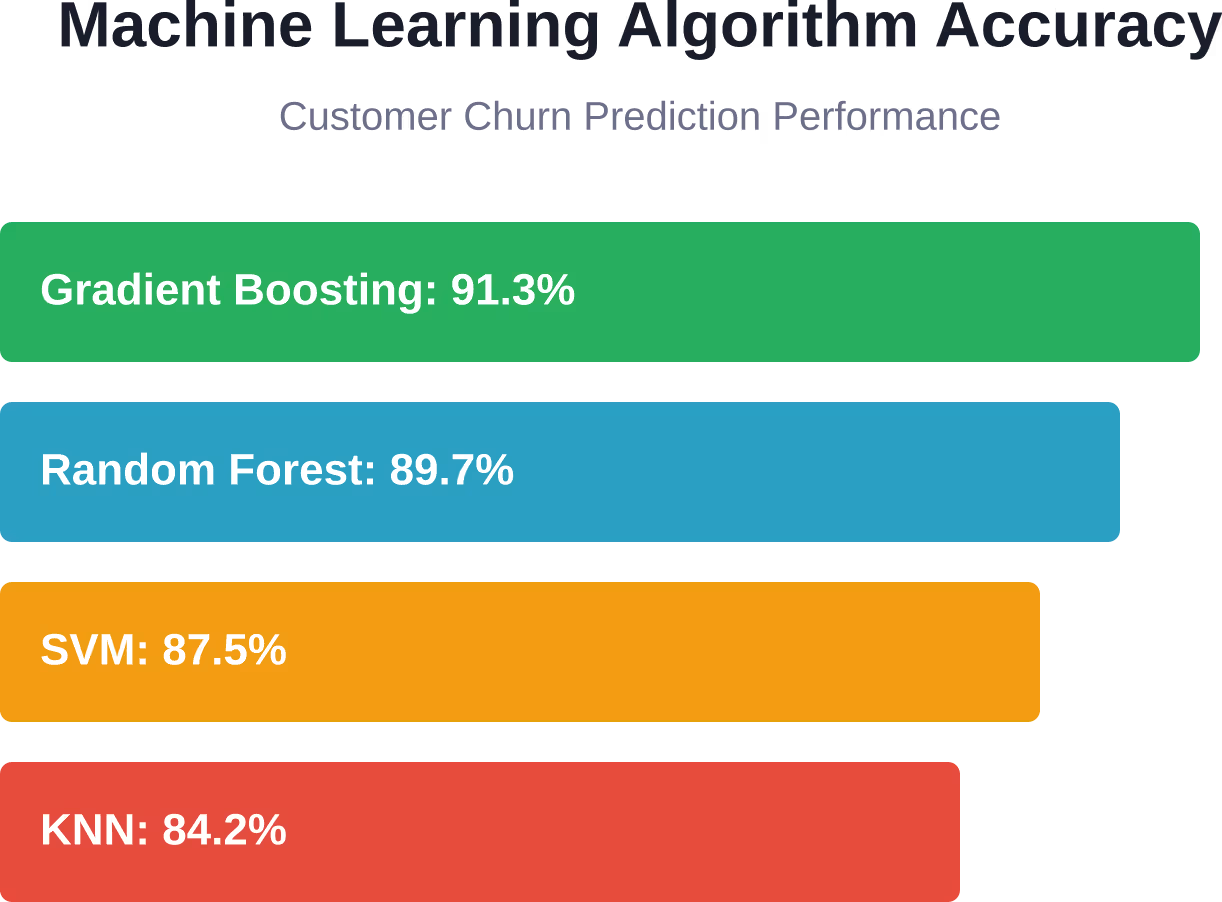
How to Choose the Right Big Data Analytics Solution
With dozens of platforms across four categories, selection becomes strategic.
Start With Your Data Volume
The practical threshold matters. Tools designed for big data add unnecessary complexity when datasets fit comfortably on a single machine. If your largest tables contain fewer than 10 million rows and total database size stays under 100GB, traditional tools like PostgreSQL plus a BI platform might suffice. When data exceeds what single-machine processing handles efficiently — typically beyond 100GB or when query times become frustratingly slow — distributed big data platforms become worth the investment.
Assess Technical Expertise
Managed platforms like Snowflake, Databricks, and Fivetran reduce operational burden but cost more. Open-source alternatives like Hadoop, Spark, and NiFi offer flexibility but require specialized data engineering skills. Honest assessment of your team’s capabilities prevents costly missteps. Deploying Hadoop without experienced infrastructure engineers leads to poor performance, security gaps, and maintenance nightmares. No-code platforms like Skyvia democratize data integration for teams without engineering resources. Visual interfaces let business analysts build pipelines that would otherwise require Python developers.
Consider Total Cost of Ownership
License costs represent just one component of TCO. Factor in:
- Infrastructure expenses (compute, storage, networking)
- Personnel costs (engineers, administrators, training)
- Opportunity costs (time spent on infrastructure versus analytics)
- Migration costs (moving from current systems)
Managed cloud platforms show higher monthly bills but lower total costs when personnel and opportunity costs are included. Conversely, open-source platforms show zero licensing fees but require significant engineering investment.
Evaluate Integration Requirements
Big data solutions rarely exist in isolation. The platforms must connect to existing databases, SaaS applications, visualization tools, and custom applications. Prioritize solutions with native connectors for your critical systems. Building custom integrations consumes weeks of engineering time. Check whether connectors support the specific features you need. Some integrations only handle batch sync, lacking real-time change data capture.
Plan for Scale
Today’s 100GB dataset becomes next year’s 2TB dataset faster than anticipated. Choose platforms that scale gracefully without architectural rewrites. Cloud-native solutions scale more easily than on-premises systems. Adding compute capacity means adjusting a configuration setting rather than ordering hardware and waiting weeks for delivery.
Security and Compliance Considerations
Regulated industries face strict requirements around data handling, access controls, and audit logging. Verify that platforms provide necessary compliance certifications. Healthcare organizations need HIPAA compliance. Financial institutions require SOC 2 and potentially PCI DSS. European companies must ensure GDPR compliance. Cloud providers share compliance responsibility but don’t eliminate it. Understanding the shared responsibility model prevents dangerous gaps.
| Decision Factor | Choose Managed Platforms | Choose Open-Source |
|---|---|---|
| Team size | Small to medium technical teams | Large teams with specialized engineers |
| Budget | Higher budget, lower risk tolerance | Limited budget, higher risk tolerance |
| Timeline | Need results in weeks | Can invest months in setup |
| Customization | Standard features sufficient | Need deep customization |
| Compliance | Need certified platforms | Can manage compliance internally |
Emerging Trends in Big Data Analytics
The landscape continues evolving rapidly. Several trends are reshaping how organizations approach big data.
Data Products and Product Thinking
According to the AWS survey cited in MIT Sloan research, 80% of data leaders now use or consider data products and data product management approaches. This shift treats data assets like software products — with defined owners, SLAs, documentation, and versioning. Rather than dumping tables into a warehouse, teams package curated datasets with metadata and quality guarantees.
The Generative AI Integration Gap
Excitement around generative AI is sky-high. Surveys indicate high organizational belief in generative AI’s transformational potential, with 80% of AWS survey respondents believing it will transform their organizations. But deployment lags dramatically behind enthusiasm. The AWS and Wavestone surveys indicate that generative AI adoption in production environments remains limited compared to the high levels of organizational interest. The gap stems largely from inadequate data infrastructure. Generative AI requires clean, well-organized data, yet most organizations haven’t modernized their data platforms.
Real-Time Analytics Becomes Standard
Batch processing dominated big data for years. Load data overnight, run reports in the morning, make decisions by afternoon. That cycle no longer works. Competition demands immediate insights. Customer expectations shifted from next-day to same-hour responses. Streaming architectures that once required specialized expertise now appear in mainstream platforms. Snowflake added streaming ingestion. BigQuery supports real-time table inserts. These capabilities democratize real-time analytics.
DataOps and Platform Engineering
As data platforms grow more complex, organizations adopt DevOps principles for data infrastructure. DataOps emphasizes automation, monitoring, and continuous improvement. Platform engineering teams build internal data platforms that abstract complexity from data scientists and analysts. Rather than each team configuring Spark clusters and tuning Redshift, centralized platforms provide self-service interfaces.
Common Implementation Challenges
Even well-chosen platforms face obstacles during implementation.
Organizational Resistance to Change
Research on big data analytics implementation in a large commercial bank identified resistance to change as a critical barrier. Existing processes, established workflows, and comfortable tools create inertia. Successful implementations require change management programs that address people issues, not just technical ones. Training, communication, and demonstrating quick wins help overcome resistance.
Data Quality and Governance
The most sophisticated analytics platform produces garbage when fed dirty data. Missing values, inconsistent formats, duplicate records, and stale data undermine every analysis. Data governance programs establish ownership, quality standards, and validation processes. Automated data quality checks catch issues before they poison downstream analytics.
Skill Gaps
Big data platforms require different skills than traditional databases. SQL knowledge doesn’t automatically translate to optimizing Spark jobs or tuning distributed queries. Organizations either train existing staff or hire specialized talent. Both approaches take time. Training programs require months before showing results. Hiring experienced big data engineers proves competitive and expensive.
Cost Management
Cloud data platforms make scaling easy — sometimes too easy. Inefficient queries, forgotten test environments, and unconstrained compute all generate surprise bills. Implementing cost controls prevents runaway spending. Resource tagging tracks spending by team. Query timeouts prevent runaway operations. Regular cost reviews identify optimization opportunities.
Building Your Big Data Stack
Rather than replacing everything simultaneously, successful organizations build incrementally.
Phase 1: Establish Data Integration
Start by centralizing data from critical source systems. Choose an integration platform that handles your most important connectors reliably. This foundation enables everything else. Without reliable data movement, storage and processing investments deliver limited value.
Phase 2: Implement Storage and Processing
With data flowing reliably, add a warehouse or lake for centralized storage. Choose a processing engine aligned with your use cases — Spark for general analytics, Flink for real-time requirements. Start small. Process one use case end-to-end before expanding. Learn the platforms, establish best practices, and prove value.
Phase 3: Deploy Visualization and Self-Service
Once processed data exists, democratize access through BI platforms. Enable business users to answer their own questions without constant SQL requests to analysts. This multiplies the value of earlier investments. Data that only engineers can access delivers limited organizational impact.
Phase 4: Operationalize and Optimize
With the stack functioning, focus on reliability and efficiency. Add monitoring, alerting, and automation. Optimize query performance. Implement data quality checks. This phase never truly ends. Continuous improvement becomes ongoing practice.
Frequently Asked Questions
What is the difference between big data analytics and traditional analytics?
Traditional analytics processes structured data on single machines, typically handling datasets under 100GB. Big data analytics uses distributed computing across clusters to process datasets exceeding single-machine capacity — often terabytes or petabytes. Big data platforms handle diverse data types including unstructured and semi-structured formats, support real-time streaming, and scale horizontally by adding nodes rather than upgrading single servers.
How much does big data analytics software cost?
Costs vary dramatically by platform and deployment model. Open-source options like Apache Spark and Hadoop have zero licensing fees but require infrastructure and personnel investment. Managed cloud platforms charge based on consumption — Snowflake bills per-second for compute, BigQuery charges per query bytes processed. Integration tools range from $79/month for entry-level plans to five-figure monthly bills for enterprise deployments processing millions of rows. Check official vendor websites for current pricing as rates change frequently.
Do I need specialized skills to use big data platforms?
It depends on the platform. No-code tools like Skyvia, Tableau, and Power BI enable business analysts to work independently without programming. Processing engines like Spark and Flink require programming skills in Python, Scala, or Java. Cloud warehouses like Snowflake and BigQuery use standard SQL, making them accessible to anyone with database experience. Deploying and managing on-premises solutions like Hadoop requires specialized data engineering expertise. Match platform complexity to your team’s capabilities.
Which big data solution is best for small businesses?
Small businesses should prioritize managed cloud platforms that minimize operational complexity. Start with a no-code integration tool like Skyvia to centralize data, a cloud warehouse like BigQuery for storage and basic processing, and Power BI or Looker Studio for visualization. This stack provides big data capabilities without requiring dedicated data engineers. As data volume and team size grow, add specialized processing tools like Databricks. Avoid on-premises platforms like Hadoop that demand significant infrastructure expertise.
Can big data analytics work with real-time data streams?
Yes. Modern big data platforms handle both batch and streaming data. Apache Spark includes Structured Streaming for real-time processing. Apache Flink specializes in stream processing with exactly-once semantics. Cloud warehouses like Snowflake and BigQuery added streaming ingestion capabilities. Real-time analytics requires different architectural patterns than batch processing — using message queues like Apache Kafka for buffering, maintaining low-latency data pipelines, and designing for eventual consistency.
How do I know when my organization needs big data analytics?
Several indicators suggest big data platforms become necessary. Query performance degrades as traditional databases struggle with table sizes exceeding tens of millions of rows. Data volume exceeds what single-machine tools can process efficiently, typically beyond 100GB. Business requirements demand real-time insights rather than overnight batch processing. Analytics must combine data from many disparate sources simultaneously. Machine learning models require training on massive historical datasets. If you experience these challenges, investigate big data solutions.
What is the NIST Big Data Framework?
The National Institute of Standards and Technology published the NIST Big Data Interoperability Framework to help organizations implement big data solutions effectively. Released in final form in October 2019, the framework provides standard definitions, reference architectures, and security guidance. According to NIST, big data describes data collections that exceed the capacity of typical database software tools to capture, store, manage, and analyze. The framework helps organizations make sense of complex big data ecosystems through common terminology and architectural patterns.
Conclusion
Big data analytics solutions have matured from bleeding-edge experiments to essential infrastructure. The landscape breaks down into four functional categories — integration, storage, processing, and visualization. Most organizations need components from all four, assembled into a coherent stack aligned with use cases, skills, and budget. Cloud-native managed platforms like Snowflake, Databricks, and Fivetran reduce operational complexity but cost more. Open-source alternatives like Hadoop, Spark, and Apache NiFi provide flexibility for organizations with engineering resources. The generative AI wave creates urgency around data infrastructure. According to MIT Sloan research, 93% of data leaders agree that data strategy is critical to AI value, yet only 6% have production AI applications. The gap stems from inadequate data platforms. Start small. Choose one use case, implement end-to-end, prove value, then expand. Avoid the trap of deploying every platform simultaneously without demonstrating business impact. The right big data analytics solution depends entirely on your context. A startup with cloud-native architecture needs different tools than a regulated financial institution with on-premises requirements. Match platform complexity to team capabilities and organizational maturity.