Quick Summary: Machine learning integration in web development enables intelligent features like personalized recommendations, chatbots, and automated testing. Developers use frameworks like TensorFlow.js and PyTorch to deploy ML models directly in browsers, enhancing user experience and operational efficiency. The technology is transforming how websites analyze data, predict user behavior, and automate repetitive tasks. The fusion of machine learning with web development has shifted from experimental to essential. Websites and applications now analyze user behavior in real-time, automate complex tasks, and deliver personalized experiences that adapt on the fly. But here’s the thing—implementing ML doesn’t require rebuilding your entire stack or hiring a team of data scientists. Modern frameworks make it possible to integrate intelligent features directly into web applications.
What Machine Learning Brings to Web Development
Machine learning algorithms process data, identify patterns, and make predictions without explicit programming for each scenario. In web development contexts, this translates to smarter applications that learn from user interactions. The practical applications extend beyond recommendation engines. ML powers chatbots that understand context, A/B testing that optimizes automatically, and security systems that detect anomalies in real-time. According to research from arXiv, practitioners report that ML application development requires balancing model accuracy with deployment constraints. The manufacturing sector provides tangible evidence—BMW reported a 40% reduction in manufacturing flaws and General Electric reported a 40% decrease in unplanned downtime through ML integration.
Key Capabilities ML Adds to Websites
Personalization engines analyze browsing history, click patterns, and time spent on content to surface relevant recommendations. E-commerce sites adjust product displays based on individual preferences. Natural language processing enables chatbots that handle customer queries without human intervention. These systems understand intent, not just keywords. Image recognition powers visual search features, content moderation, and accessibility tools. Users upload photos to find similar products or identify objects. Predictive analytics forecast user behavior, helping developers optimize load times, content placement, and conversion funnels. 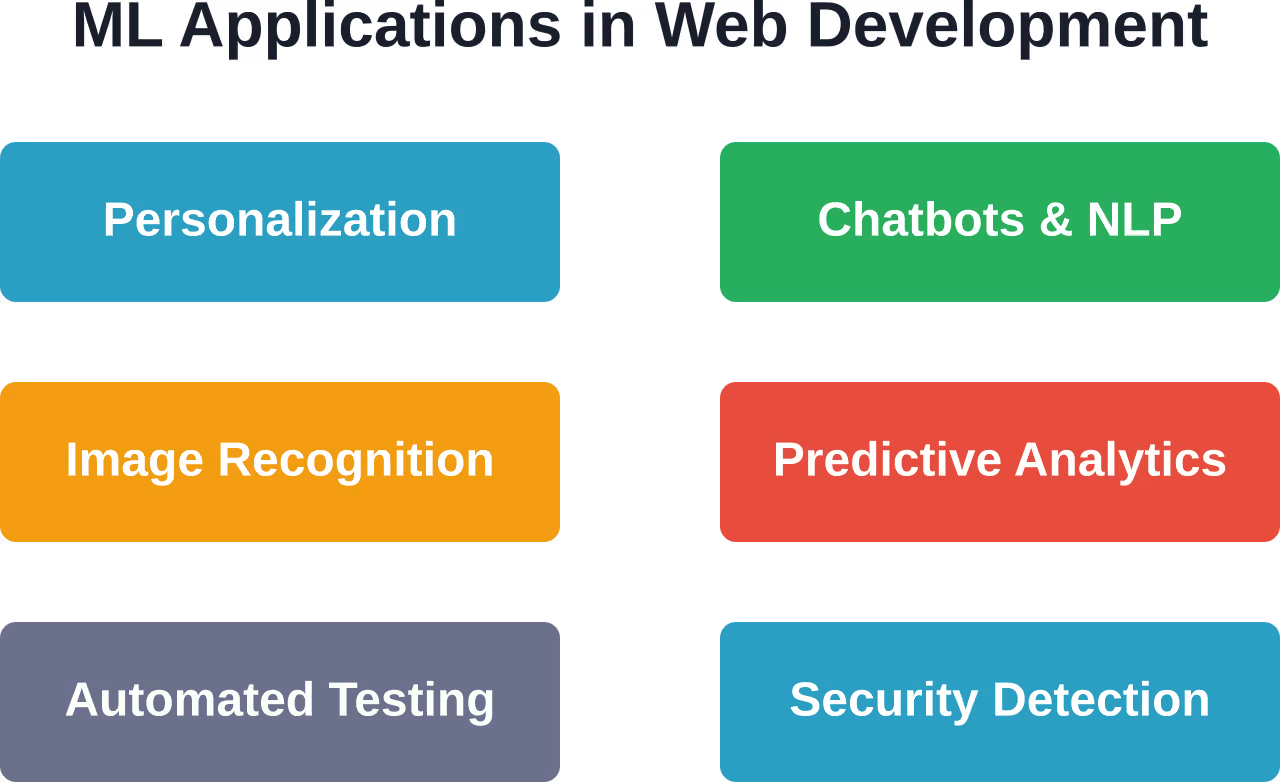

Turn Web Data Into AI Software With AI Superior
AI Superior helps companies assess AI use cases and turn them into working software. Their services cover AI consulting, AI software development, R&D, training, and integration into existing workflows. For web development teams, this can support search tools, personalization, recommendation systems, content analysis, customer behavior insights, or AI features inside existing web platforms.
Need Machine Learning for a Web Product?
AI Superior can help with:
- assessing machine learning use cases
- building custom AI and ML tools
- developing analytics and automation models
- integrating AI into web systems
👉 Contact AI Superior to discuss your project.
Frameworks and Tools for Web ML
TensorFlow.js brings Google’s machine learning library to JavaScript. It runs models directly in the browser or on Node.js servers, handling everything from image classification to natural language processing. The framework supports two approaches: using pre-trained models or training custom models from scratch. Pre-trained models work well for common tasks like object detection or sentiment analysis. Community discussions on the PyTorch forum reveal developers searching for browser-based alternatives to TensorFlow.js. While PyTorch excels in research and server environments, its JavaScript ecosystem remains less mature. ONNX Runtime provides another path—train models in any framework, convert to ONNX format, and deploy via JavaScript. This approach maximizes flexibility for teams working across multiple ML platforms.
Choosing the Right Framework
TensorFlow.js works best when teams need comprehensive documentation, extensive pre-trained models, and active community support. The library handles computer vision and NLP tasks efficiently. For simpler use cases, Brain.js offers a lightweight neural network library with straightforward APIs. It’s ideal for projects requiring basic pattern recognition without TensorFlow’s complexity. ML5.js builds on TensorFlow.js but simplifies common tasks into beginner-friendly functions. Creative developers use it for interactive art projects and educational applications.
| Framework | Best For | Browser Support | Learning Curve |
|---|---|---|---|
| TensorFlow.js | Production applications | Excellent | Moderate |
| Brain.js | Simple neural networks | Good | Low |
| ML5.js | Creative projects | Good | Very Low |
| ONNX Runtime | Cross-platform models | Good | Moderate |
Implementing ML Models in Web Applications
The implementation process starts with defining the problem ML should solve. Not every feature needs machine learning—rules-based logic often suffices for simple tasks. Research from arXiv emphasizes that ML application development follows distinct patterns from traditional software engineering. Model training, validation, and deployment require specialized pipelines. For browser deployment, model size matters. Large models increase load times and memory consumption. Quantization and pruning techniques reduce model size while maintaining accuracy. NIST research on industrial AI applications highlights the importance of validating model accuracy against real-world scenarios.
Deployment Strategies
Client-side deployment runs models in the user’s browser. This approach protects privacy since data never leaves the device. It also reduces server costs for high-traffic applications. Server-side deployment centralizes model execution. This works better for complex models requiring significant compute resources or when training needs frequent updates. Hybrid approaches split processing—simple predictions happen client-side while complex analysis runs server-side. This balances performance with resource constraints.
Practical Use Cases Developers Implement Today
Content recommendation systems analyze reading patterns to suggest relevant articles. News sites and blogs use collaborative filtering to surface content similar users enjoyed. Form validation goes beyond checking empty fields. ML models detect suspicious patterns, flag potential fraud, and verify uploaded document authenticity. Search functionality improves when algorithms understand synonyms, typos, and context. Users find results even when their query doesn’t match exact keywords. Automated testing frameworks use ML to identify brittle tests, predict failure points, and generate test cases based on code changes. This reduces maintenance overhead.
Performance Optimization Through ML
Predictive prefetching loads resources before users request them. Models analyze navigation patterns to anticipate next clicks. Image optimization adjusts compression levels based on content type and user connection speed. ML algorithms balance quality with load times. A/B testing platforms use reinforcement learning to allocate traffic dynamically. Instead of fixed splits, they shift users toward better-performing variants.
Challenges and Considerations
Model accuracy varies with data quality. Biased training data produces biased predictions. Teams need diverse datasets representing actual user populations. Performance overhead affects user experience. Large models slow page loads, drain batteries, and consume memory. Optimization becomes critical. Privacy concerns arise when processing user data. Regulations like GDPR require explicit consent and data handling transparency. Client-side processing helps but doesn’t eliminate all concerns. Maintenance complexity increases. Models drift as user behavior changes, requiring retraining. Monitoring systems must detect when accuracy degrades.
| Challenge | Impact | Mitigation Strategy |
|---|---|---|
| Data Quality | Poor predictions | Diverse datasets, regular audits |
| Performance | Slow load times | Model compression, lazy loading |
| Privacy | Regulatory risk | Client-side processing, consent |
| Model Drift | Accuracy loss | Continuous monitoring, retraining |
Getting Started with Web ML
Start small. Pick a single feature that benefits from ML rather than attempting a complete rewrite. Recommendation widgets or simple chatbots make good first projects. Use pre-trained models initially. Transfer learning adapts existing models to specific use cases with less training data. This accelerates development. Measure impact. Track metrics before and after ML implementation. Does the feature improve conversion rates, engagement, or user satisfaction? The Google Machine Learning Crash Course offers structured learning for developers new to ML concepts. It covers fundamentals through hands-on exercises. W3Schools provides introductory material distinguishing machine learning from deep learning—useful context for understanding when each approach applies.
The Path Forward
Machine learning in web development continues evolving. Models grow more efficient, frameworks mature, and deployment becomes simpler. Edge computing brings ML processing closer to users. WebAssembly enables near-native performance for complex models in browsers. The barrier to entry keeps dropping. What required specialized knowledge two years ago now comes packaged in accessible libraries. Real talk: ML won’t replace traditional development practices. It augments them, adding intelligence where rules-based logic falls short. Developers who understand both web fundamentals and ML principles will build the next generation of intelligent applications. The technology is here. The question becomes what to build with it. Start experimenting. Deploy a simple model. Measure results. Iterate. That’s how practical ML skills develop—through building, not just reading.
Frequently Asked Questions
Do I need a data science background to use ML in web development?
No extensive background is required for basic implementations. Frameworks like TensorFlow.js and ML5.js abstract complex mathematics into simple APIs. Pre-trained models handle common tasks without custom training. Understanding fundamental concepts helps, but developers can start building with working knowledge of JavaScript, HTML, and CSS.
What’s the difference between client-side and server-side ML deployment?
Client-side deployment runs models in the user’s browser, offering better privacy and reduced server costs. Server-side deployment executes models on backend infrastructure, supporting more complex computations and centralized model updates. Many applications use hybrid approaches, processing simple predictions client-side while routing complex tasks server-side.
How large are ML models and do they slow down websites?
Model sizes vary dramatically. Simple neural networks might be 1-5 MB, while complex computer vision models can exceed 100 MB. Large models do impact load times. Compression techniques like quantization reduce size by 75% or more with minimal accuracy loss. Lazy loading and caching strategies prevent repeated downloads.
Can ML models work offline in web applications?
Yes, when deployed client-side using service workers and cached models. Once the model downloads, it runs entirely on the user’s device without internet connectivity. Progressive web apps leverage this capability for offline-first experiences. The model persists locally until explicitly cleared or updated.
How often do ML models need retraining?
Retraining frequency depends on how quickly user behavior or data patterns change. E-commerce recommendation systems might retrain weekly, while document classification models remain stable for months. Monitoring accuracy metrics helps determine when performance degrades enough to warrant retraining. Automated pipelines can trigger retraining based on accuracy thresholds.
What privacy concerns arise with web-based ML?
Processing user data for training or inference raises privacy questions. Client-side models minimize risk since data never leaves the device. Server-side processing requires careful data handling, encryption, and compliance with regulations like GDPR. Federated learning approaches train models across distributed devices without centralizing raw data.
Which ML use cases provide the best ROI for typical websites?
Personalized recommendations, intelligent search, and chatbots typically deliver measurable value. These features directly impact conversion rates and user engagement. Automated content moderation and fraud detection provide ROI through reduced operational costs. Start with features tied to specific business metrics rather than implementing ML for its own sake.
Conclusion
Machine learning is becoming a practical part of web development, not just an experimental add-on. It can help websites personalize content, improve search, automate testing, detect unusual behavior, and make user experiences more responsive. At the same time, ML should be added with a clear purpose. Not every feature needs a model, and poor data or heavy implementation can create more problems than value. The strongest results usually come from focused use cases, lightweight deployment, strong privacy practices, and regular performance monitoring. For developers, the best path is to start small: test one useful feature, measure the impact, and improve from there. As tools like TensorFlow.js, ONNX Runtime, and browser-based ML frameworks continue to mature, machine learning will become easier to build into everyday web applications.