
If you’ve been watching the AI coding space lately, you’ve probably heard both OpenClaw and Cursor mentioned in the same breath. But here’s the thing—they’re not actually competitors.
OpenClaw operates at the system level, automating tasks across your OS, browser, and messaging apps. Cursor lives inside your IDE, helping you write and edit code faster with AI-powered autocomplete and inline suggestions.
The confusion makes sense. Both tools use AI, both help developers work faster, and both are generating serious hype in 2026. But comparing them is like comparing a self-driving car to cruise control. They work at completely different layers of your workflow.
What OpenClaw and Cursor Actually Do
Let’s clear this up right away.
OpenClaw is an autonomous agent that runs on your machine. It can open applications, navigate websites, execute commands in your terminal, manage files, send messages, and coordinate multi-step workflows. According to the official OpenClaw GitHub repository, it’s built as a “personal assistant” that works across your entire operating system.
You give it high-level instructions—”research these five libraries and summarize their GitHub activity”—and it handles the browser navigation, data extraction, and file creation automatically.
Cursor is a fork of VS Code with deeply integrated AI features. It provides inline code completion, chat-based code generation, and context-aware editing suggestions. As noted on the official Cursor documentation, it’s designed to make you “extraordinarily productive” at writing software within your editor.
You work in your codebase, and Cursor predicts your next line, rewrites functions on command, or generates boilerplate based on your existing patterns.
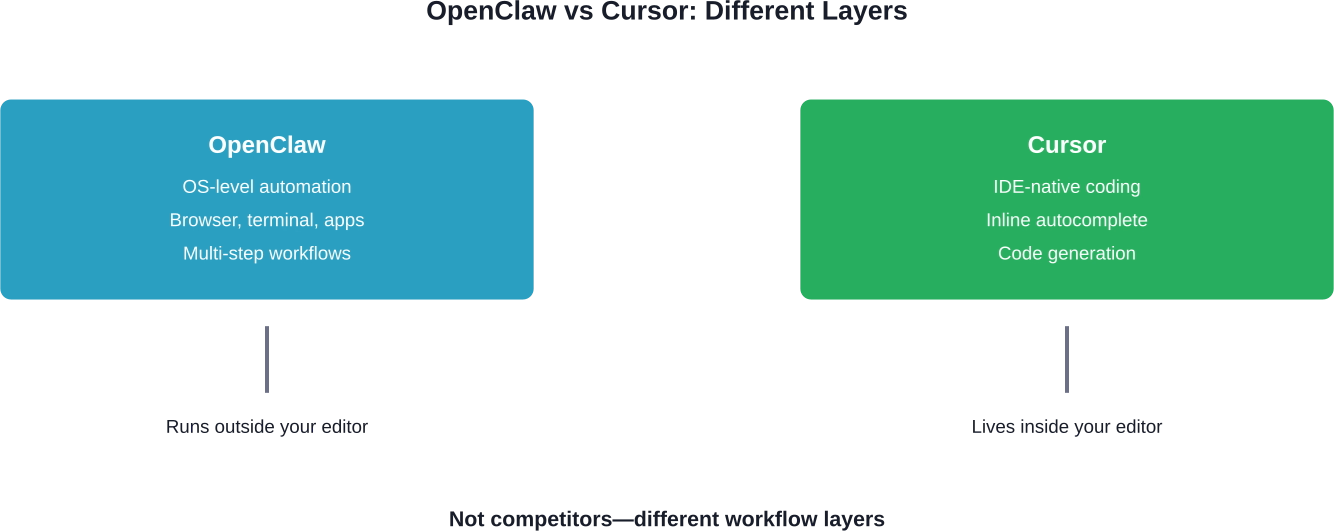
OpenClaw and Cursor operate at completely different layers of your development stack.
Where OpenClaw Wins: Automation Cursor Can’t Touch
Cursor won’t schedule your meetings, scrape competitor websites, or automate your inbox. OpenClaw will.
Community discussions on Reddit highlight this repeatedly. One user running OpenClaw on an old 2011 Mac Mini noted it took 20 minutes to install and immediately started handling calendar management, file organization, and research tasks. The GitHub repository VoltAgent/awesome-openclaw-skills showcases community-built “skills”—modular automations for specific tasks.
OpenClaw shines when you need:
- Cross-application workflows: pulling data from Gmail, summarizing it, and posting to Slack
- Research automation: visiting multiple sites, extracting structured data, compiling reports
- System-level tasks: managing files, running shell scripts, organizing directories
- Browser-based automation: form filling, data entry, repetitive web tasks
But here’s the trade-off: setup complexity. Multiple Reddit users mentioned spending significant time trying to get things to work flawlessly and that community sentiment suggests challenges with adoption. One perspective noted concerns about setup complexity relative to alternative approaches.
Where Cursor Wins: Code Editing OpenClaw Can’t Match
OpenClaw doesn’t live in your codebase. It can’t predict your next line of TypeScript or refactor a function while preserving type safety.
According to a LinkedIn comparison by Vladimir Arustamov, Cursor provides “clean UX, clear project structure, built-in file explorer, multiple terminals, and flexible model selection.” The tool integrates models from OpenAI, Anthropic, Google, and more, as documented on the official Cursor Models page.
Cursor excels at:
- Inline code completion: tab-to-accept suggestions that understand your entire project context
- Contextual refactoring: rewrite functions, rename variables, update imports automatically
- Chat-based generation: describe what you want, Cursor writes the code in the right file
- Multi-file editing: make coordinated changes across your codebase in one operation
A Reddit user maintaining both tools explained: “Cursor is great if you already know what you’re doing and want to do very fast targeted development. A story to add a new API endpoint, or to add a new button on a website.”
Cursor offers a multi-tiered pricing model: Hobby (Free), Pro ($20/mo), Pro+ ($60/mo), and Ultra ($200/mo), though individual usage patterns may vary.
Cost Comparison: What You’ll Actually Pay
| Tool | Base Cost | API Costs | Hidden Costs
|
|---|---|---|---|
| OpenClaw | Free (open source) | You pay your own API keys (Claude, GPT-4, etc.) | Time investment: setup, debugging, skill configuration |
| Cursor | Free tier available; Pro ~$20/mo | Included in Pro plan (limited requests) | Overage fees if you exceed monthly request limits |
Reddit users report OpenClaw can get expensive with API usage. Community discussions mention developers being mindful of API costs and optimizing model selection for cost efficiency.
Cursor bundles API costs into its subscription, which simplifies budgeting but limits flexibility. You can’t swap models or route requests to cheaper alternatives without external tooling.
The One Workflow Where They Work Together
Here’s where it gets interesting. You can run both.
Use OpenClaw to handle everything outside your IDE: scraping documentation sites, fetching API examples, organizing research, managing your environment. Then use Cursor to write the actual code based on that curated context.
A Reddit user running both described this split: “OpenClaw feels like ambient infrastructure—the value compounds over weeks as it learns your patterns. Cursor is a scoped tool for a defined task.”
This approach isolates concerns. OpenClaw never touches your codebase directly (reducing risk of automated errors). Cursor stays focused on what it does best: editing files.
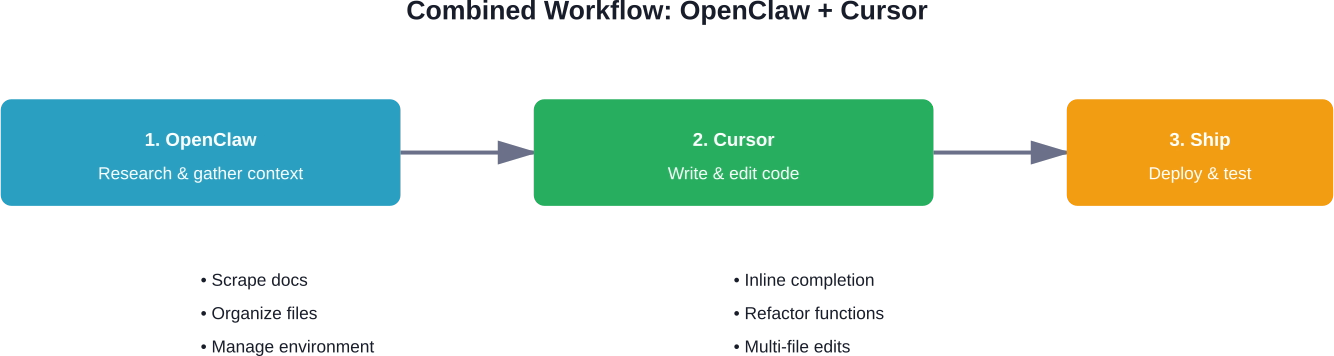
A practical workflow combining OpenClaw for research and Cursor for code editing.
Security and Privacy: The Elephant in the Room
OpenClaw runs with significant system access. It can read your files, execute commands, and interact with any application on your machine.
Reddit users have expressed caution about granting extensive permissions. Community discussions mention security considerations and the importance of understanding what data and access levels different tools require.
The GitHub repository centminmod/explain-openclaw includes documentation on the tool’s architecture and capabilities, and security considerations should be reviewed before deployment.
Cursor operates inside your editor. It can read your codebase (which you should assume anyway with AI coding tools), but it doesn’t have OS-level permissions. That’s a narrower attack surface.
If you’re working with proprietary code or sensitive data, carefully review what each tool can access before granting permissions.
Which Developers Choose Which Tool
Based on community discussions and GitHub activity:
You’ll want OpenClaw if:
- You spend hours on repetitive browser-based research
- You need cross-application automation (email, Slack, calendar, terminal)
- You’re comfortable debugging open-source tools and writing custom skills
- You value privacy and want full control over where your data goes
You’ll want Cursor if:
- You write code 6+ hours a day and want to ship faster
- You prefer tools that work out of the box with minimal configuration
- You need IDE-native features (file explorer, terminals, debugging)
- You want predictable monthly pricing without managing API keys
A developer on Reddit put it plainly: “Building AI products right now feels less about ‘the best tool’ and more about reducing friction so you can actually ship.”

Scaling Beyond Tools with AI Superior
While navigating the nuances of OpenClaw and Cursor can significantly boost individual productivity, many organizations eventually hit a ceiling where off-the-shelf tools cannot solve complex, proprietary business challenges. At AI Superior, our team of Ph.D.-level Data Scientists and engineers helps businesses bridge this gap by developing end-to-end, custom AI-driven software. Instead of managing fragmented API costs and setup complexities yourself, we provide the technical expertise to build scalable, secure solutions in Computer Vision, NLP, and predictive analytics that integrate seamlessly into your existing stack.
We believe that the true power of AI lies in its strategic application to your unique datasets. Whether you are looking to automate high-level decision-making or require a robust R&D partner to vet new automation workflows, our German-based team is equipped to turn these technical possibilities into a tangible competitive advantage. We work closely with our clients to move beyond general-purpose assistants and toward specialized systems that drive long-term efficiency and business continuity.
The Bottom Line
OpenClaw and Cursor aren’t competitors. They’re complementary tools operating at different layers of your workflow.
If you need OS-level automation—managing files, scraping websites, coordinating multi-application workflows—OpenClaw offers power and flexibility that Cursor simply doesn’t provide. But expect setup complexity and variable API costs.
If you want to write code faster with AI-powered autocomplete, refactoring, and inline generation, Cursor delivers a polished, IDE-native experience that OpenClaw can’t match. But it won’t help you outside your editor.
The best developers in 2026 aren’t choosing one or the other. They’re using both strategically, keeping each tool focused on what it does best.
Start with Cursor if you’re coding daily. Add OpenClaw when repetitive non-coding tasks start slowing you down. And always audit what permissions you’re granting before giving any AI agent access to your system.
Frequently Asked Questions
Can OpenClaw replace Cursor for coding?
No. OpenClaw operates at the system level and doesn’t provide inline code completion, refactoring, or IDE-native features. It can execute scripts and manage files, but it’s not designed for the tight feedback loop of writing code inside an editor.
Can I use OpenClaw and Cursor together?
Yes, and many developers do. Use OpenClaw for research, file management, and cross-application workflows. Use Cursor for writing and editing code. They complement each other rather than overlap.
Is OpenClaw free?
OpenClaw itself is open source and free to use. However, you’ll pay for API calls to language models (Claude, GPT-4, etc.) separately. Costs vary based on usage but can add up depending on automation intensity.
Which tool is better for beginners?
Cursor. It has a polished interface, works immediately after installation, and doesn’t require configuring API keys or writing custom skills. OpenClaw has a steeper learning curve and setup complexity based on community feedback.
What are the biggest downsides of OpenClaw?
Community discussions highlight setup complexity, debugging time, security considerations from OS-level access, and variable API costs. Early adoption status means community-reported challenges with polished deployment.
Can OpenClaw run on Windows?
OpenClaw is available for multiple operating systems, though community discussions and documentation examples tend to emphasize macOS and Linux usage patterns.
 English
  German
  Arabic
  French
  Dutch
Dutch  Spanish