
Quick Summary: Asynchronous code can dramatically reduce LLM costs when implemented correctly, but common pitfalls like upfront request firing can negate savings. Strategic async patterns combined with techniques like prompt caching, batch processing, and controlled concurrency can cut costs by 60-90% while maintaining performance. OpenAI’s o3 model pricing dropped 80% to $2-8 per million tokens as of June 2025, making proper async implementation even more cost-effective.
LLM costs can spiral out of control faster than most teams expect. What starts as a few validation scripts or agentic workflows quickly turns into thousands of API calls that burn through budgets at alarming rates.
Here’s the thing though—async programming promises to make everything faster and more efficient. But when implemented incorrectly, it can actually increase your costs while giving the illusion of optimization.
The culprit? Subtle patterns in async code that fire off all requests upfront, even when downstream processes stop early or only need partial results. According to community discussions on the OpenAI developer forums, developers moving from synchronous to asynchronous implementations frequently encounter unexpected cost spikes despite faster execution times.
The Hidden Cost Trap in Async LLM Code
Async code feels like the obvious choice for LLM applications. Send multiple requests simultaneously, process results as they arrive, and move on. Faster execution, happier users.
But there’s a trap lurking in the most common async patterns.
When async functions create all their API calls upfront—wrapping them in tasks or promises before any processing logic runs—every single request hits the LLM provider’s servers. Even if your validation logic stops after the first failure. Even if the user cancels halfway through. Even if you only needed three results but queued up fifty.
The requests have already been sent. The tokens are already being processed. The bill is already growing.
How Upfront Request Firing Works
Consider a validation script that checks LLM responses against quality criteria. A naive async implementation might look like this:
| async def validate_responses(prompts): tasks = [call_llm_api(prompt) for prompt in prompts] for task in tasks: result = await task if not meets_criteria(result): return False return True |
Spot the problem? That list comprehension on line 2 creates all the API call tasks immediately. Before the loop even starts. Before any validation happens.
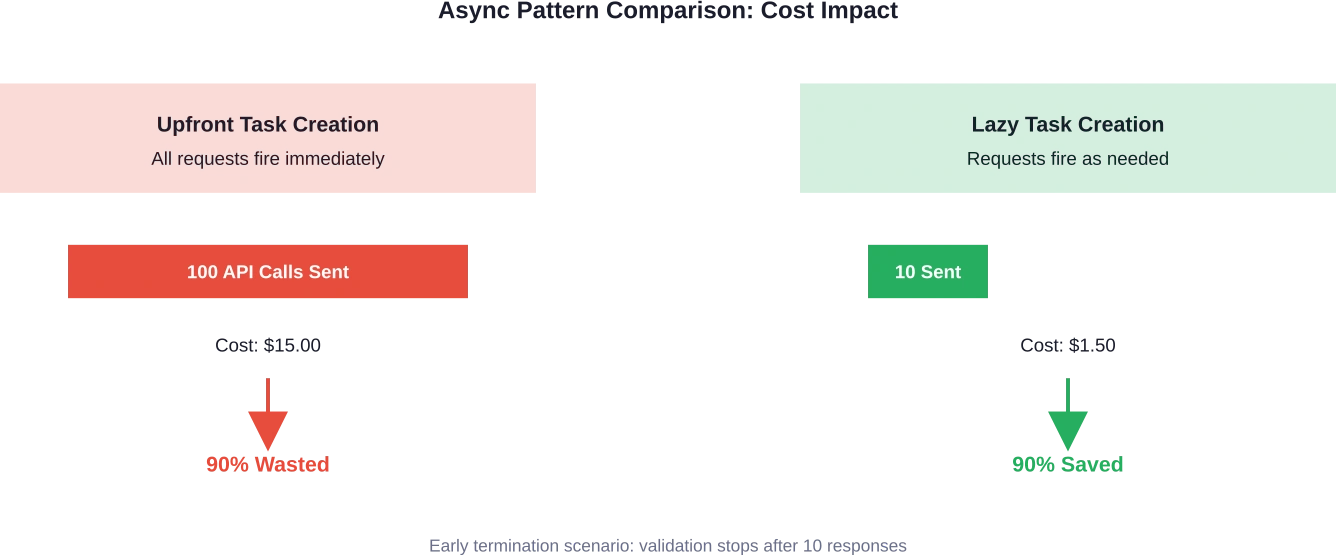
If the first result fails validation, the function returns False—but forty-nine other API calls are already in flight, already consuming tokens, already generating costs.
Real-World Cost Impact
One development team discovered this issue when their LLM validation script was running fast but generating unexpectedly high bills. Despite implementing what appeared to be efficient async code, they were processing 10× more tokens than necessary.
The fix? Five lines of code that restructured how tasks were created and awaited. Instead of creating all tasks upfront, they moved task creation inside the loop, allowing early termination to actually prevent unnecessary API calls.
Result: 90% cost reduction with virtually no loss in speed or functionality.
Controlled Concurrency: The Semaphore Solution
Fixing upfront request firing is step one. But there’s another async pattern that impacts both costs and performance: uncontrolled concurrency.
When applications fire hundreds or thousands of simultaneous LLM requests, they create several problems:
- Rate limit throttling that triggers retries and delays
- Inconsistent latency as provider infrastructure struggles with load spikes
- Failed requests that need reprocessing, doubling costs
- Memory pressure from managing too many concurrent connections
The solution involves asyncio semaphores—a concurrency control mechanism that limits how many requests run simultaneously.
Implementing Semaphore-Based Rate Limiting
According to discussions in the OpenAI community, developers implementing concurrency control using an asyncio semaphore with a limit of 5 simultaneous calls see more consistent performance. While this doesn’t directly reduce token usage, it prevents the cascade of failures and retries that inflate costs.
| import asyncio async def controlled_llm_call(semaphore, prompt): async with semaphore: return await call_llm_api(prompt) async def process_batch(prompts): semaphore = asyncio.Semaphore(5) tasks = [controlled_llm_call(semaphore, p) for p in prompts] return await asyncio.gather(*tasks) |
This pattern ensures only five requests run concurrently, reducing rate limit hits and stabilizing latency.
But wait—we still have the upfront firing problem. The task list is created before any processing happens. For cost optimization, combine controlled concurrency with lazy task creation.
Prompt Caching: The 60% Cost Reduction Secret
Now let’s talk about a different kind of optimization—one that works regardless of your async implementation.
Prompt caching exploits the fact that many LLM applications send the same context repeatedly. Research papers, documentation, system instructions, example datasets—content that remains constant across multiple queries.
When caching is enabled, the LLM provider processes and stores this repeated content. Subsequent requests that reuse the cached content pay only for the new tokens, not the entire prompt.
How Prompt Caching Works
Most major LLM providers now offer prompt caching with similar mechanics:
- Mark certain parts of your prompt as cacheable
- First request processes and caches that content
- Subsequent requests within a time window reuse the cache
- You pay reduced rates for cached tokens
The cache (Prompt Caching) typically remains valid for 5 to 10 minutes of inactivity. If the content is reused within that window, massive savings follow.
Real talk: If you have a 30,000-token research paper and want to ask ten different questions about it, caching changes the economics completely.
Without caching, the LLM processes all 30,000 tokens for each question—that’s 300,000 tokens total. With caching, you pay full price for the first request, then reduced rates for the cached portion in the next nine requests.
| Scenario | Total Tokens Processed | Cost Reduction
|
|---|---|---|
| No caching (10 queries) | 300,000 tokens | Baseline |
| With caching (10 queries) | ~120,000 tokens | 60% savings |
| With caching (50 queries) | ~180,000 tokens | 88% savings |
Combining Caching with Async Patterns
Here’s where things get interesting. When you combine proper async implementation with prompt caching, the cost savings multiply.
Async code naturally batches similar requests together in time—exactly what caching needs to be effective. Requests that arrive within the cache validity window all benefit from the same cached content.
But if your async implementation fires unnecessary requests, those extra calls consume your cached content budget without delivering value. The 60% caching savings gets eaten by the 10× unnecessary request multiplication.
Get both right, and the economics transform completely.
Batch API: Trading Time for Massive Cost Savings
OpenAI’s Batch API represents another async-friendly cost reduction strategy. As discussed in the OpenAI developer community, developers are moving approximately 4,200 synchronous calls to the Batch API to take advantage of the 24-hour processing window and cost savings.
The trade-off is straightforward: accept longer processing times in exchange for significantly reduced costs.
When Batch Processing Makes Sense
Batch APIs work best for:
- Dataset processing and analysis
- Content generation pipelines
- Evaluation and testing workflows
- Any workload where immediate results aren’t critical
The async pattern here is different. Instead of managing concurrent requests, the application submits a batch job and polls for completion. The LLM provider optimizes processing behind the scenes, often routing requests to less-utilized infrastructure or processing them during off-peak hours.
| # Batch API async pattern async def submit_batch_job(requests): batch = await client.batches.create( input_file=upload_batch_file(requests), endpoint=”/v1/chat/completions” ) return batch.id async def poll_batch_status(batch_id): while True: batch = await client.batches.retrieve(batch_id) if batch.status == “completed”: return await retrieve_batch_results(batch_id) await asyncio.sleep(60) |
The cost savings come from the provider’s ability to optimize resource utilization. When you’re not demanding immediate responses, they can pack your requests more efficiently.

Reduce LLM Costs With the Right Architecture
LLM costs are often driven by inefficient usage patterns, large prompts, and poorly structured inference pipelines. Working with an experienced AI engineering team like AI Superior can help identify where costs actually come from. The company develops custom AI systems and LLM-based applications, including NLP tools, chatbots, and data analysis platforms. Their engineers design model pipelines, optimize infrastructure, and structure deployments so systems scale without unnecessary compute costs.
Looking to Reduce the Cost of Running Your LLM?
Talk with AI Superior to:
- design LLM pipelines and backend architecture
- develop NLP systems and AI-powered applications
- deploy and integrate models into existing software
👉 Request an AI consultation with AI Superior to discuss your LLM project.
Current LLM Pricing Landscape in 2026
Understanding cost optimization requires knowing current pricing. As of June 2025, OpenAI announced significant price reductions for their o3 model—an 80% decrease from previous pricing.
The new o3 pricing structure:
- Input tokens: $2 per 1 million tokens
- Output tokens: $8 per 1 million tokens
According to research on Mixture-of-Experts architectures, GPT-4.5 was charging $150 for 1 million token generation, making it prohibitively expensive for many applications. The dramatic price reduction in newer models changes the cost-benefit calculation for optimization techniques.
That said, even at lower per-token costs, wasteful async patterns can still generate significant expenses at scale. A million unnecessary API calls at $2 per million input tokens is still $2,000 wasted.
Advanced Async Patterns for LLM Cost Control
Beyond the basics, several advanced async patterns provide additional cost optimization opportunities.
Asynchronous KV Cache Prefetching
Research on accelerating LLM inference throughput via asynchronous KV cache prefetching shows significant performance gains. On NVIDIA H20 GPUs, this method achieves up to 1.97× end-to-end inference acceleration on mainstream open-source LLMs.
While this technique primarily targets latency reduction rather than direct cost savings, faster inference means higher throughput per GPU—reducing the infrastructure costs per request.
Asynchronous RLHF Training
For organizations training custom models, asynchronous RLHF (Reinforcement Learning from Human Feedback) offers computational efficiency gains. Research demonstrates that asynchronous approaches to RLHF can train models approximately 40% faster than traditional synchronous methods.
The cost savings come from reduced training time and more efficient GPU utilization. Asynchronous training frameworks like AsyncFlow show 1.76× to 1.82× throughput improvements over baseline implementations at scale.
Streaming Responses with Early Termination
Streaming API responses enable another cost optimization pattern: early termination based on response quality.
Rather than waiting for the complete response, applications can evaluate the streamed tokens in real-time and cancel the request if the output doesn’t meet quality thresholds. This prevents wasting tokens on responses that will ultimately be discarded.
| async def stream_with_quality_check(prompt): stream = await client.chat.completions.create( model=”gpt-4″, messages=[{“role”: “user”, “content”: prompt}], stream=True ) accumulated = “” async for chunk in stream: accumulated += chunk.choices[0].delta.content or “” if should_terminate_early(accumulated): await stream.aclose() return None return accumulated |
The key is defining appropriate quality checks that run quickly enough to provide value—checking for prohibited content, off-topic responses, or format violations.
Measuring and Monitoring Async Cost Efficiency
Optimization without measurement is guesswork. Effective cost control requires tracking the right metrics.
Key Metrics to Monitor
| Metric | What It Reveals | Target
|
|---|---|---|
| Tokens per request | Prompt efficiency and response lengths | Minimize without quality loss |
| Cache hit rate | How often cached content is reused | Above 70% for repetitive workloads |
| Failed request rate | Retry costs from errors and throttling | Below 2% |
| Early termination rate | How often requests stop before completion | Track against cost savings |
| Concurrent request count | Load on provider infrastructure | Match semaphore limits |
| Cost per successful output | True cost including failures and retries | Primary optimization target |
Implementing Cost Tracking
Most LLM providers offer usage dashboards, but these typically show aggregate data. For fine-grained optimization, implement request-level tracking in your application.
According to community discussions about API usage, viewing charges grouped by line item reveals important patterns. Some developers discovered inexplicable token usage variations that only became visible through detailed tracking.
Wrap your API calls with instrumentation that logs:
- Request timestamp and latency
- Input and output token counts
- Cache hit/miss status
- Error types and retry attempts
- Actual cost based on current pricing
This data enables identifying cost anomalies before they become budget problems.
Real-World Implementation: A Step-by-Step Approach
Okay, so how do you actually implement these cost optimizations in a real application?
Start with an audit of current async patterns. Look for these red flags:
- List comprehensions creating all tasks before any await statements
- asyncio.gather() calls with no concurrency limits
- No prompt caching configuration despite repetitive content
- Synchronous batch jobs that could move to batch APIs
- Missing error handling that causes expensive retries
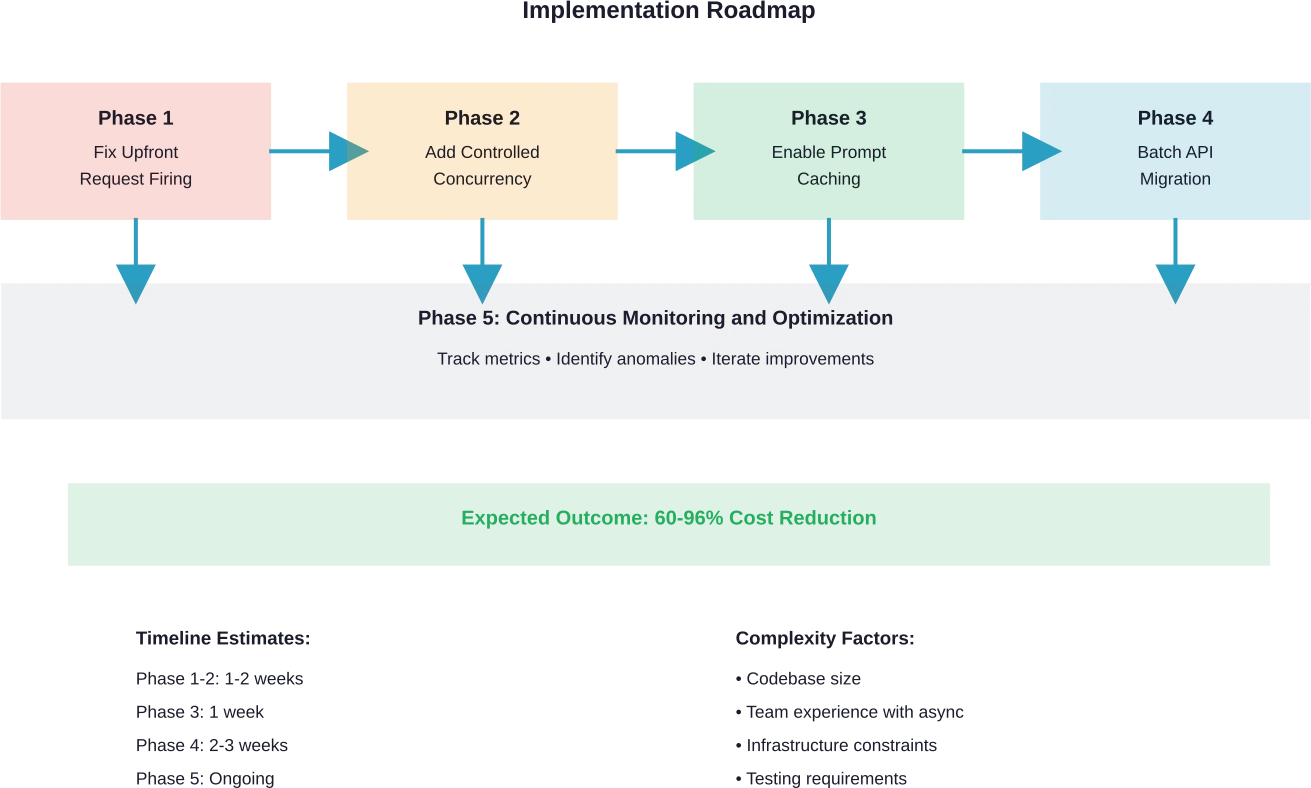
Phase 1: Fix Upfront Request Firing
Identify functions that create all tasks before processing begins. Refactor to lazy task creation:
| # Before: All tasks created upfront async def process_items(items): tasks = [process_item(item) for item in items] for task in tasks: result = await task if not validate(result): return False # After: Tasks created as needed async def process_items(items): for item in items: result = await process_item(item) if not validate(result): return False |
This single change can eliminate 50-90% of unnecessary requests in workflows with early termination logic.
Phase 2: Add Controlled Concurrency
Implement semaphores to prevent rate limit issues:
| class LLMClient: def __init__(self, max_concurrent=5): self.semaphore = asyncio.Semaphore(max_concurrent) self.client = OpenAI() async def call(self, prompt): async with self.semaphore: return await self.client.chat.completions.create( model=”gpt-4″, messages=[{“role”: “user”, “content”: prompt}] ) |
Phase 3: Enable Prompt Caching
Structure prompts to maximize cache reuse. Place static content at the beginning and mark it as cacheable according to your provider’s API.
Phase 4: Move Suitable Workloads to Batch Processing
Evaluate which workflows can tolerate delayed responses. Dataset processing, content generation, and evaluation pipelines are prime candidates.
Phase 5: Implement Monitoring
Add cost tracking to measure the impact of optimizations and identify new opportunities.
Common Pitfalls and How to Avoid Them
Even with the best intentions, async cost optimization can go wrong. Here are the most common traps.
Over-Optimization at the Expense of Latency
Reducing concurrency too aggressively saves on rate limit issues but dramatically increases total execution time. A semaphore limit of 1 might eliminate throttling, but it also serializes all requests.
Find the sweet spot through testing. Start with conservative limits and gradually increase while monitoring error rates.
Cache Invalidation Confusion
Prompt caching works wonderfully until cached content becomes stale. Applications that update reference documents or system instructions need cache invalidation strategies.
Most providers handle this automatically through time-based expiration, but be aware of the window. If critical content changes, waiting 10 minutes for cache expiration might be unacceptable.
Ignoring Failed Request Costs
Many async implementations focus on successful requests while ignoring the cost of failures. Rate limit errors, timeouts, and validation failures often trigger retries that multiply costs.
Track failed requests separately and implement exponential backoff with maximum retry limits.
Premature Batch API Migration
Moving workloads to batch processing before understanding their latency requirements causes user experience problems. Not all “non-critical” workloads can tolerate 24-hour delays.
Start with truly asynchronous workloads like overnight dataset processing before touching anything user-facing.
Frequently Asked Questions
How much can async optimization realistically reduce LLM costs?
Cost reduction depends heavily on current implementation patterns. Applications with upfront request firing and early termination logic can see 60-90% reductions. Applications already using efficient async patterns might see 20-40% savings from caching and batch processing alone. The key is identifying where unnecessary requests occur in the current workflow.
Does prompt caching work with all LLM providers?
Most major providers now offer prompt caching or similar features, but implementation details vary. Check provider documentation for specific requirements around minimum cache sizes, cache duration, and pricing structures. Some providers cache automatically while others require explicit configuration.
What concurrency limit should I use with semaphores?
Start with 5-10 concurrent requests and monitor rate limit errors. If you see consistent throttling, reduce the limit. If error rates are low and latency is acceptable, gradually increase. The optimal limit depends on your provider’s rate limits, request sizes, and application latency requirements. Based on community discussions, limits between 5 and 10 work well for most applications.
Can I combine streaming responses with prompt caching?
Yes, streaming and caching are complementary. Cached prompt content reduces the tokens that need processing, while streaming provides early access to results and enables early termination. This combination offers both cost and latency benefits.
How do I measure if optimizations are actually saving money?
Implement request-level cost tracking that logs token counts and calculates costs based on current pricing. Compare costs before and after optimization changes over equivalent workload periods. According to community recommendations, viewing usage grouped by line item in provider dashboards reveals detailed cost patterns that aggregate views miss.
Should I optimize for cost or latency first?
This depends on application requirements. User-facing features typically prioritize latency while maintaining acceptable costs. Background processing can tolerate higher latency for cost savings. Start by eliminating waste—unnecessary requests that provide no value regardless of speed. Then balance cost versus latency trade-offs based on specific use cases.
What happens to in-flight requests when my application crashes?
Async requests sent to LLM providers continue processing even if your application terminates. The provider still charges for completed requests. Implement proper shutdown handlers that cancel pending requests and close async event loops cleanly to prevent orphaned requests that generate charges without delivering results.
Closing Thoughts: Making Async Work for Your Budget
Async programming isn’t inherently good or bad for LLM costs—it’s a tool that requires careful implementation.
The patterns that make code run faster can also make bills balloon faster if requests fire unnecessarily. But when implemented correctly, async enables cost optimization strategies that synchronous code simply can’t match.
Start with an honest audit of current async patterns. Look for upfront task creation, uncontrolled concurrency, and missed caching opportunities. Fix the biggest issues first—usually upfront request firing in workflows with early termination.
Then layer in additional optimizations: prompt caching for repetitive content, batch processing for non-urgent workloads, streaming with quality checks for real-time features.
And critically, measure everything. Track tokens, costs, latency, and error rates at the request level. The data will reveal optimization opportunities that aren’t obvious from code inspection alone.
The LLM cost landscape continues evolving. OpenAI’s 80% price reduction for o3 models in June 2025 changed the economics significantly. But even at lower per-token costs, efficiency matters at scale.
Ready to cut your LLM costs? Start by reviewing your async implementation patterns today. The five-line fixes that eliminate unnecessary requests often deliver the biggest impact with the least effort.
 English
  German
  Arabic
  French
  Dutch
Dutch  Spanish