
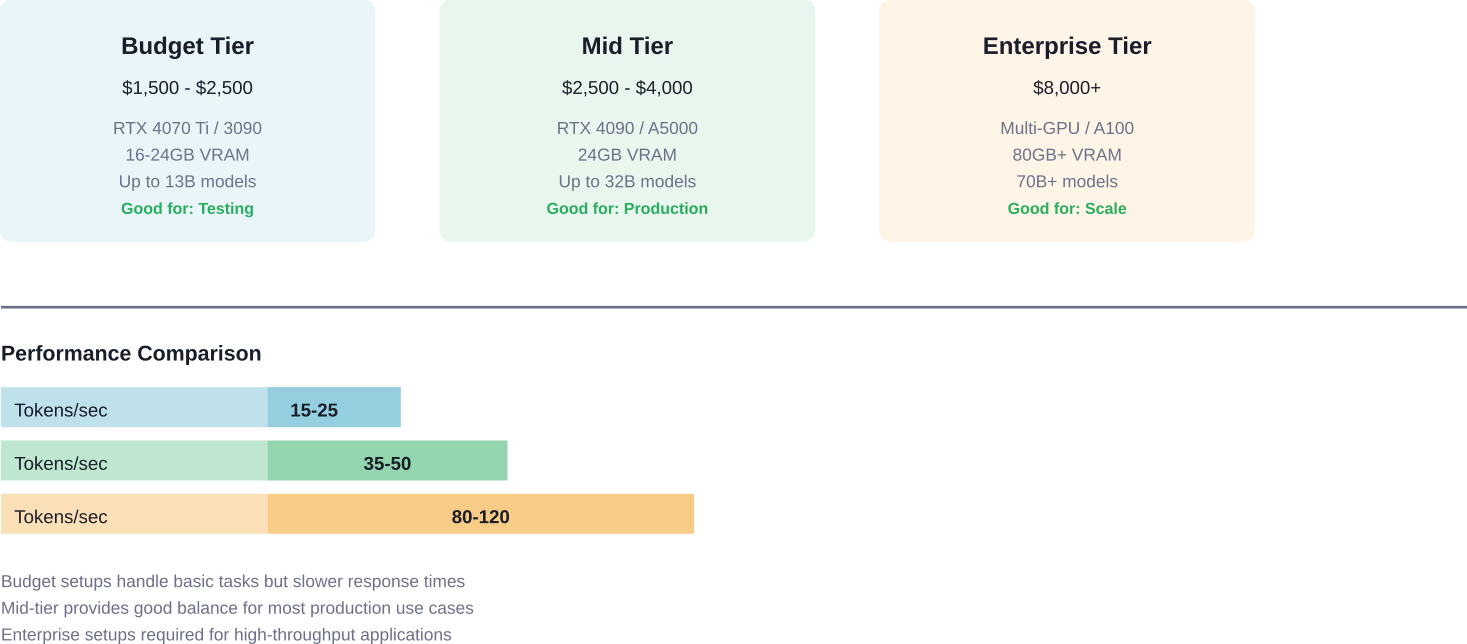
Quick Summary: Running a local LLM costs between $1,500-$4,000 upfront for capable hardware (GPU with 24GB+ VRAM), plus $50-$300 monthly for electricity and cloud hosting if needed. Self-hosted deployments break even with commercial APIs after 6-12 months for moderate usage, but require technical expertise and ongoing maintenance costs that many organizations underestimate.
The conversation around local LLM deployment has shifted dramatically. What started as a hobby for AI enthusiasts has become a serious consideration for enterprises looking to control costs and maintain data privacy.
But here’s what nobody tells you upfront: the total cost picture is way more complex than just buying a GPU.
Community discussions reveal significant gaps between initial hardware purchases and actual operational expenses. Energy costs, maintenance overhead, and opportunity costs add up fast. Some deployments pencil out beautifully. Others bleed money while delivering subpar performance.
This guide breaks down real costs from actual deployments, compares self-hosted versus cloud pricing, and identifies when local inference makes financial sense.
Understanding Local LLM Hardware Requirements
Hardware represents the biggest upfront investment for local LLM deployment. The size and capability of your model dictate minimum specifications.
Smaller models like Qwen-2.5 32B or QwQ 32B require substantial GPU memory. Community testing shows these models need approximately 24GB of VRAM to run smoothly with acceptable inference speeds. A single RTX 4090 or similar consumer GPU hits this threshold.
Larger models demand enterprise hardware. Llama-3 70B models require multiple high-end GPUs. Qwen-2.5 32B requires approximately 20-24GB VRAM for 4-bit quantization or ~64GB for full FP16. It can run effectively on a single RTX 4090 (24GB) with quantization or a single A6000/A100 (48/80GB) without needing a 4-GPU cluster. For 70B parameter models, deployments typically use p4d.24xlarge instances with 8x A100 GPUs.
However, Llama-3 70B can run on a single H100 (80GB) or two RTX 6000 Ada GPUs using 4-bit or 8-bit quantization. Standard p4d.24xlarge (8x A100) is overkill for inference of a single 70B model and is typically used for training or high-throughput serving of much larger models (e.g., 405B).
GPU Options and Pricing Tiers
The consumer GPU market offers several entry points. Mid-range cards with 16GB VRAM cost $800-$1,200 but limit you to smaller quantized models. High-end consumer cards like the RTX 4090 (24GB) run $1,500-$2,000 and handle 30B parameter models comfortably.
Professional workstation GPUs provide better value for serious deployments. Cards designed for AI workloads offer better cooling and longer operational lifespans than gaming cards pushed to 24/7 duty.
Apple Silicon presents a unique option. M-series chips use unified memory architecture, allowing the entire system RAM pool to serve model inference. An M2 Ultra with 192GB unified memory outperforms many dedicated GPU setups for certain workloads, though at premium pricing.
CPU and Memory Considerations
Running smaller LLMs on CPUs remains possible but painfully slow. Modern consumer CPUs deliver around 100 GB/s memory bandwidth through dual-channel DDR5-6400. GPUs achieve over 1.7 TB/s.
That bandwidth difference translates directly to inference speed. CPU-only inference works for occasional queries but becomes impractical for interactive applications or high-throughput scenarios.
System RAM matters too. Even with GPU acceleration, adequate system memory (32GB minimum, 64GB recommended) prevents bottlenecks during model loading and context management.
Cloud Hosting vs On-Premise Deployment Costs
Beyond buying hardware, teams face a fundamental choice: host on-premise or rent cloud GPU instances.
Cloud GPU pricing varies wildly by provider and instance type. Community reports indicate AWS g5.12xlarge instances (4x A10G GPUs) suitable for running Qwen-2.5 32B models cost approximately $50,000 per year when running 24/7. That’s before factoring in bandwidth, storage, or redundancy.
Larger model deployments get expensive fast. Running Llama-3 70B on AWS p4d.24xlarge instances (8x A100 GPUs) approaches ~$287k/year when running 24/7 continuously.
But wait. Those numbers assume constant operation.
Usage Patterns Change Everything
Most organizations don’t need 24/7 inference availability. Development teams might run models during business hours. Customer-facing applications might see traffic spikes rather than constant load.
Spot instances and auto-scaling reduce cloud costs dramatically. Teams report cutting cloud GPU expenses by 60-70% using spot instances for non-critical workloads and scaling down during low-usage periods.
On-premise hardware eliminates ongoing rental fees but introduces different trade-offs. The hardware investment pays off only after breaking even with equivalent cloud costs.
Break-Even Analysis
According to research from Carnegie Mellon analyzing on-premise LLM deployment economics, organizations with moderate usage patterns typically break even between 6-12 months when comparing upfront hardware purchases against cloud API costs.
The calculation depends heavily on usage volume. Low-volume deployments (hundreds of requests daily) favor cloud APIs. High-volume deployments (thousands of requests hourly) justify hardware purchases within months.
| Deployment Type | Upfront Cost | Monthly Cost | Break-Even Period | Best For |
|---|---|---|---|---|
| Cloud APIs | $0 | $200-$2,000+ | N/A | Variable/low usage |
| Cloud GPU Instance | $0 | $500-$5,000+ | N/A | Predictable medium usage |
| On-Premise (Budget) | $2,000 | $50-$100 | 4-8 months | Testing, development |
| On-Premise (Mid) | $3,500 | $75-$150 | 6-12 months | Production, moderate scale |
| On-Premise (Enterprise) | $15,000+ | $200-$400 | 8-18 months | High-volume, compliance needs |
Energy Costs and Power Consumption
Electricity represents the primary ongoing expense for on-premise deployments. High-end GPUs consume significant power under load.
An RTX 4090 draws significant power during intensive operation, with maximum power consumption specifications around 450 watts. Running continuously, that’s 10.8 kWh daily or 324 kWh monthly. At typical residential rates around $0.12-$0.15 per kWh in the United States, continuous RTX 4090 operation would approximate $40-$50 monthly in GPU power costs.
But that’s not the complete picture. System power includes CPU, RAM, storage, cooling fans, and power supply inefficiencies. Total system draw typically adds 30-50% to GPU-only figures.
Real talk: even in expensive energy markets, electricity costs remain manageable. A developer in Ireland, where peak rates reach $0.62 per kWh among the highest globally, reports electricity costs do not meaningfully impact operational budgets for local LLM deployments.
Inference vs Training Power Draw
Here’s where many cost projections go wrong. They confuse inference power requirements with training power requirements.
Training LLMs requires maximum GPU utilization for extended periods—days or weeks of continuous full-power operation. Inference runs at much lower sustained power draw.
During actual inference, GPUs rarely hit maximum power consumption. Typical inference workloads use 60-80% of theoretical maximum, with power draw varying by batch size and context length. Idle time between requests reduces average consumption further.
For typical development or moderate production workloads, realistic monthly electricity costs range from $50-$150 for capable hardware setups.
Cooling and Environmental Costs
Data center deployments must account for cooling infrastructure. The industry standard Power Usage Effectiveness (PUE) ratio suggests every watt consumed by computing requires an additional 0.5-0.7 watts for cooling and power distribution.
Home and small office deployments avoid dedicated cooling infrastructure but increase ambient temperature. Summer months in warm climates may require running air conditioning longer, indirectly increasing costs.
Hidden Costs and Operational Overhead
Hardware and energy represent obvious expenses. But several less-visible costs significantly impact total ownership.
Technical Expertise Requirements
Self-hosted LLM infrastructure requires ongoing technical management. Someone needs to handle model updates, dependency management, security patches, and troubleshooting.
Small teams often underestimate this overhead. Commercial cloud APIs abstract away operational complexity. Self-hosted deployments expose the entire stack.
Conservatively estimate 5-10 hours monthly for maintenance on stable deployments. Development environments require more. That’s 60-120 hours annually of skilled technical time.
Bandwidth and Storage
Model files consume substantial storage. A single 70B parameter model requires 140GB+ at full precision, around 40GB quantized. Organizations running multiple models or maintaining version history need terabytes of fast storage.
Network bandwidth affects both initial setup and ongoing operations. Downloading large models over slow connections wastes time. Serving inference results to distributed users requires adequate upload bandwidth.
Opportunity Costs
Time spent managing local infrastructure represents opportunity cost. Teams focused on infrastructure management spend less time on application development.
Cloud APIs exchange higher per-request costs for reduced operational burden. That trade-off makes sense when engineering time costs more than API fees.
Model Selection and Performance Trade-offs
Not all models cost the same to run. Model architecture, parameter count, and quantization level dramatically affect hardware requirements and inference speed.
Carnegie Mellon research on LLM deployment establishes performance parity as the threshold where models maintain benchmark scores within 20% of leading commercial alternatives. That threshold reflects real enterprise practice—modest performance gaps often get offset by cost savings, security benefits, and integration control.
Quantization Impact
Quantization reduces model precision to lower memory requirements and increase inference speed. Full precision (FP32 or FP16) provides maximum accuracy but requires more VRAM.
INT8 quantization cuts memory requirements roughly in half with minimal accuracy loss for most tasks. More aggressive quantization (INT4, INT3) reduces requirements further but introduces noticeable quality degradation.
Published research indicates quantized models like Llama3-70B-Instruct variants show comparable performance across multiple benchmarks with different quantization levels. Teams can run larger models on smaller hardware without meaningful quality compromise.
Parameter Count vs Capability
Bigger isn’t always better. Modern 7B-13B models often match or exceed older 30B-65B models on specific tasks through improved training techniques and architecture refinements.
Smaller models also deliver dramatically faster inference. A well-tuned 13B model might generate 50-80 tokens per second on mid-range hardware versus 15-25 tokens per second for a 70B model on the same system.
Task-specific fine-tuning further improves smaller model performance. Teams report 7B models fine-tuned for domain-specific applications outperforming generic 30B models while requiring one-fourth the hardware resources.
Software Stack and Deployment Tools
Multiple frameworks simplify local LLM deployment. Choosing the right tools significantly impacts both setup time and ongoing maintenance burden.
Ollama
Ollama provides the simplest entry point for local LLM deployment. Single-command installation works across Windows, macOS, and Linux. The tool handles model downloads, manages dependencies, and provides a straightforward API.
Limitations include reduced configuration flexibility and basic performance optimization. But for development environments or low-volume deployments, Ollama eliminates operational complexity.
vLLM and Advanced Inference Engines
Production deployments benefit from specialized inference engines. vLLM optimizes throughput through efficient memory management and request batching. Teams report 2-3x performance improvements over basic deployment methods.
These tools require more setup expertise. Configuration involves understanding batch sizes, context lengths, tensor parallelism, and hardware-specific optimizations. The complexity pays off for high-throughput scenarios.
Container-Based Deployment
Docker containers provide deployment consistency and simplified dependency management. Teams can package specific model versions, inference engines, and configurations into portable containers.
Container orchestration platforms like Kubernetes enable scaling across multiple nodes. But orchestration adds another layer of operational complexity suitable mainly for larger deployments.
When Self-Hosting Makes Financial Sense
Not every organization benefits from self-hosted LLMs. Several factors determine whether local deployment justifies the investment.
Usage Volume Thresholds
Commercial API pricing typically charges per token. Organizations processing millions of tokens monthly hit substantial API bills. At that volume, hardware costs amortize quickly.
Community discussions suggest the threshold sits around 50-100 million tokens monthly. Below that volume, cloud APIs often cost less than self-hosted infrastructure when accounting for all operational expenses. Above that threshold, self-hosting delivers clear savings.
Data Privacy and Compliance
Regulated industries face strict data handling requirements. Financial services, healthcare, and government organizations often cannot send sensitive data to external APIs regardless of cost.
On-premise deployment provides complete data control. Information never leaves organizational infrastructure. That capability justifies hardware investment even when per-request costs exceed cloud alternatives.
Latency Requirements
Applications requiring sub-100ms response times struggle with cloud APIs. Network round-trip time consumes a significant latency budget before inference even begins.
Local deployment eliminates network overhead. Applications can achieve single-digit millisecond overhead beyond actual inference time. Real-time applications and interactive tools benefit substantially.
Customization Needs
Teams requiring extensive model customization, fine-tuning, or experimentation benefit from local hardware. Cloud API fine-tuning services exist but impose constraints and incremental costs.
Local infrastructure enables unlimited experimentation without per-request charges. Development teams can iterate rapidly without cost concerns.
| Factor | Favors Cloud APIs | Favors Self-Hosted |
|---|---|---|
| Monthly token volume | < 50M tokens | > 100M tokens |
| Data sensitivity | Non-sensitive | Regulated/confidential |
| Latency needs | > 200ms acceptable | < 100ms required |
| Technical expertise | Limited ML ops team | Strong infrastructure team |
| Usage pattern | Highly variable | Predictable/constant |
| Customization | Standard models work | Extensive fine-tuning needed |
Environmental and Sustainability Considerations
Local LLM deployment carries environmental implications beyond direct energy costs.
Analysis from Hugging Face indicates a service queried once daily by all users globally would generate CO₂ emissions equivalent to approximately 408 gasoline-powered cars driven for one year. Even single-user scenarios accumulate substantial impact over time.
But comparing local versus cloud deployment environmental impact isn’t straightforward. Large cloud providers achieve economies of scale with optimized data centers, renewable energy procurement, and efficient cooling infrastructure.
Energy Source Matters
The carbon intensity of electricity varies dramatically by location and provider. Data centers in regions with high renewable energy penetration generate lower emissions per computation than those powered by fossil fuels.
Organizations committed to sustainability should consider local grid carbon intensity when evaluating deployment options. Some regions offer carbon-negative hosting through renewable energy sources.
Hardware Lifecycle
Manufacturing GPUs carries substantial environmental cost. Extending hardware lifespan through efficient utilization reduces per-request environmental impact.
Cloud providers amortize hardware across many customers, potentially achieving better utilization than dedicated local hardware sitting idle during off-peak hours. But local hardware eliminates redundant cooling, networking, and facility infrastructure serving single tenants.
Real-World Deployment Examples
Examining actual deployments illustrates how theory translates to practice.
Small Development Team
This example scenario illustrates potential cost dynamics: a small team using commercial APIs at ~$2,000/month could theoretically break even on a $3,200 hardware investment running Qwen-2.5 32B within several months if usage patterns remain consistent. Inference speed would improve from 300ms average with API latency to under 50ms locally.
Mid-Size SaaS Company
A customer service automation platform serving 50 clients evaluated deployment options. Usage patterns showed 80% of requests occurring during business hours with minimal overnight traffic.
Analysis favored cloud GPU instances with aggressive auto-scaling. Reserved instances for baseline load combined with spot instances for peak traffic delivered 65% cost reduction versus always-on infrastructure.
This scenario demonstrates how usage patterns and growth projections influence deployment decisions, with break-even analysis suggesting extended timeframes for certain workloads.
Enterprise Financial Services
A bank deploying internal document analysis tools faced regulatory constraints preventing external API usage. Data privacy requirements mandated on-premise deployment regardless of cost.
Enterprise deployments require substantial investment; industry discussion suggests internal deployment can range from $125K–$190K annually depending on scale and operational complexity.
Comparable cloud API usage at that processing volume would likely exceed on-premise infrastructure costs substantially.
Optimizing Costs for Local Deployments
Several strategies reduce operational expenses for teams committed to self-hosting.
Dynamic Scaling
Implement auto-shutdown during predictable low-usage periods. Development environments rarely need 24/7 availability. Automated scheduling reduces electricity costs by 40-60% for typical office hour usage patterns.
Model Tiering
Deploy multiple model sizes and route requests intelligently. Simple queries run on small, fast models. Complex reasoning tasks escalate to larger models. This approach optimizes both response time and hardware utilization.
Aggressive Quantization
Use the most aggressive quantization that meets quality requirements. INT4 quantization doubles the model size runnable on given hardware versus INT8 with minimal quality loss for many applications.
Batch Processing
Applications without real-time requirements benefit from request batching. Accumulating queries and processing in batches dramatically improves GPU utilization and reduces per-request costs.

Decide If a Local LLM Actually Saves You Money
Running a local LLM looks cheaper on paper, but costs shift into infrastructure, optimization, and ongoing maintenance. Without the right setup, hardware is underused, models are oversized, and performance drops, which offsets any savings. AI Superior works across the full cycle – from data preparation and model selection to fine-tuning and deployment – helping teams decide when local models make financial sense and how to configure them properly.
In practice, this often involves comparing local vs API setups, adjusting model size, and aligning infrastructure with real usage rather than theoretical capacity. The goal is to reach a clear break-even point, not just move costs from one place to another. If you are considering running models locally or already investing in infrastructure, it is worth reviewing your setup early. Reach out to AI Superior to assess whether your approach will actually reduce costs.
Future Cost Trends
Several factors will influence local LLM economics going forward.
GPU prices continue declining as manufacturers increase production volume and competition intensifies. GPU pricing has shown declining trends over time, with high-end cards offering 24GB+ VRAM becoming more accessible.
Model efficiency improvements reduce hardware requirements for given capability levels. Techniques like TurboSparse achieve 90% sparsity, meaning models activate only 4B parameters while maintaining performance comparable to larger dense models. Reports from PowerInfer indicate TurboSparse models achieved 90% sparsity with approximately $0.1M in sparsification investment.
Specialized AI accelerators from companies beyond traditional GPU manufacturers will likely diversify hardware options and potentially reduce costs further.
Common Pitfalls to Avoid
Organizations new to self-hosted LLM deployment frequently make predictable mistakes.
Underestimating Operational Complexity
Hardware purchase represents only the first step. Ongoing maintenance, security updates, model management, and troubleshooting require dedicated time and expertise.
Ignoring Scaling Needs
Initial hardware might handle current usage but struggle as demand grows. Planning for 2-3x usage growth within the first year prevents premature hardware obsolescence.
Overlooking Redundancy
Production deployments need backup hardware or cloud failover. Single points of failure cause complete service outages. Budget for redundancy from day one rather than retrofitting after incidents.
Focusing Solely on Hardware Specs
Raw GPU memory and compute matter less than the complete system design. Storage I/O, network bandwidth, and CPU capabilities all impact real-world performance. Balanced systems outperform those with one impressive specification and multiple bottlenecks.
Frequently Asked Questions
What’s the minimum budget for running a capable local LLM?
A functional setup starts around $1,500-2,000 for hardware capable of running smaller models (7B-13B parameters) at acceptable speeds. This includes a mid-range GPU with 16GB+ VRAM, adequate CPU, RAM, and storage. Budget setups work fine for development, testing, and low-volume personal use but struggle with larger models or production workloads.
How much does electricity actually add to monthly costs?
Electricity costs typically range from $50-150 monthly for continuous operation of mid-range to high-end GPU setups in areas with average residential rates ($0.10-0.15 per kWh). Intermittent usage reduces costs proportionally. Even in expensive energy markets, electricity represents a relatively small portion of total operational expenses compared to hardware amortization and opportunity costs.
Can I run a 70B model on consumer hardware?
Running 70B models on consumer hardware requires either multiple high-end GPUs (2-4 cards with 24GB each) or aggressive quantization with slower inference. Single consumer GPUs can technically run heavily quantized 70B models but with significant performance compromises. For practical 70B deployment, expect to invest in enterprise-grade multi-GPU setups or accept slower performance with extreme quantization.
When does self-hosting break even compared to cloud APIs?
Break-even typically occurs between 6-12 months for moderate-to-high usage scenarios. The calculation depends heavily on usage volume—processing 100+ million tokens monthly justifies hardware investment much faster than sporadic usage. Factor in all costs including electricity, maintenance time, and opportunity costs rather than just comparing hardware price against API bills.
What ongoing maintenance do local LLM deployments require?
Expect 5-10 hours monthly for stable production deployments handling software updates, security patches, model version management, monitoring, and troubleshooting. Development environments or experimental setups require more. This technical overhead represents a significant hidden cost often underestimated during initial planning.
Do I need different hardware for fine-tuning versus inference?
Fine-tuning requires significantly more GPU memory and computational power than inference. While a 24GB GPU might handle inference for a 30B model, fine-tuning that same model needs 80GB+ VRAM or extensive optimization techniques. Organizations planning fine-tuning should budget separately from inference hardware or use cloud resources specifically for training tasks.
How do Apple Silicon Macs compare to GPU-based setups for cost and performance?
Apple Silicon Macs with unified memory architecture offer unique advantages for specific workloads. An M2 Ultra with 192GB unified memory can effectively run larger models than most single-GPU systems. However, token generation speed typically lags behind dedicated GPU setups. Macs excel for development and moderate usage scenarios but struggle to match GPU throughput for high-volume production deployments.
Making Your Decision
Local LLM deployment isn’t universally better or worse than cloud APIs. The optimal choice depends on specific organizational needs, technical capabilities, usage patterns, and constraints.
Cloud APIs make sense for teams with variable usage, limited infrastructure expertise, or who prioritize minimal operational burden. The per-request cost model aligns expenses with actual usage without upfront investment.
Self-hosted deployment benefits organizations with high usage volumes, strict data privacy requirements, low-latency needs, or extensive customization requirements. Hardware investment pays off through ongoing savings and operational control.
Many organizations benefit from hybrid approaches—using cloud APIs for variable overflow capacity while running baseline loads on local hardware. This strategy provides cost optimization without sacrificing availability during unexpected demand spikes.
The most expensive mistake isn’t choosing cloud versus local. It’s failing to analyze total cost of ownership accurately before committing to either path.
Start with an honest assessment of usage patterns, technical capabilities, and actual requirements. Cloud APIs remain the sensible default for most teams until clear factors justify infrastructure investment. But when those factors align, local deployment delivers substantial long-term value.
Run the numbers for your specific scenario. Don’t rely on generic advice or assumptions. Your costs, usage patterns, and requirements determine the right answer.
 English
  German
  Arabic
  French
  Dutch
Dutch  Spanish