
Quick Summary: Cost-effective GPUs for LLM training in 2026 include NVIDIA RTX 4090 and L4 for local setups, while cloud options like H100 and emerging fractional GPU allocation offer flexible pricing. The optimal choice depends on model size, budget, and whether purchasing or renting—with breakeven points around 3,500 hours for ownership versus cloud rental. The hardware decision for LLM training now determines whether projects finish on schedule or burn through budgets before deployment. As models push past 70 billion parameters, teams face a market where a single wrong GPU choice can cost weeks of wasted compute time or thousands of dollars in overprovisioned capacity. Here’s the thing though—cost effectiveness isn’t just about the sticker price. It’s about matching workload requirements to hardware capabilities while avoiding both underpowered bottlenecks and expensive overkill.
Understanding GPU Requirements for LLM Training
Training large language models demands specific hardware characteristics that go beyond gaming or traditional ML workloads. Memory capacity sets the floor for what models can run at all. Full fine-tuning typically demands around 16GB of VRAM per billion parameters. A 7B parameter model needs roughly 67GB for complete training, while a 13B model jumps to 125GB, and 30B models require 288GB. But wait. Those numbers assume full fine-tuning. Parameter-efficient methods change the calculation entirely.
| Model Size | Full Fine-Tuning | LoRA | QLoRA (4-bit) | Inference Only |
|---|---|---|---|---|
| 7B parameters | 67GB | 15GB | 5GB | 14GB |
| 13B parameters | 125GB | 28GB | 9GB | 26GB |
| 30B parameters | 288GB | 64GB | 21GB | 60GB |
Memory bandwidth controls training speed. Despite consuming full power, GPUs during standard LLM pre-training often operate at suboptimal utilization rates of 30%-50% according to research from Mindbeam AI. The bottleneck frequently sits in how quickly the GPU can access model weights and gradients, not raw compute. Tensor cores provide another critical performance multiplier. Modern NVIDIA architectures include specialized hardware for matrix operations that transformer models rely on heavily.
Local GPU Options: When Ownership Makes Sense
Purchasing hardware makes financial sense when training workloads run continuously. Breakeven data shows that an RTX 4090 purchase only matches A100 rental costs after about 3,500 hours of active use. That’s roughly 146 days of 24/7 operation. For teams running nonstop research or regular production retraining, ownership pays off. For intermittent projects, it doesn’t.
NVIDIA RTX 4090: The Budget Workhorse
The RTX 4090 delivers 24GB VRAM at around $1,600-$1,800 per card. According to community reports, YOLOv8 training times have dropped from 38 hours to 9 hours when moving from inadequate hardware to the RTX 4090. Twenty-four gigabytes handles most 7B models with LoRA fine-tuning comfortably. QLoRA can push into 13B territory on a single card. For 30B+ models, multi-GPU setups become necessary. The 4090 lacks NVLink support, limiting multi-GPU scaling efficiency compared to datacenter cards. Bandwidth between GPUs relies on PCIe instead, which creates bottlenecks for models that don’t fit in single-GPU memory.
NVIDIA L4: The Efficiency Play
The L4 GPU targets inference primarily, but its efficiency characteristics make it relevant for certain training scenarios. With lower power consumption than flagship training GPUs, the L4 reduces operational costs in cloud deployments. Cloud providers price L4 instances considerably below A100 or H100 options. For smaller models or parameter-efficient training methods, the L4 provides adequate performance at better economics.
Multi-GPU Configurations for Large Models
Training 70B parameter models locally requires substantial GPU arrays. According to Hugging Face Forums discussion from April 2025, a 70B model requires approximately 280GB VRAM for model weights alone, with additional memory for gradients and activations. The RTX 4070 Ti SUPER has 16GB of VRAM, while the RTX 5070 Ti (Blackwell architecture) also has 16GB of GDDR7, but its MSRP is $749 (real-world price in 2026 is often higher at $900+). Additionally, building a cluster of 18 consumer GPUs (RTX series) in a single system is technically impractical due to PCIe lane, power, cooling, and motherboard limitations. The maximum realistic number in a consumer system without dedicated server-grade expanders is typically 4–8 cards. Real talk: most teams targeting 70B+ models should seriously evaluate cloud options before committing to massive local builds. 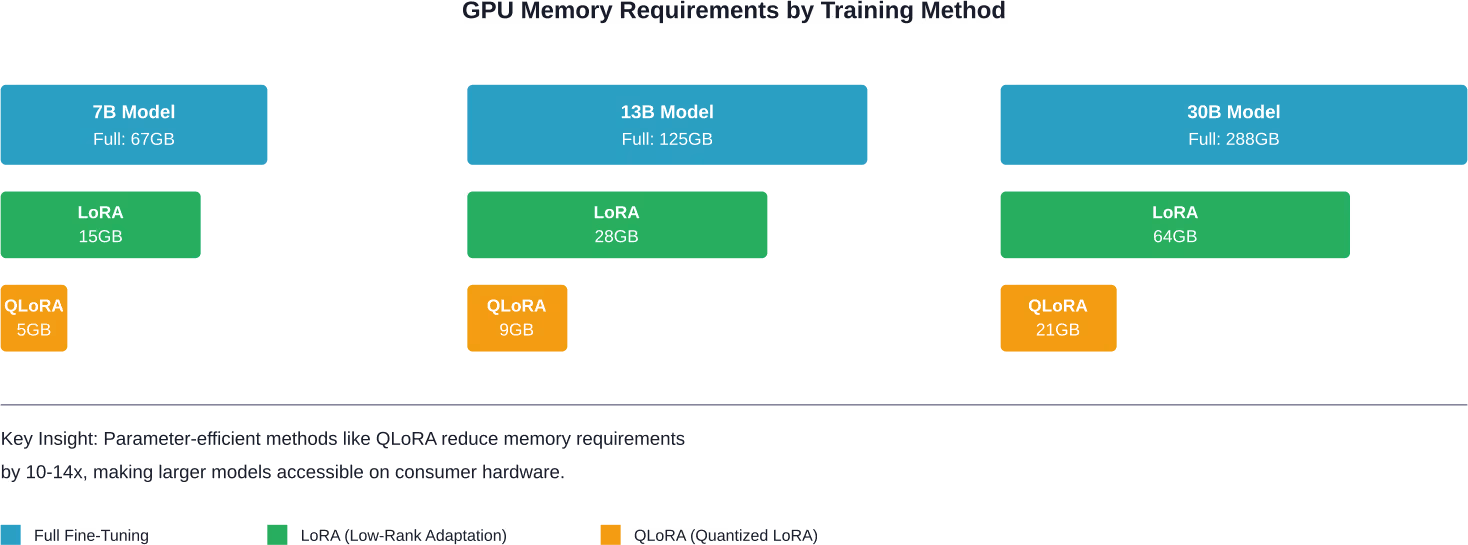
Cloud GPU Rental: Flexible Access to Datacenter Hardware
Cloud providers offer access to NVIDIA’s datacenter GPU lineup without capital expenditure. H100 and H200 GPUs deliver 80GB HBM3 memory with vastly superior bandwidth compared to consumer cards. Pricing varies considerably across providers. According to the ‘Beyond Benchmarks: The Economics of AI Inference’ paper, A800 80G baseline hourly cost is approximately $0.79/hour, generally falling within the $0.51–$0.99/hour range depending on provider and commitment.
Hyperscaler vs Specialized GPU Clouds
Major cloud platforms provide GPU instances with high availability but premium pricing. Specialized GPU cloud providers often undercut hyperscalers significantly while offering the same hardware. The tradeoff sits in ecosystem integration. Hyperscalers bundle GPUs with extensive adjacent services—managed databases, object storage, networking, identity management. Specialized providers focus purely on compute access. For teams already embedded in AWS, Azure, or GCP ecosystems, staying in-platform often makes sense despite higher GPU costs. For GPU-first workloads with minimal dependencies, specialized providers deliver better economics.
| Provider Type | Control | On-Demand Availability | Price | Best For |
|---|---|---|---|---|
| Hyperscaler | High | Medium | Premium | Enterprise integration |
| Specialized Cloud | Medium | High | Competitive | Pure GPU workloads |
| Spot/Preemptible | Low | Variable | Lowest | Fault-tolerant jobs |
H100 and H200: Current Datacenter Flagships
NVIDIA H100 GPUs represent the current standard for large-scale LLM training. With 80GB HBM3 memory and specialized tensor cores, these cards handle even massive models efficiently. The H200 extends memory to 141GB HBM3e, allowing even larger models or bigger batch sizes. For mixture-of-experts architectures like the Mistral Large 3 model with a total parameter count of 675B, as detailed in NVIDIA’s December 2025 announcement, this additional memory matters considerably. Costs typically range from $2-4 per hour depending on provider, commitment, and region. At 3,500 hours—the breakeven point for RTX 4090 ownership—H100 rental costs would total $7,000-$14,000. That pricing makes sense only when hardware needs exceed what’s economically purchasable, when workloads are intermittent, or when bleeding-edge performance justifies the premium.
Fractional GPU Allocation
Recent innovations in GPU scheduling enable multiple workloads to share single GPUs efficiently. NVIDIA Run:ai addresses this through dynamic fractional allocation that improves token throughput while reducing idle capacity. According to joint benchmarking between NVIDIA and Nebius published February 18, 2026, GPU fractioning can substantially improve resource utilization for LLM workloads, with 77% of full GPU throughput achievable using 0.5 GPU fractions. According to NVIDIA Run:ai benchmarking with Nebius (February 2026), small models like Phi-4-Mini with 3.8B parameters requiring approximately 8GB memory can effectively share GPUs with other workloads. This approach works best when running multiple smaller models or mixed inference and training workloads. For single large training runs, dedicated GPU access still provides optimal performance.
Emerging Hardware: What’s Coming
NVIDIA announced the Rubin platform on January 5, 2026, promising up to 10x reduction in inference token cost and 4x reduction in number of GPUs required for training. The platform includes sixth-generation NVLink delivering 3.6TB/s bandwidth per GPU. Blackwell GPUs, positioned between current H200 and future Rubin, deliver massive performance leaps in inference throughput. According to NVIDIA’s April 2, 2025 announcement, Blackwell optimizes for the growing compute demands of AI reasoning workloads. NVIDIA Dynamo 1.0 entered production on March 16, 2026, providing open-source software for generative and agentic inference at scale. According to NVIDIA’s announcement, Dynamo boosts Blackwell GPU inference performance by up to 7x. But here’s the catch—all this next-generation hardware will command premium pricing upon release. Early adopters pay for cutting-edge performance. Cost-conscious teams should evaluate whether current-generation GPUs meet requirements before chasing the newest silicon.
Optimization Strategies That Reduce GPU Requirements
Hardware selection is only half the equation. Training methodology determines actual resource consumption.
Parameter-Efficient Fine-Tuning
LoRA and QLoRA techniques reduce memory requirements by 4-14x compared to full fine-tuning. Instead of updating all model weights, these methods train small adapter layers while keeping the base model frozen. A 13B model requiring 125GB for full fine-tuning drops to just 9GB with 4-bit QLoRA. That’s the difference between needing eight GPUs versus one. Performance tradeoffs exist—parameter-efficient methods don’t always match full fine-tuning quality. But for many applications, the difference is negligible compared to the cost savings.
Gradient Checkpointing and Mixed Precision
Gradient checkpointing trades computation for memory by recomputing intermediate activations during backpropagation instead of storing them. This roughly halves memory requirements at the cost of 20-30% longer training time. Mixed precision training uses 16-bit floats for most operations while keeping critical calculations in 32-bit. Modern tensor cores accelerate 16-bit operations, often making mixed precision both faster and more memory-efficient than pure 32-bit training.
Tensor Offloading and GPUDirect Storage
Research published June 6, 2025, on arXiv introduced TERAIO, a cost-efficient LLM training approach using lifetime-aware tensor offloading via GPUDirect Storage. According to TERAIO research, the active tensors take only a small fraction (1.7% on average) of allocated GPU memory in each LLM training iteration. The system allows direct tensor migration between GPUs and SSDs, alleviating CPU bottlenecks and maximizing SSD bandwidth utilization. This architecture enables training larger models on fewer GPUs by intelligently swapping tensors between GPU memory and fast NVMe storage. The performance penalty from storage access is minimized through predictive prefetching.
Cost Calculation Framework
Determining actual cost effectiveness requires calculating total cost of ownership, not just sticker prices. 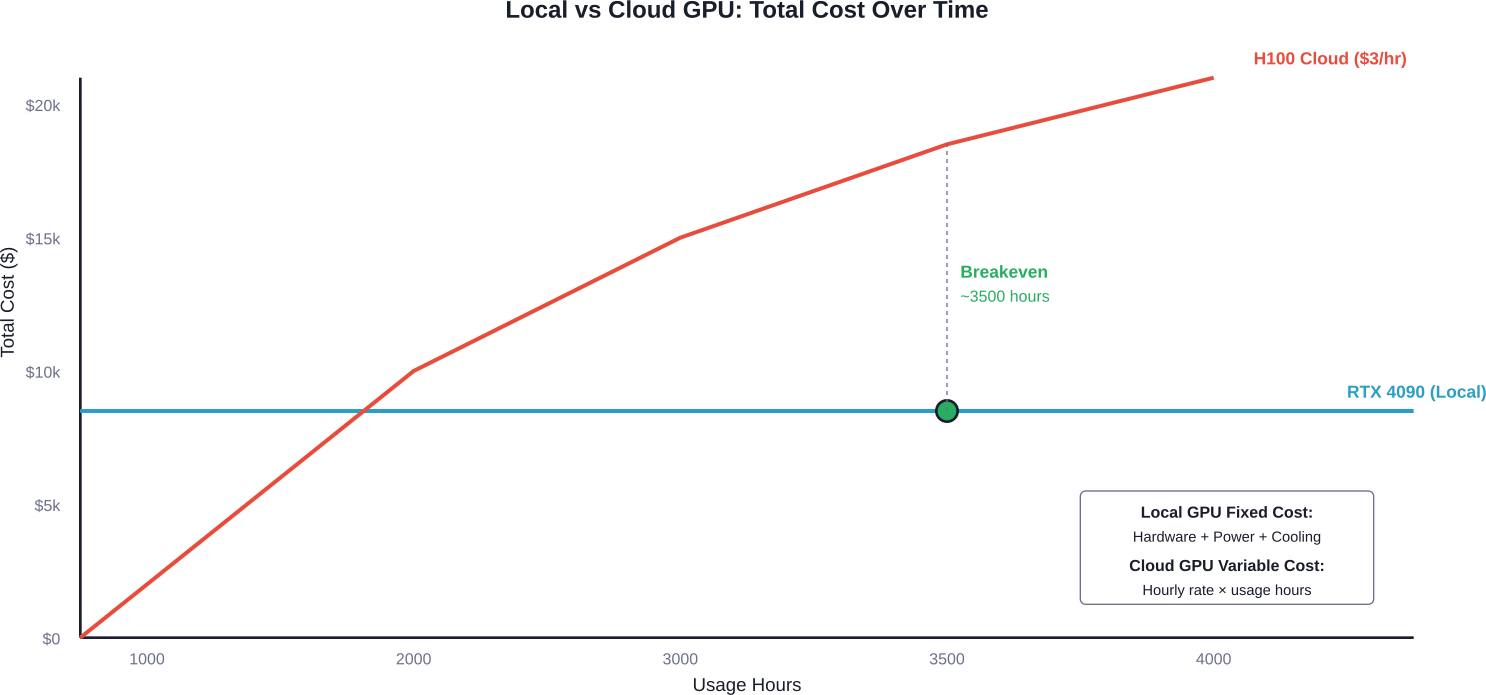
Local GPU TCO Components
Hardware purchase price represents the obvious cost, but operational expenses add up:
- Power consumption: The RTX 4090 is rated at approximately 450W under full load. At typical U.S. electricity rates around $0.12/kWh, continuous operation would cost approximately $0.05 per hour or $438 per year.
- Cooling requirements: High-performance GPUs generate substantial heat requiring adequate airflow or liquid cooling.
- Support infrastructure: Motherboard, CPU, RAM, storage, power supply, case.
- Maintenance and potential replacement: Consumer GPUs lack enterprise warranties and fail eventually.
A complete system built around an RTX 4090 typically costs $3,000-$4,000 all-in. Amortized over three years with power costs, that’s roughly $1,500 annually plus electricity.
Cloud GPU TCO Components
Cloud billing appears simple—hourly rate times usage hours. Hidden costs emerge in:
- Data transfer: Moving training datasets and model checkpoints in/out of cloud storage.
- Storage costs: Persistent disks for datasets and intermediate outputs.
- Idle time: Forgetting to shut down instances after training completes.
- Network egress: Downloading trained models for deployment elsewhere.
Budget an additional 10-20% beyond base GPU hourly costs for these ancillary expenses.
Decision Framework: Local, Cloud, or Hybrid
The optimal strategy depends on usage patterns and scale requirements. Choose local GPUs when:
- Training runs continuously (over 3,500 hours annually)
- Model sizes fit comfortably within consumer GPU memory constraints
- Data residency or security requirements prevent cloud usage
- Budget exists for upfront capital expenditure
Choose cloud GPUs when:
- Training is intermittent or experimental
- Model sizes exceed practical local configurations
- Peak demand varies significantly over time
- Access to latest hardware matters more than long-term economics
Hybrid approaches make sense for many teams. Develop and test on local hardware, then scale to cloud resources for full training runs. This maximizes utilization of owned hardware while accessing datacenter GPUs only when necessary.
GPU Sharing and Multi-Tenant Deployments
Research published May 6, 2025, on arXiv introduced Prism, a system for GPU sharing in multi-LLM serving. According to arXiv paper 2505.04021 (May 2025), Prism achieves more than 2x cost savings and 3.3x SLO attainment compared to state-of-the-art multi-LLM serving systems. While focused on inference rather than training, the principles apply. Multiple small training jobs can share GPU resources more efficiently than dedicating entire GPUs to each workload. Kubernetes-based GPU scheduling, combined with tools like NVIDIA’s device plugin, enables fractional GPU allocation in self-hosted environments. This maximizes utilization when running diverse workloads across a shared GPU pool.
Regional and Decentralized Training
Decentralized training frameworks enable LLM pretraining across geographically distributed GPUs. According to SPES research presented at ICLR 2026, researchers successfully trained MoE LLMs using decentralized GPU configurations with reduced memory footprints per node. This paradigm extends accessible LLM training to organizations with distributed compute resources rather than centralized clusters. Cost effectiveness emerges from utilizing existing hardware across multiple sites rather than purchasing dedicated training infrastructure.
Practical Recommendations by Budget Tier
Now, this is where it gets practical. What should teams actually purchase or rent?
Entry Budget ($0-$3,000)
Focus on cloud spot instances or consumer GPUs with 16-24GB VRAM. RTX 4060 Ti (16GB) offers the minimum viable option for 7B model experimentation with QLoRA. Cloud spot instances for NVIDIA T4 GPUs with small configurations are priced at $0.40/hour according to Hugging Face GPU Spaces pricing. This enables 7,500 hours of training time before matching a $3,000 local build—more than enough for initial research.
Mid Budget ($3,000-$10,000)
RTX 4090 systems deliver the best balance of capability and value. A properly configured dual-4090 system handles most 13B training scenarios and smaller 30B models with parameter-efficient methods. Alternatively, commit that budget to H100 cloud credits. At $3/hour, $10,000 provides approximately 3,333 hours—sufficient for substantial research projects without ownership obligations.
Production Budget ($10,000+)
Serious production workloads justify datacenter hardware. Multiple A100 or H100 GPUs in cloud deployments with reserved instance pricing deliver predictable costs and performance. For organizations with sustained training needs, on-premises A100 or L40S clusters become cost-effective despite higher upfront investment. Enterprise support and long-term economics favor ownership at scale.
Common Pitfalls to Avoid
Several mistakes consistently waste budget and time:
- Over-provisioning memory: Purchasing 80GB GPUs for 7B model training wastes money. Match hardware to actual requirements, not theoretical maximums.
- Ignoring bandwidth: PCIe lanes and NVLink connectivity matter for multi-GPU training. Consumer motherboards often lack adequate bandwidth to support more than 2-3 high-end GPUs effectively.
- Forgetting cooling: Multiple high-performance GPUs in a single chassis require substantial airflow. Thermal throttling kills performance and creates reliability issues.
- Mixing incompatible hardware: Not all GPUs support NVLink, PCIe versions matter for bandwidth, and power supplies must provide adequate clean power on appropriate rails.
- Neglecting software optimization: The cheapest performance improvement comes from better code, not better hardware. Profile workloads before throwing money at GPUs.

Don’t Overpay for GPUs, Fix the Training Setup First
GPU costs usually reflect deeper choices – what you train, how you train it, and whether the workload is actually justified. AI Superior works on building and training LLMs with a focus on efficiency at each stage. That includes deciding when full training is needed versus fine-tuning, structuring datasets so they are usable without excess volume, and setting up training runs that do not waste cycles. The goal is to avoid defaulting to large-scale compute when a smaller, better-aligned setup would deliver the same outcome. A lot of GPU spend comes from running processes that were never properly scoped – repeated experiments, oversized models, or training pipelines that are not adjusted over time. Reducing that requires changes in how the system is planned, not just what hardware is used. If you want to bring GPU costs under control before they compound, contact AI Superior and look at how your training workflow is defined.
Future-Proofing Considerations
GPU architectures evolve rapidly. Hardware purchased today will be outperformed by next generation releases within 12-18 months. But does that actually matter? For production workloads, stable platforms with proven software support often deliver better ROI than bleeding-edge hardware with immature tooling. Cloud rental provides natural protection against obsolescence. Upgrade to new hardware by changing instance types rather than replacing owned equipment. For local builds, focus on platforms with good resale value. NVIDIA consumer GPUs maintain secondary market demand. Datacenter cards retain value longer but have less liquid markets.
FAQ
What GPU do I need to train a 7B parameter LLM?
For full fine-tuning, approximately 67GB VRAM across one or more GPUs. With LoRA, a single 24GB GPU like the RTX 4090 works. QLoRA reduces requirements to just 5GB, making even entry-level GPUs viable.
Is it cheaper to buy a GPU or rent from the cloud?
Local GPU ownership becomes cheaper after roughly 3,500 hours of use compared to cloud rental. For intermittent training or projects under 150 days of continuous compute, cloud rental costs less. For sustained workloads, ownership wins.
How much does H100 cloud GPU rental cost?
Pricing ranges from $2-4 per hour depending on provider, region, and commitment level. Spot instances and reserved pricing can reduce costs, while on-demand access carries premium rates.
Can I train LLMs on consumer GPUs like RTX 4090?
Absolutely. The RTX 4090 with 24GB VRAM handles 7B models comfortably and 13B models with parameter-efficient techniques. Multiple 4090s in parallel can train even larger models, though datacenter GPUs provide better multi-GPU scaling.
What’s the difference between A100 and H100 GPUs?
H100 offers 80GB HBM3 memory versus A100’s 80GB HBM2e, providing higher bandwidth. H100 includes fourth-generation tensor cores with improved performance for transformer operations. For LLM training, H100 typically delivers superior performance compared to A100.
Do I need NVLink for multi-GPU training?
NVLink significantly improves multi-GPU efficiency for large models that don’t fit in single-GPU memory. For models that fit entirely within one GPU using data parallelism, PCIe bandwidth suffices. Training 30B+ models benefits substantially from NVLink connectivity.
What is the most cost-effective GPU architecture for LLMs in 2026?
For local builds, RTX 4090 delivers the best performance per dollar. For cloud workloads, NVIDIA L4 provides efficiency for smaller models, while H100 delivers optimal performance for large-scale training. The “most cost-effective” option depends on workload size and usage patterns rather than any single architecture.
Conclusion
Cost-effective GPU selection for LLM training balances purchase versus rental economics, memory requirements against model size, and performance needs against budget constraints. For teams just starting LLM development, cloud GPU rental provides flexibility without capital commitment. Experiment with different model sizes and training approaches before investing in hardware. Organizations with sustained training workloads should evaluate local GPU builds seriously. After 3,500 hours, ownership economics beat rental costs decisively. The most important insight? Hardware optimization and training methodology improvements often deliver bigger performance gains than simply buying more expensive GPUs. Start with efficient code and appropriate techniques, then scale hardware to match actual bottlenecks. Check current pricing from GPU cloud providers and hardware vendors before making final decisions—this market moves quickly and costs fluctuate monthly.