Quick Summary: Image recognition is a branch of computer vision that enables computers to identify and classify objects, people, places, and actions in digital images using machine learning algorithms. Beginners can start by understanding convolutional neural networks (CNNs), which process images through layers to detect patterns and features, then progress to hands-on projects using frameworks like TensorFlow with datasets such as CIFAR-10 or EMNIST. Image recognition has become one of those technologies everyone talks about but few truly understand. It’s everywhere—from unlocking your phone with your face to organizing thousands of photos automatically. But how does a machine actually “see” and identify what’s in an image? This guide breaks down image recognition from the ground up. No confusing jargon, no assumed knowledge. Just the essentials that’ll get beginners from zero to building their first working model.
What Is Image Recognition?
Image recognition is the ability of computers to identify objects, places, people, writing, and actions in digital images. This technology relies on artificial intelligence, specifically machine learning algorithms, which are trained using vast amounts of labeled images. Once trained, these algorithms can recognize various patterns and features within new, unseen images. The process mirrors human visual perception—but instead of neurons in a brain, it uses mathematical operations in a neural network. Here’s the thing though—image recognition isn’t just one task. It encompasses several related capabilities:
- Image classification: Determining what an image contains (“this is a cat”)
- Object detection: Locating where objects appear in an image
- Facial recognition: Identifying specific individuals from facial features
- Scene understanding: Recognizing environments and contexts
How Image Recognition Works: The Basics
Understanding how machines process images starts with knowing how they “see” pictures. Unlike humans who perceive images as cohesive visual scenes, computers see arrays of numbers—pixel values representing colors and intensities. A typical color image consists of three channels (red, green, blue), with each pixel holding a value between 0 and 255 for each channel. A 32×32 pixel image—like those in the CIFAR-10 dataset, which holds 60,000 images in 10 categories—contains 3,072 individual numbers (32 × 32 × 3). The recognition process follows a systematic pipeline. Raw images enter the system, undergo preprocessing (resizing, normalization), pass through feature extraction layers that identify meaningful patterns, and finally reach classification layers that output predictions. 
Create Computer Vision Software With AI Superior
AI Superior builds AI-based applications and custom software products using machine learning and AI models. Their team supports projects from early discovery and data review to MVP development, integration, and result evaluation. For beginners, this can be useful when an image recognition idea needs to be checked, scoped, and turned into a practical first version instead of staying theoretical.
Need Help Turning an AI Idea Into Software?
AI Superior can help with:
- reviewing your image recognition use case
- building a PoC or MVP
- creating custom AI models
- connecting the solution with existing tools
👉 Contact AI Superior to discuss your project.
Convolutional Neural Networks: The Engine Behind Recognition
Convolutional neural networks form the backbone of modern image recognition. These specialized deep learning architectures are designed specifically to process grid-like data—images being the perfect example. According to Stanford’s CS231n course on Deep Learning for Computer Vision, CNNs transform input images through a series of functions into class probabilities. The transformed representations can be loosely thought of as activations of neurons along the way, with the network learning hierarchical features automatically from data.
Core Components of a CNN
CNNs contain several distinct layer types, each serving a specific purpose:
| Layer Type | Function | What It Does |
|---|---|---|
| Convolutional | Feature Detection | Applies filters to detect edges, textures, patterns |
| Pooling | Dimensionality Reduction | Downsamples feature maps, retains important information |
| Activation (ReLU) | Non-linearity | Enables network to learn complex patterns |
| Fully Connected | Classification | Combines features to make final predictions |
The convolutional layer is where the magic happens. Small filters (typically 3×3 or 5×5) slide across the image, computing dot products with the underlying pixels. Each filter learns to detect specific features—one might respond to horizontal edges, another to circular shapes, and so on. As noted in MIT’s Foundations of Computer Vision by Antonio Torralba, Phillip Isola, and William Freeman, these networks build reader intuition through hierarchical feature learning, where early layers detect simple edges and later layers combine those into complex object representations.
Why CNNs Excel at Image Tasks
Traditional neural networks struggle with images because they treat every pixel independently. A standard network processing a 224×224 color image would need over 150,000 input connections per neuron in the first layer—computationally absurd and prone to overfitting. CNNs solve this through three key principles:
- Local connectivity: Each neuron connects only to a small region of the input
- Parameter sharing: The same filter applies across the entire image
- Translation invariance: Features detected anywhere in the image are recognized equally
These properties make CNNs incredibly efficient for visual recognition tasks. The network learns “cat-ness” rather than memorizing that cats appear in specific image locations.
Building Your First Image Recognition Model
Theory is one thing, but actually building a model cements the concepts. TensorFlow, launched by Google in 2015, has made image classification tasks more accessible to beginners. As of 2026, PyTorch has become the primary recommendation for beginners and researchers alike due to its superior ecosystem and integration with modern transformer architectures. A typical beginner project follows this structure: 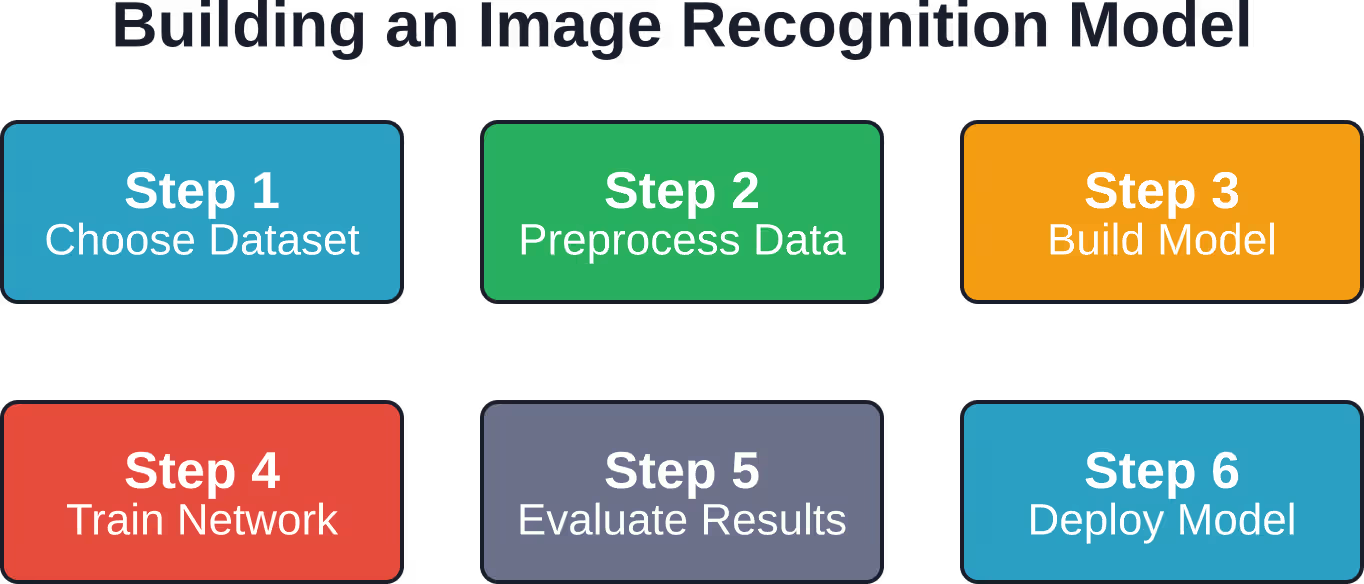
Choosing Your Dataset
Starting with the right dataset makes all the difference. Beginners should look for datasets that are:
- Properly labeled with ground truth annotations
- Balanced across classes (roughly equal examples per category)
- Appropriately sized (not too large to overwhelm, not too small to learn from)
- Relevant to the task at hand
Popular beginner-friendly datasets include CIFAR-10 (60,000 32×32 images in 10 object categories) and the EMNIST dataset from NIST—a set of handwritten character digits (published April 4, 2017) that extends the classic MNIST dataset.
Data Preprocessing Essentials
Raw images rarely feed directly into models. Preprocessing steps standardize inputs and improve training:
- Resizing: Normalize all images to consistent dimensions
- Normalization: Scale pixel values to a standard range (typically 0-1 or -1 to 1)
- Augmentation: Generate variations through rotation, flipping, cropping to increase dataset size
- Train-test split: Reserve 20-30% of data for validation
Real talk: skipping preprocessing is the fastest way to tank model performance. Clean, consistent data leads to faster convergence and better accuracy.
Model Architecture for Beginners
A simple but effective CNN for image classification might include:
- Input layer accepting normalized images
- Two convolutional layers (32 and 64 filters) with ReLU activation
- Max pooling layers after each convolution to reduce spatial dimensions
- Flatten layer to convert 2D feature maps to 1D vectors
- Dense layer with dropout for regularization
- Output layer with softmax activation for class probabilities
This architecture balances learning capacity with computational efficiency—perfect for beginners working on standard laptops.
Training and Evaluating Your Model
Training a neural network means adjusting millions of parameters until the model accurately predicts labels from image inputs. The process iteratively presents training examples, calculates prediction errors, and updates weights to minimize those errors. According to Stanford’s CS231n course, assignments comprise 45% of course grading, with a midterm exam and final project components—reflecting the hands-on nature of learning computer vision through implementation.
Key Training Concepts
- Epochs and batch size: An epoch is one complete pass through the training dataset. Models typically train for 10-100 epochs. Batch size determines how many images process together before weight updates—common values range from 16 to 128.
- Loss functions: These measure prediction errors. Categorical cross-entropy is standard for multi-class image classification, comparing predicted probability distributions against true labels.
- Optimizers: Algorithms that adjust network weights. Adam optimizer combines the benefits of two other extensions of stochastic gradient descent and works well out-of-the-box for most tasks.
- Learning rate: Controls how drastically weights change during training. Too high and the model never converges; too low and training takes forever. Typical starting values range from 0.001 to 0.0001.
Evaluation Metrics That Matter
Accuracy alone doesn’t tell the full story. Consider these metrics:
| Metric | What It Measures | When to Use It |
|---|---|---|
| Accuracy | Percentage of correct predictions | Balanced datasets with equal class importance |
| Precision | Correct positive predictions / all positive predictions | When false positives are costly |
| Recall | Correct positive predictions / all actual positives | When false negatives are costly |
| F1 Score | Harmonic mean of precision and recall | Imbalanced datasets requiring balance |
Medical imaging applications prioritize recall—missing a disease (false negative) is far worse than a false alarm. Security systems might prioritize precision to reduce false alarms.
Common Challenges and How to Overcome Them
Image recognition isn’t always smooth sailing. According to Stanford’s tutorial on image recognition, many obstacles stand in the way, such as viewpoint variation, different lighting conditions, occlusions, and background clutter.
Overfitting: The Silent Killer
Overfitting happens when models memorize training data rather than learning general patterns. The network performs brilliantly on training images but fails catastrophically on new ones. Solutions include:
- Data augmentation: Artificially expand datasets through transformations
- Dropout layers: Randomly disable neurons during training to prevent co-adaptation
- Early stopping: Halt training when validation performance stops improving
- Regularization: Add penalties for complex models to favor simpler solutions
Insufficient Training Data
Deep learning models are data-hungry. With too few examples, networks can’t learn robust features. But there’s a workaround that’s become incredibly popular: transfer learning. Transfer learning leverages models pre-trained on massive datasets (ImageNet contains 14 million images). These pre-trained networks already understand edges, textures, and object parts. Fine-tuning the final layers for a specific task requires far less data than training from scratch.
Computational Limitations
Training deep networks demands significant computational resources. GPUs accelerate the matrix operations that dominate neural network calculations, reducing training time from weeks to hours. Cloud platforms now offer GPU access without purchasing expensive hardware. Google Colab provides free GPU runtime, making experimentation accessible to anyone with an internet connection.
Real-World Applications of Image Recognition
Image recognition has moved far beyond laboratory demonstrations into practical applications across industries. According to NIST’s ongoing face recognition challenges in cooperation with IARPA, these programs drive research and development into face detection, verification, identification, and identity clustering. 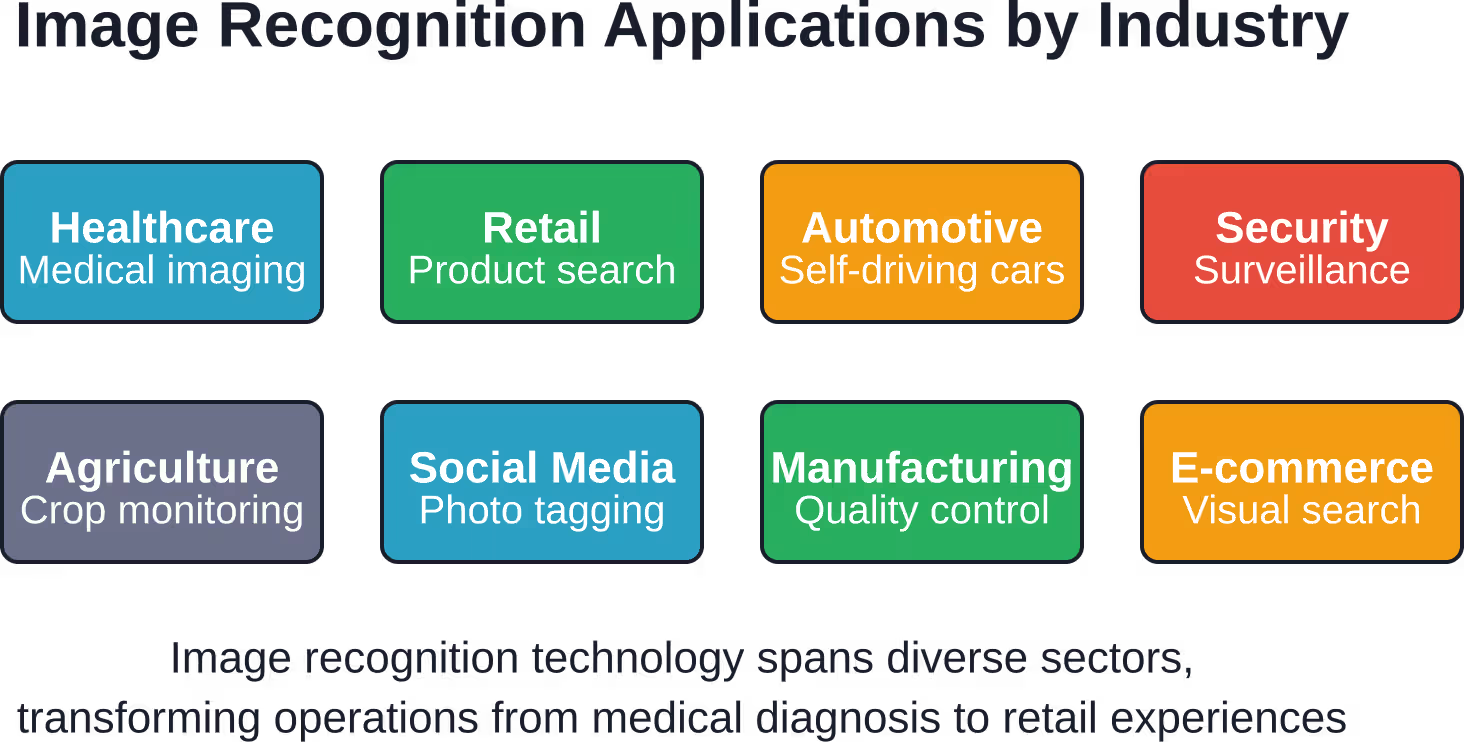
Medical Imaging and Diagnostics
Image recognition plays a critical role in medical imaging, aiding in identifying health issues. Neural networks now detect tumors in X-rays, classify skin lesions as benign or malignant, and identify diabetic retinopathy from retinal scans—often matching or exceeding human expert performance.
Autonomous Vehicles
Self-driving cars rely heavily on computer vision. Multiple cameras capture the vehicle’s surroundings, while recognition systems identify pedestrians, other vehicles, traffic signs, lane markings, and obstacles. Recent research continues breaking records in image recognition ability for autonomous navigation.
Retail and E-commerce
Google image search exemplifies recognition technology at scale. Visual search enables customers to photograph products and find similar items instantly. Automated checkout systems identify items without scanning, while inventory management uses recognition to track stock levels.
Security and Surveillance
Facial recognition systems verify identities at borders, unlock devices, and monitor secure facilities. Object detection identifies suspicious items or behaviors in surveillance footage, alerting security personnel to potential threats.
Getting Started: Resources for Beginners
Learning image recognition requires both theoretical understanding and practical implementation. The path forward depends on current skill level and learning preferences.
Online Courses and Tutorials
Stanford’s CS231n: Deep Learning for Computer Vision remains the gold standard for comprehensive computer vision education. The course covers convolutional neural networks in depth, requiring prerequisites of proficiency in Python and familiarity with basic probability concepts like Gaussian distributions, mean, and standard deviation. MIT’s Foundations of Computer Vision book by Antonio Torralba, Phillip Isola, and William Freeman provides foundational topics with an image processing and machine learning perspective, including extensive visualizations to build intuition.
Practical Tools and Frameworks
TensorFlow and PyTorch dominate deep learning frameworks. Both offer high-level APIs that abstract complexity while remaining flexible enough for custom architectures. TensorFlow’s Keras API is particularly beginner-friendly. Cloud-based notebooks eliminate setup headaches. Google Colab and Kaggle Kernels provide free computing resources with pre-installed libraries, allowing immediate experimentation without local configuration.
Community and Support
Community discussions and user experiences on platforms like Reddit’s r/tensorflow and r/MachineLearning provide troubleshooting help, project ideas, and moral support. Stack Overflow remains invaluable for debugging specific technical issues. Kaggle competitions offer structured challenges with real datasets, leaderboards for motivation, and kernels showing how top performers approached problems—excellent learning through observation and iteration.
Frequently Asked Questions
What’s the difference between image recognition and object detection?
Image recognition classifies entire images into categories (“this image contains a dog”), while object detection locates where objects appear within images, typically drawing bounding boxes around each instance. Object detection is more complex because it must answer both “what” and “where” for multiple objects simultaneously.
How much math do I need to know before starting image recognition?
Basic linear algebra (matrices, vectors, dot products), calculus (derivatives, gradients), and probability (distributions, expectations) provide the foundation. That said, many beginners start with high-level frameworks and pick up mathematical concepts gradually through practical application. Understanding improves with experience.
Can I build image recognition models without expensive hardware?
Absolutely. Cloud platforms like Google Colab offer free GPU access sufficient for learning and small projects. Transfer learning reduces computational requirements dramatically by starting with pre-trained models. Modern laptops can handle inference (using trained models) even if training from scratch proves slow.
What’s transfer learning and why does everyone recommend it?
Transfer learning uses models pre-trained on massive datasets as starting points for new tasks. Instead of training from scratch, practitioners fine-tune existing models for specific applications. This approach requires less data, trains faster, and often achieves better performance—particularly when working with limited datasets.
How accurate can image recognition models become?
Accuracy depends heavily on the task, dataset quality, and model architecture. On well-defined problems with clean data, modern CNNs exceed 95% accuracy. Complex real-world scenarios with varied lighting, occlusions, and diverse viewpoints typically achieve 70-90% accuracy. Some specialized tasks like medical imaging achieve performance matching human experts.
What programming language should I learn for image recognition?
Python dominates machine learning and computer vision. All major frameworks (TensorFlow, PyTorch, scikit-learn) have excellent Python support. The language’s readability and extensive library ecosystem make it ideal for beginners. Other languages exist for specific use cases, but Python provides the smoothest entry point.
How long does it take to train an image recognition model?
Training time varies enormously based on dataset size, model complexity, and available hardware. Simple models on small datasets might train in minutes on a laptop. Large-scale models on massive datasets can require days or weeks on GPU clusters. For beginners, expect initial experiments to take 10-60 minutes using cloud GPUs and standard datasets.
Moving Forward with Image Recognition
Image recognition technology continues evolving rapidly, with new architectures, training techniques, and applications emerging constantly. The fundamentals covered here—understanding how computers process images, how CNNs extract features, and how to train models systematically—remain constant even as specific implementations advance. Beginners benefit most from hands-on experimentation. Reading tutorials builds knowledge, but implementing models cements understanding. Start with simple projects using existing datasets. Gradually increase complexity as confidence grows. The barriers to entry have never been lower. Free tools, abundant educational resources, and supportive communities make this the ideal time to dive into computer vision. But knowledge without action remains theoretical. Pick a project that genuinely interests you—whether classifying flowers, detecting faces, or recognizing handwritten digits. Download a dataset. Write the code. Train a model. Watch it learn. That first moment when a neural network correctly classifies an image it’s never seen before is genuinely magical. Ready to transform from passive learner to active practitioner? The tools are free, the resources are plentiful, and the community is welcoming. Your first image recognition model awaits.