Quick Summary: Image recognition technology for blind individuals uses AI-powered systems to identify objects, read text, and describe surroundings through audio feedback. According to World Health Organization (WHO) data, at least 2.2 billion people globally live with near or distance vision impairment, with at least 1 billion of these cases preventable or yet to be addressed. The American Foundation for the Blind estimates more than 25 million people in the United States living with vision loss, while research indicates about 0.5% of the global population is affected by severe visual impairment and blindness. Modern applications like Seeing AI, Be My Eyes, and Envision leverage machine learning to achieve accuracy rates between 50-95% for object recognition, though users tolerate error rates up to 40% before switching methods. Visual information shapes how most people navigate the world. But what happens when that channel closes? Computer vision technology has transformed assistive tools for blind and visually impaired individuals. These systems convert visual data into audio descriptions, opening access to everything from product labels to facial expressions. The technology isn’t perfect. Research on object recognition systems shows accuracy varies by object type and conditions, with performance ranging across different categories. Yet according to authoritative research, users will tolerate recognition error rates up to 40% before abandoning the tool entirely. That tolerance threshold matters because it defines what makes assistive technology actually useful versus technically impressive.
How Image Recognition Works for Visual Assistance
These systems combine three core components: image capture, processing algorithms, and audio output. A camera (often a smartphone or wearable device) captures the visual scene. Machine learning models analyze the image, identifying objects, text, or people. The system then converts findings into synthesized speech or haptic feedback. Most modern applications use convolutional neural networks trained on millions of labeled images. This training allows algorithms to recognize common objects even under varying lighting conditions or angles. But here’s the thing—recognition accuracy depends heavily on what’s being identified. Research on SURF-based recognition algorithms reported varying accuracy across object categories. The gap between benchmark performance and practical usability remains the central challenge. Lab conditions don’t replicate cluttered kitchens or dimly lit stores. 
Turn Visual Data Into AI Software With AI Superior
AI Superior helps companies turn image recognition ideas into working software. Their computer vision work can cover image analysis, object detection, image segmentation, OCR, and classification, depending on the project needs. For accessibility tools for blind users, this can support object recognition, scene understanding, text reading, or other visual assistance features built into an app or connected device.
Need Image Recognition for Accessibility?
AI Superior can help with:
- building custom computer vision tools
- detecting and describing objects in images
- testing ideas through PoC or MVP development
- integrating AI into apps or devices
👉 Contact AI Superior to discuss your project.
Leading Applications Transforming Daily Independence
Several platforms have emerged as front-runners in this space.
Seeing AI
Microsoft’s free application narrates the world through a smartphone camera. It handles short text, documents, products via barcodes, people recognition, scenes, colors, and currency. The app processes most recognition tasks on-device, which means faster response times and no internet dependency for core features.
Be My Eyes
This platform takes a different approach—connecting users with sighted volunteers through live video calls. When AI can’t solve a problem, human intelligence steps in. The service combines automated image recognition with human assistance, creating a fallback system when technology hits its limits.
Envision AI
Envision offers both mobile and smart glasses implementations. The technology articulates visual information into speech, covering text reading, scene description, object detection, and color identification. Smart glasses versions allow hands-free operation—particularly valuable when navigating or multitasking.
Lookout by Google
Google’s entry focuses on three primary modes: Explore (for understanding surroundings), Shopping (for product identification), and Quick Read (for text capture). The application integrates with Google Assistant, enabling voice-commanded scanning and identification workflows. 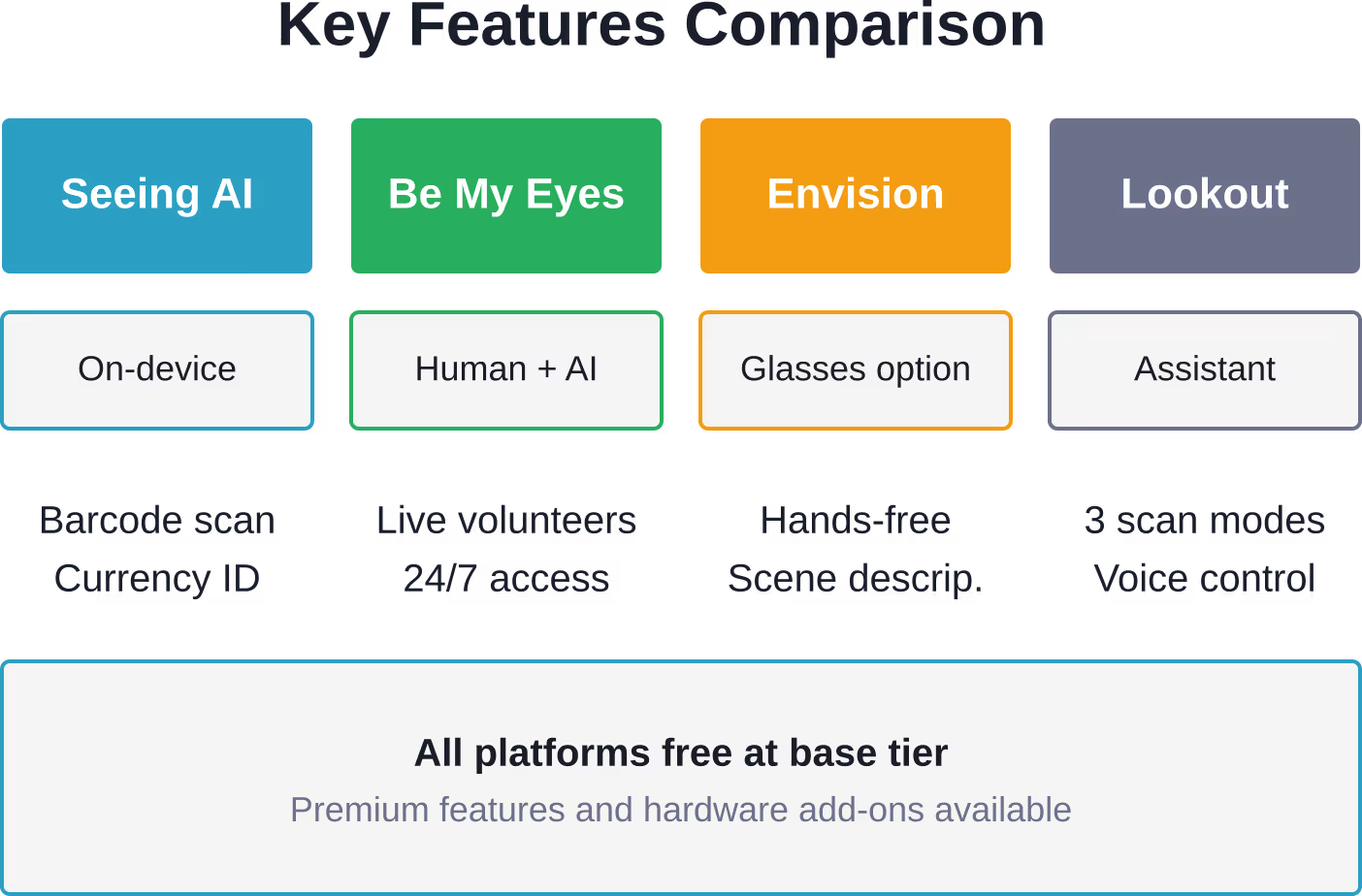
Advanced Research and Emerging Accuracy Benchmarks
Recent research on object detection models has reported high accuracy rates on controlled datasets—a significant leap over earlier systems. However, controlled datasets don’t capture real-world variables. Lighting shifts, partial occlusions, unusual angles, and cluttered backgrounds all degrade performance. That’s why user tolerance for errors becomes the practical success metric. Research on user behavior found that blind users develop sophisticated strategies for handling recognition failures. They cross-reference results with other senses. They reframe objects or adjust lighting. They learn which object categories the system handles reliably and avoid it for others.
Hardware Options Beyond Smartphones
While most users rely on smartphone cameras, dedicated hardware expands possibilities. Smart glasses from Ray-Ban Meta and Envision mount cameras at eye level, enabling natural gaze-directed scanning. This hands-free operation matters when carrying items or using a white cane. Mobility challenges and head-level obstacles are common concerns for blind individuals using traditional mobility aids. Wearable cameras can detect obstacles traditional mobility aids miss. Specialized devices include portable scanners for document OCR and standalone object identifiers. NFC tagging systems are available for tagging personal items.
Practical Limitations and User Strategies
Real talk: these systems fail regularly. Small text, poor contrast, uncommon objects, and complex scenes all trigger errors. Research found that users developed extensive workarounds—requesting human assistance, using multiple apps for verification, or abandoning digital tools for tactile alternatives. The 40% error tolerance threshold represents the breaking point where workarounds become more burdensome than the benefit provided. Context matters enormously. Users accept higher error rates for low-stakes tasks (identifying a shirt color) than critical ones (reading medication labels).
Cost Considerations and Accessibility
Base-level applications from Microsoft, Google, and Be My Eyes offer free access to core recognition features. This democratizes access significantly compared to earlier assistive technology. Premium tiers add features like unlimited cloud processing, advanced AI models, or priority support. Research-grade camera equipment involves variable costs depending on specifications, though consumer smartphones include capable cameras. Smart glasses range considerably in price. Check manufacturer websites for current pricing, as models and features evolve rapidly.
| Technology Type | Typical Cost Range | Primary Use Case |
|---|---|---|
| Smartphone apps | Free – $10/month | General object and text recognition |
| Smart glasses | Check official sites | Hands-free navigation and scanning |
| Portable scanners | Varies by model | Document OCR and reading |
| NFC tagging systems | Varies by model | Personal item identification |
The Role of OCR in Visual Assistance
Optical Character Recognition remains one of the most reliable components of image recognition systems for blind users. According to the American Foundation for the Blind, OCR technology achieves high accuracy with straight text but performance drops significantly with mixed columns, charts, diagrams, or graphics. Modern implementations use neural network-based OCR that handles multiple languages, handwriting, and varied fonts. These systems can process everything from restaurant menus to street signs. Fewer than 10% of legally blind individuals 21 years of age or younger use Braille as their primary reading medium, making audio OCR output critical for text access.
Integration with Screen Readers and Voice Assistants
Image recognition apps don’t operate in isolation—they integrate with broader accessibility ecosystems. Screen readers like VoiceOver (iOS) and TalkBack (Android) provide the audio interface layer. Voice assistants enable hands-free operation. Cloud services offer processing power for complex recognition tasks. This integration creates workflows where users can photograph an object, have it identified via AI, hear the result through a screen reader, and issue follow-up commands by voice—all without touching the device.
Frequently Asked Questions
How accurate is image recognition for blind people?
Accuracy ranges from 50-95% depending on object type and conditions. Research shows users tolerate error rates up to 40% before switching methods.
Are image recognition apps free for blind users?
Major platforms including Seeing AI, Be My Eyes, and Google Lookout offer free base tiers with core recognition features. Premium subscriptions and specialized hardware incur additional costs, but essential functionality remains accessible at no charge.
Can image recognition identify people’s faces?
Yes, many applications include facial recognition features that can identify saved contacts or describe facial attributes like age and expression. Privacy settings allow users to control this functionality.
What’s the difference between AI recognition and volunteer assistance?
AI processes images automatically using algorithms, providing instant results but with occasional errors. Volunteer services like Be My Eyes connect users with sighted helpers via video for complex tasks AI can’t handle reliably.
Do these systems work offline?
Some applications like Seeing AI process recognition on-device, functioning without internet connectivity. Cloud-based systems require network access but typically offer more advanced recognition capabilities.
How do blind users handle recognition errors?
Research on user behavior found that blind users develop strategies including cross-referencing with other senses, reframing objects, adjusting lighting, and learning which object categories their preferred system handles best.
Can image recognition read handwriting?
Modern neural network-based OCR handles printed and handwritten text, though accuracy varies with handwriting legibility. Clear, well-spaced handwriting produces better results than cursive or stylized writing.
Moving Forward with Visual Assistance Technology
Image recognition for blind individuals has progressed from research labs to everyday tools. The technology isn’t perfect—significant gaps remain between benchmark performance and practical reliability. The American Foundation for the Blind estimates more than 25 million people in the United States living with vision loss, while research indicates about 0.5% of the global population is affected by severe visual impairment and blindness. These tools provide measurable independence gains. The best approach? Try multiple applications. Recognition strengths vary by platform, and different tasks suit different tools. What works brilliantly for barcode scanning might struggle with scene description. Download Seeing AI or Lookout today and test object recognition in various environments. Understand the limitations alongside the capabilities. Build workflows that combine technology with other senses and strategies. Visual assistance technology continues evolving. Models improve. Hardware shrinks. Integration deepens. The gap between lab accuracy and real-world performance narrows incrementally. For blind and visually impaired individuals, each percentage point of improved accuracy translates to expanded independence and access.