
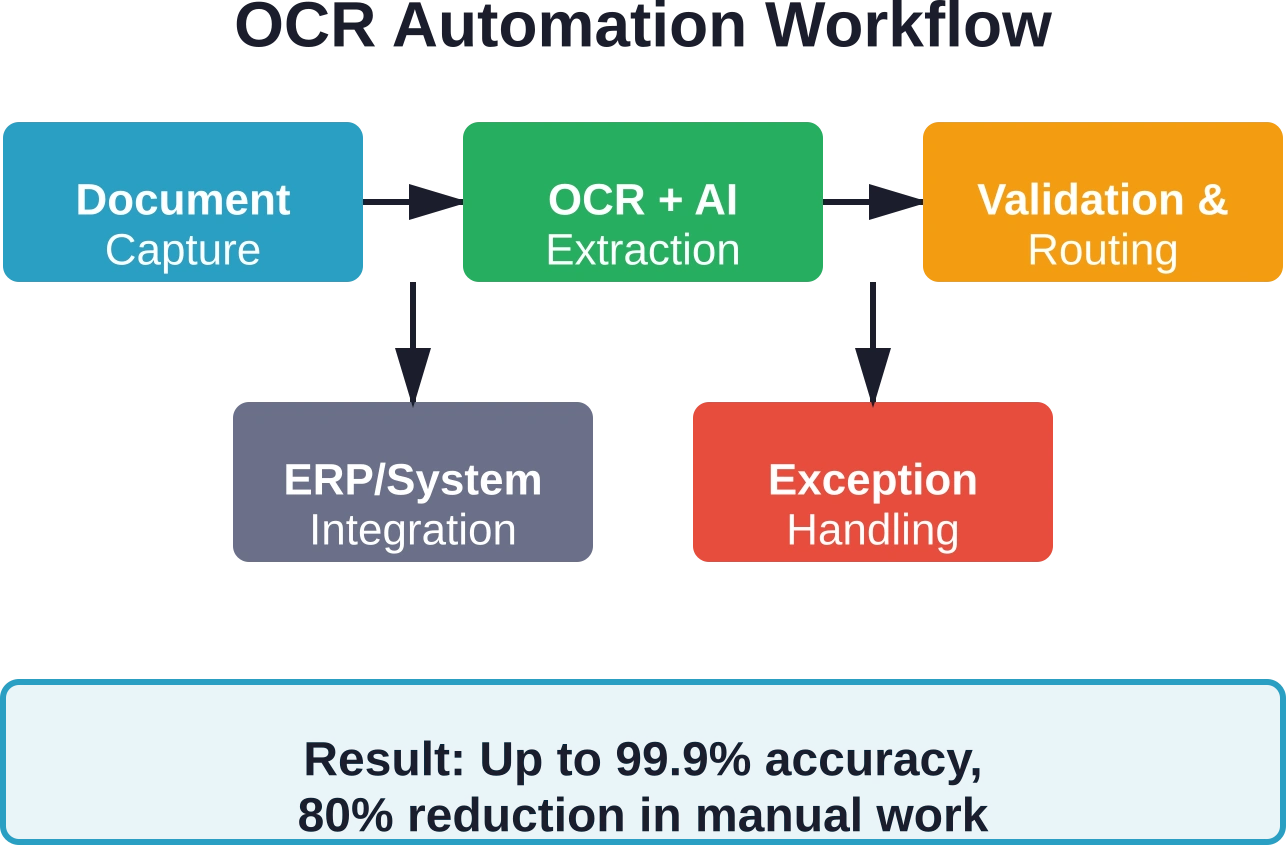
Quick Summary: OCR (Optical Character Recognition) transforms business process automation by converting printed and handwritten documents into machine-readable data, enabling straight-through processing of invoices, contracts, and forms. Modern OCR systems achieve up to 99.9% accuracy when combined with AI validation, reducing manual data entry by up to 80% and freeing teams for strategic work. Organizations see the greatest ROI when OCR is integrated into redesigned workflows—not just bolted onto existing manual processes.
Manual data entry from invoices, contracts, and resumes creates a massive operational bottleneck. It’s slow, error-prone, and diverts skilled teams away from high-value work.
Some finance teams lose as many as 72 workdays per year to manual invoice processing alone. That’s nearly three months of productivity lost to tedious typing and validation.
OCR technology changes the equation entirely. By automatically extracting text from scanned documents, PDFs, and images, OCR enables straight-through processing that eliminates most manual touchpoints.
This guide covers what businesses need to know about OCR automation in 2026: how the technology works, where it delivers the most value, and what separates basic scanning tools from enterprise-grade automation platforms.
What Is OCR and How Does It Enable Business Automation?
Optical Character Recognition analyzes text images in documents, identifies character patterns, and converts them into machine-readable plain text. The technology has existed since the early 20th century, but modern implementations bear little resemblance to their predecessors.
Traditional OCR worked reasonably well for printed text in standardized formats. But throw in handwriting, poor scan quality, or non-standard layouts? Accuracy rates plummeted to 50% or lower.
Advanced OCR platforms in 2026 combine character recognition with artificial intelligence, machine learning, and natural language processing. The result is systems that can handle handwritten notes with approximately 90% accuracy, process documents in 200+ languages, and learn from corrections over time.
The real value emerges when OCR is embedded into end-to-end workflow automation. According to MIT Sloan research, AI delivers the most value when organizations redesign workflows rather than just automating individual tasks.
Traditional OCR vs. Advanced OCR: What Changed
The gap between traditional and advanced OCR systems has widened significantly. Understanding the differences matters when evaluating solutions for business automation.
| Feature | Traditional OCR | Advanced OCR |
|---|---|---|
| Language Support | Approximately 120 languages | 200+ languages with dialect support |
| Handwriting Recognition | Accuracy as low as 50% | Approximately 90% accuracy |
| Learning Capability | Static rules-based processing | Self-learning AI |
| Complex Layouts | Requires standardized templates | Handles variable formats |
Modern platforms combine OCR with AI and automated controls to raise accuracy as high as 99.9%. That precision level makes straight-through processing viable for high-volume operations.
The University of Colorado’s Document Management Service team notes that OCR with batch processing capabilities helps departments eliminate paper-based inefficiencies while ensuring compliance with regulations like FERPA and HIPAA.
Where OCR Delivers the Highest Business Value
Not every document process benefits equally from OCR automation. Three areas consistently show the strongest ROI: invoice processing, contract management, and customer onboarding.
Invoice and AP Automation
Accounts payable departments process thousands of invoices monthly, each requiring data extraction, validation, coding, approval routing, and payment.
Leading platforms automate invoice processing with up to 99.9% accuracy when combined with AI validation and reduce manual data entry by up to 80%, appealing to AP teams keen on faster close cycles.
The workflow typically includes automatic capture from email or portals, field extraction, three-way matching against purchase orders, automated routing for approval, and direct posting to ERP systems.
Contract Analysis and Management
Legal and procurement teams handle contracts that often arrive as scanned PDFs or paper documents. Extracting key terms, dates, obligations, and renewal clauses manually is time-consuming and risky.
According to WashU Law’s examination of AI-powered legal document drafting software (published August 20, 2025), traditional manual processes for document drafting introduce vulnerabilities related to human error, inconsistencies, and time expenditure that modern systems address.
Customer Onboarding and KYC
Financial services, healthcare, and regulated industries face extensive documentation requirements for new customers.
OCR enables mobile document capture—customers photograph their driver’s license or passport, and the system extracts and validates information instantly. Combined with liveness detection and database verification, this creates smooth onboarding experiences while maintaining compliance standards.

Automate OCR Workflows With AI Superior
OCR becomes more valuable when it is integrated into business processes rather than used only for extracting text from scanned files. AI Superior provides computer vision, machine learning, data processing, AI consulting, and custom AI software development for document-heavy workflows. These capabilities support use cases where organizations need to extract, structure, and utilize information from scanned documents, images, forms, and records. They offer intelligent document processing solutions as part of their broader computer vision services.
AI Superior can support OCR automation with:
- Document processing use case definition
- Data extraction from scanned documents and images
- Computer vision and machine learning for document workflows
- Custom AI software for process automation
👉Contact AI Superior to discuss OCR automation for document workflows, data entry optimization, or internal process improvement.
Choosing OCR Software: What Actually Matters
Feature checklists and vendor demos rarely reveal what matters most. Here’s what separates effective OCR platforms from tools that’ll create more problems than they solve.
Accuracy and Confidence Scoring
Raw accuracy percentages mean little without context. The useful metric is straight-through processing rate—the percentage of documents processed end-to-end without human intervention.
Look for platforms that provide field-level confidence scores. When the system extracts an invoice total with 99.8% confidence but a vendor name with only 72% confidence, it should flag just that field for review rather than bouncing the entire document.
Integration Architecture
OCR that doesn’t connect to downstream systems creates busywork, not automation. The platform should offer REST APIs for custom integration, pre-built connectors for common ERP and business systems, webhook support for event-driven workflows, and bulk export in standard formats.
Training and Adaptability
No OCR system handles every document format perfectly out of the box. The question is how easily it adapts to organization-specific documents.
Leading platforms use self-learning AI that improves from corrections. When a user fixes an extraction error, the system should learn that correction and apply it to similar documents automatically.
Implementation Patterns That Work
Technical capabilities matter less than implementation approach. Organizations that succeed with OCR automation follow distinct patterns.
Start With Highest-Volume, Most Standardized Processes
The first OCR implementation shouldn’t tackle the hardest problem. Begin with high-volume processes using relatively standardized documents. Supplier invoices from major vendors, shipping documents, or recurring forms work well.
This builds confidence, demonstrates ROI quickly, and provides time to understand the technology before tackling edge cases.
Redesign the Workflow, Don’t Just Digitize It
Here’s the thing though—MIT research shows AI delivers maximum value when organizations redesign workflows rather than automating tasks within existing processes.
If the current process involves receiving a paper invoice, scanning it, manually entering data into a spreadsheet, emailing the spreadsheet to approvers, and finally entering approved data into the ERP, simply adding OCR doesn’t transform that workflow.
Better approach: redesign around straight-through processing. Invoices arrive via email or portal, OCR extracts data directly into the ERP as draft entries, automated rules route for approval based on amount and GL code, and approves work from a queue in the ERP itself.
Plan for Exceptions From Day One
Let’s be realistic—no automation system delivers 100% accurate results. Advanced OCR systems can learn from errors, but exception handling must be part of the initial design.
Effective exception handling includes clear confidence thresholds for automatic processing, intuitive review interfaces highlighting uncertain fields, escalation paths for documents the system can’t process, and feedback loops so corrections train the AI.
Measure Process Outcomes, Not Just Tool Metrics
Vendor dashboards show extraction accuracy, processing speed, and throughput. Those matter, but the business cares about different metrics: days to close, cost per invoice processed, approval cycle time, error rate in financial reporting.
| Tool Metric | Business Impact Metric |
|---|---|
| OCR accuracy rate | Error rate in financial statements |
| Documents processed per hour | Days to financial close |
| Straight-through processing % | Cost per invoice processed |
| Exception handling time | Staff hours on manual entry |
OCR and RPA: Better Together
OCR extracts data. Robotic Process Automation (RPA) acts on it. The combination enables end-to-end automation that neither achieves alone.
Consider purchase order processing. OCR extracts data from supplier confirmation emails. RPA then validates that data against the original PO in the procurement system, updates delivery dates, triggers warehouse notifications, and adjusts demand forecasts in the planning system.
When implementing OCR and RPA together, design the entire workflow before building anything, identify decision points that need business rules, ensure OCR output format matches RPA input requirements, and build exception handling for both OCR failures and RPA errors.
Common OCR Implementation Mistakes
Several patterns lead to failed or disappointing OCR projects.
Underestimating Data Quality Requirements
Even advanced OCR struggles with terrible inputs. Faxed documents, fourth-generation photocopies, and images taken in poor lighting create extraction errors no amount of AI can fully overcome.
Address source quality where possible. Encourage suppliers to send invoices as PDF rather than scanning paper. Provide mobile apps with image quality feedback for customer document capture.
Ignoring Change Management
OCR changes how people work. AP staff who’ve manually entered invoices for years now review exceptions and handle escalations. That’s a different skill set requiring different training.
Skipping the Pilot Phase
Moving straight to full implementation without a pilot increases risk unnecessarily. Run a focused pilot on one document type or one business unit. Validate accuracy, test integrations, train users, and refine the workflow before expanding.
Frequently Asked Questions
What accuracy rate should businesses expect from modern OCR software?
Advanced OCR platforms achieve up to 99.9% accuracy for printed text on clean documents when combined with AI validation rules. Handwritten text typically reaches approximately 90% accuracy with market-leading solutions. Actual results depend on document quality, layout complexity, and whether the system has been trained on organization-specific templates.
How much can OCR reduce manual data entry workload?
Industry data shows OCR automation can reduce manual data entry by up to 80% for high-volume document processes like invoice processing. The exact reduction depends on document standardization, exception handling requirements, and workflow design. Organizations that redesign processes around automation see larger gains than those that simply add OCR to existing manual workflows.
Does OCR work with handwritten documents?
Yes, but accuracy varies significantly. Traditional OCR struggled with handwriting, achieving accuracy rates as low as 50%. Advanced OCR platforms with AI achieve approximately 90% accuracy on handwritten text. Performance depends on handwriting legibility, language, and whether the system supports cursive versus printed handwriting.
Can OCR integrate with existing business systems like ERP and CRM?
Enterprise-grade OCR platforms provide REST APIs, webhooks, and pre-built connectors for common business systems including major ERP, accounting, and CRM platforms. Integration architecture is one of the most important evaluation criteria—OCR that exports files requiring manual upload doesn’t enable true automation.
What document types benefit most from OCR automation?
High-volume, semi-standardized documents show the strongest ROI: supplier invoices, purchase orders, contracts, shipping documents, insurance claims, loan applications, and tax forms. The ideal candidates combine high processing volume (1,000+ documents monthly), relatively consistent formatting from major sources, and clear downstream workflow integration.
How long does OCR implementation typically take?
A focused pilot on one document type typically takes 6-8 weeks from initial setup through refinement. Full production deployment across multiple document types and business units usually requires 3-4 months. Implementation timeline depends on integration complexity, number of document variations, change management requirements, and whether the organization redesigns workflows or simply automates existing processes.
Taking the Next Step With OCR Automation
OCR technology has matured to where it delivers genuine business value—not just incremental improvements, but transformational changes to how organizations handle document-intensive processes.
The organizations seeing the strongest results share common characteristics. They start with high-volume standardized processes, redesign workflows rather than just digitizing existing steps, and build exception handling into initial implementations.
For organizations ready to move forward, the path is straightforward: identify the highest-volume document process creating bottlenecks, map the complete workflow from document receipt through final system entry, select a platform with appropriate accuracy and integration capabilities, run a focused pilot, then scale based on proven results.
The alternative—continuing manual document processing—becomes less tenable as business volumes grow and competition intensifies. Teams that eliminate 80% of manual data entry redeploy that capacity toward strategic work that actually differentiates the organization.