
Quick Summary: Computer vision applications are transforming business operations across manufacturing, retail, healthcare, and logistics by enabling machines to interpret visual data for quality control, safety monitoring, inventory management, and process automation. According to NIST data from 2026, 72% of manufacturers cite cost reduction as an AI investment driver, with computer vision playing a central role in defect detection, predictive maintenance, and workplace safety. Modern computer vision systems have achieved 99% accuracy in visual recognition tasks, driving adoption across industries seeking operational gains and competitive advantage.
The ability of machines to see and understand visual information isn’t science fiction anymore. It’s happening right now in warehouses, hospitals, retail stores, and factory floors worldwide.
Computer vision applications have quietly slipped into everyday business operations, solving problems that once required armies of human inspectors or were simply impossible to tackle at scale. From spotting microscopic defects on production lines to tracking inventory in real-time across thousands of SKUs, the technology has matured from research labs into mission-critical infrastructure.
But here’s the thing: not every business knows where to start or which applications deliver actual ROI versus hype.
What Is Computer Vision and Why Does It Matter Now?
Computer vision enables machines to acquire, process, analyze, and understand visual data from the world around them. In simple terms, it teaches computers to see.
The technology has advanced dramatically. With modern neural network technology, computer vision systems have achieved 99% accuracy in visual recognition tasks. That leap changed everything.
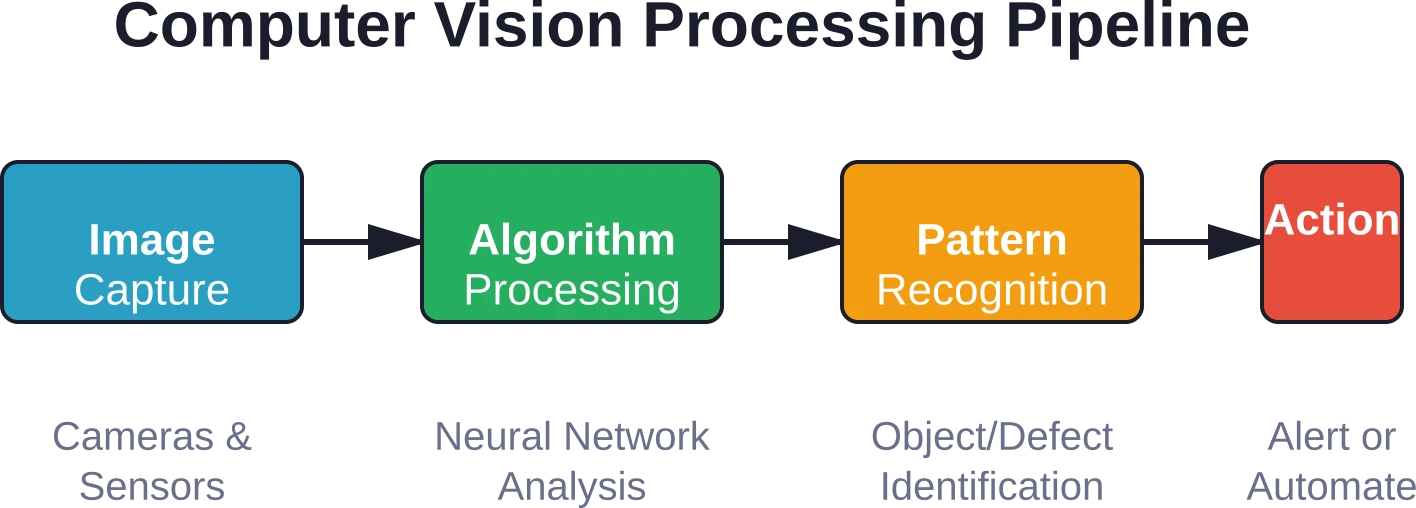
The steps of computer vision work like this:
- Training: Algorithms learn from massive visual datasets containing thousands or millions of labeled examples
- Input: Cameras, sensors, and imaging devices capture real-world visual data
- Processing: The computer vision algorithm analyzes input, identifying patterns, objects, and relationships
- Output: The system generates actionable insights, classifications, or triggers automated responses
According to NIST data from May 2026, 72% of manufacturers cite cost reduction as an AI investment driver. Computer vision represents a substantial portion of these investments, particularly in areas requiring visual inspection and monitoring.
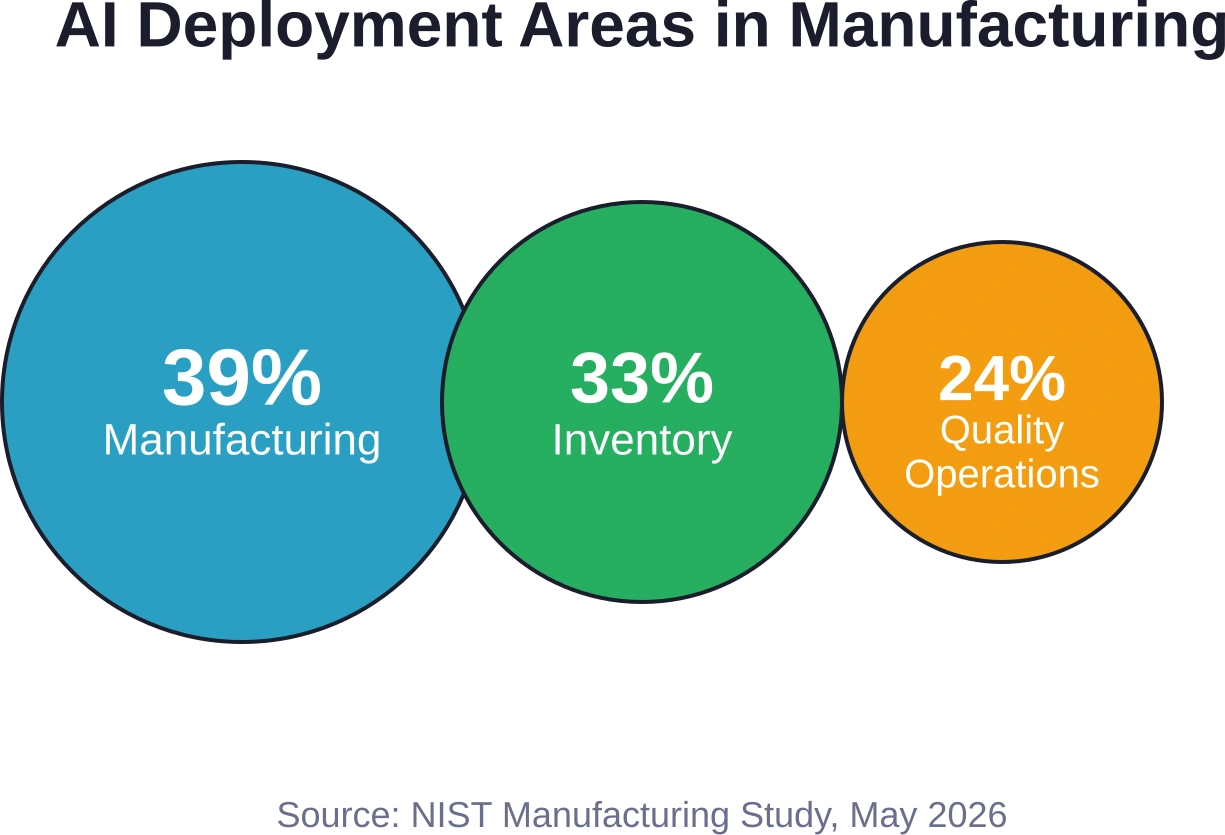
According to 2026 NIST data, 39% of manufacturers deploy AI in manufacturing and production operations, 33% in inventory management, and 24% in quality operations—all areas where computer vision plays a central role.
Core Computer Vision Capabilities Driving Business Value
Computer vision applications can already read texts with ease. They identify objects, classify them, and track their movement. They recognize human faces and interpret complex visual scenes.
The practical capabilities break down into several categories:
Object Detection and Classification
Systems can identify and categorize objects within images or video streams. In retail, this means recognizing products on shelves. In manufacturing, it means distinguishing between different part types on an assembly line.
Defect Recognition
Algorithms detect anomalies and defects that are too small to be identified by humans. In fact, some computer vision systems have achieved more than 95% accuracy in detecting microscopic defects that human inspectors would miss entirely.
Pattern Recognition and Tracking
Computer vision tracks movement patterns, whether that’s people moving through a space, vehicles on a highway, or parts moving along a conveyor belt. This capability underpins applications from workplace safety to logistics optimization.
Measurement and Alignment
Precise visual measurements enable applications like parts alignment verification, dimensional quality control, and spatial positioning in robotics.
Manufacturing: Where Computer Vision Delivers Immediate ROI
Manufacturing represents the most mature deployment area for computer vision applications. The numbers tell the story clearly.
According to NIST 2026 data, manufacturers cite process improvement, preventative and predictive maintenance, productivity improvements, and quality enhancement as key AI application areas. Computer vision systems power many of these applications.
Quality Control and Defect Detection
Traditional quality inspection relied on human inspectors examining parts visually—slow, expensive, and prone to fatigue-related errors. Computer vision changed economics completely.
Vision systems can inspect 100% of parts at production speed, catching defects too small for human detection. The more than 95% accuracy achieved by modern algorithms means fewer defective products reaching customers and less waste from over-cautious rejection of good parts.
Real-world applications include:
- Surface defect detection on painted or polished components
- Dimensional verification ensuring parts meet tolerance specifications
- Assembly verification confirming all components are present and correctly positioned
- Label and packaging inspection catching printing errors before shipment
Predictive Maintenance
Computer vision monitors equipment condition through thermal imaging, vibration analysis visualization, and visual inspection of wear patterns. The system flags potential failures before they cause downtime.
Research indicates that 82% of companies have faced at least one unplanned downtime incident over the past three years, leading to significant productivity losses.
Workplace Safety Monitoring
The most recent data from the U.S. Bureau of Labor Statistics reveals a staggering 2.6 million nonfatal injuries and illnesses recorded annually. Computer vision systems help reduce this toll by monitoring for safety violations in real-time.
Applications include detecting when workers enter hazardous zones without proper protective equipment, identifying unsafe behaviors like improper lifting techniques, and monitoring for environmental hazards like spills or obstructions.
Process Optimization
Vision systems track how materials and products move through production processes, identifying bottlenecks and inefficiencies. This visual data feeds into AI-driven optimization models that suggest process improvements.
According to NIST data, 41% of manufacturers use AI for automated internal performance metrics and dashboards, and 40% for production planning—both areas enhanced by computer vision inputs.
Retail: Transforming Customer Experience and Operations
Retail computer vision applications span both customer-facing experiences and back-office operations. The technology provides physical retail with better visibility into customer behavior and inventory status.
Inventory Management
Computer vision systems monitor shelf stock levels in real-time, automatically triggering restocking alerts when products run low. This prevents out-of-stock situations that cost retailers sales.
The systems also detect misplaced products, pricing errors, and planogram compliance issues—ensuring shelves match corporate merchandising standards.
According to 2026 NIST data, 33% of manufacturers cite inventory management as an AI deployment area, and similar patterns emerge in retail where computer vision tracks goods from warehouse to shelf.
Customer Behavior Analysis
Anonymous customer tracking reveals how shoppers move through stores, which displays attract attention, and where bottlenecks occur. Retailers use this data to optimize store layouts and product placement.
Computer vision can also estimate customer demographics and measure engagement with specific products or displays—all without compromising individual privacy through facial recognition.
Automated Checkout
Cashierless store concepts rely on computer vision to track what customers pick up and put back, automatically charging them when they leave. While still emerging, this application eliminates checkout friction entirely.
Loss Prevention
Vision systems detect suspicious behaviors like concealment or unusual movement patterns that may indicate shoplifting. They also monitor for sweethearting at checkout—when cashiers intentionally fail to scan items for friends or family.
Healthcare: Enhancing Diagnostics and Patient Care
Computer vision applications in healthcare focus primarily on medical imaging analysis, though operational applications are emerging as well.
Medical Imaging Analysis
Vision algorithms assist radiologists by highlighting potential abnormalities in X-rays, CT scans, MRIs, and other imaging modalities. The systems don’t replace human experts but serve as a second pair of eyes, reducing missed diagnoses.
Applications include detecting tumors, identifying fractures, measuring organ volumes, and tracking disease progression over time through comparison of sequential scans.
Pathology and Laboratory Analysis
Computer vision analyzes microscope slides, identifying cancerous cells, counting blood cells, and detecting pathogens. The automation accelerates lab workflows and improves consistency.
Patient Monitoring
Vision systems monitor patients for falls, track movement patterns indicating pain or distress, and verify medication administration. In surgical settings, computer vision assists with instrument tracking and procedural documentation.
Hospital Operations
Beyond clinical applications, computer vision optimizes hospital operations by tracking equipment location, monitoring hand hygiene compliance, and managing patient flow through facilities.
Transportation and Logistics: Optimizing Movement
Transportation and logistics companies deploy computer vision to improve safety, efficiency, and cost control across complex distribution networks.
Warehouse Automation
Vision-guided robots pick and place items, navigate warehouse aisles, and load delivery vehicles. Computer vision enables these robots to handle diverse package types without custom fixtures or programming.
The systems also track inventory location in real-time, verify shipment contents, and detect packaging damage before items leave the facility.
Fleet Management and Safety
Dashboard cameras with computer vision monitor driver behavior, alerting on distracted driving, drowsiness, or unsafe practices. Forward-facing cameras detect collision risks and can trigger automatic braking in equipped vehicles.
The technology also reads license plates for access control and tracks vehicle location within yards and terminals.
Intelligent Tolling Systems
Computer vision enables automated toll collection without requiring vehicles to slow down. Cameras capture license plates, vehicle classification, and occupancy counts, enabling variable pricing based on vehicle type and passenger count.
Infrastructure Inspection
There are more than 140,000 miles of railroad tracks. In 2018, the industry spent an average of $260,000 per mile for maintenance, funding, and future needs. Computer vision helps manage these costs by identifying maintenance issues before they cause disruptions.
Cameras mounted on inspection vehicles capture track conditions, and algorithms detect defects like cracked rails, missing fasteners, and ballast problems. Similar applications inspect bridges, tunnels, and roadways.
Agriculture: Precision Farming Applications
Agricultural computer vision applications help farmers monitor crop health, optimize inputs, and automate labor-intensive tasks.
Crop Monitoring and Disease Detection
Drone-mounted cameras capture field imagery that computer vision algorithms analyze for signs of disease, pest damage, nutrient deficiency, or water stress. Early detection enables targeted intervention before problems spread.
Automated Harvesting
Vision systems guide harvesting robots, identifying ripe produce and determining optimal picking points. This automation addresses labor shortages in agriculture while improving harvest timing and reducing waste.
Livestock Management
Computer vision monitors livestock for signs of illness or injury, tracks individual animal movement and behavior, and automates feeding based on body condition assessment. The technology improves animal welfare while reducing labor costs.
Quality Grading and Sorting
Vision systems grade and sort agricultural products by size, color, and quality characteristics at speeds impossible for human sorters. This ensures consistent quality and optimal pricing for different product grades.
| Industry | Primary Applications | Key Benefits | Maturity Level |
|---|---|---|---|
| Manufacturing | Quality control, defect detection, safety monitoring, predictive maintenance | Cost reduction, improved quality, enhanced safety | Mature |
| Retail | Inventory management, customer analytics, loss prevention | Reduced stockouts, optimized layouts, lower shrinkage | Growing |
| Healthcare | Medical imaging analysis, patient monitoring, lab automation | Improved diagnostics, enhanced patient safety | Expanding |
| Transportation | Fleet safety, warehouse automation, infrastructure inspection | Lower accidents, improved efficiency, reduced maintenance costs | Mature |
| Agriculture | Crop monitoring, automated harvesting, livestock management | Higher yields, reduced labor costs, improved sustainability | Emerging |
Finance and Insurance: Risk Assessment Through Visual Data
Financial services firms deploy computer vision for fraud detection, risk assessment, and process automation.
Check and Document Processing
Vision systems read handwritten checks, extract data from forms and contracts, and verify document authenticity. This automation accelerates processing while reducing errors.
Fraud Detection
Computer vision detects forged signatures, altered documents, and suspicious transaction patterns in ATM footage. The technology also verifies identity documents during account opening and transaction verification.
Property and Asset Valuation
Insurance companies use computer vision to assess property condition from photos, estimate damage after disasters, and verify assets securing loans. Real estate valuations incorporate visual analysis of property features and neighborhood characteristics.
Claims Processing
Vision algorithms assess damage in auto insurance claims from photos, reducing the need for in-person inspections. The systems estimate repair costs and detect fraudulent claims where damage photos don’t match incident descriptions.
Selecting the Right Computer Vision Partner or Platform
Most businesses lack in-house expertise for computer vision development, making vendor selection critical.
Build vs. Buy Considerations
Off-the-shelf solutions work well for common applications like document processing or basic object detection. Custom development makes sense when competitive advantage depends on proprietary capabilities or highly specialized requirements.
Hybrid approaches—starting with platform tools and customizing specific components—balance speed and specificity.
Evaluation Criteria
When evaluating computer vision vendors or platforms, consider:
- Proven experience in the target industry and application type
- Data requirements and whether vendor provides pre-trained models or requires customer data
- Integration capabilities with existing systems and workflows
- Deployment flexibility—cloud, edge, or hybrid options
- Ongoing support model and update frequency
- Pricing structure and total cost of ownership
Proof of Concept Requirements
Insist on proof-of-concept testing with real data from the target environment before major commitments. Vendors demonstrating success on similar problems elsewhere may still face challenges with specific lighting, product variations, or environmental conditions.
POC testing should use production-representative data and measure performance against defined success criteria.

Use Computer Vision for Business Tasks With AI Superior
Computer vision is useful when companies need software to analyze images, video, scanned documents, visual defects, objects, patterns, or physical environments. AI Superior provides computer vision, machine learning, deep learning, AI consulting, and custom AI software development. The team can help companies choose the right computer vision use case, build the model, and turn it into software that fits the actual workflow.
AI Superior’s computer vision support may include:
- Defining computer vision use cases for business workflows
- Building object detection or image classification models
- Developing visual inspection or video analytics tools
- Extracting useful data from images or scanned documents
- Integrating computer vision features into custom software
👉Contact AI Superior to discuss how computer vision can be applied to your visual data, operations, or software product.
Implementation Challenges and Considerations
Despite proven benefits, computer vision adoption faces several challenges that businesses must address.
Data Requirements
Training effective computer vision models requires thousands or millions of labeled images. Collecting, labeling, and managing these datasets demands significant time and resources.
The data must represent the full range of conditions the system will encounter in production—different lighting, angles, backgrounds, and object variations. Insufficient training data leads to poor real-world performance.
Integration Complexity
Computer vision systems must integrate with existing business processes, IT infrastructure, and equipment. This integration often proves more complex and expensive than the vision technology itself.
Legacy systems may lack APIs for data exchange. Production environments may require custom hardware installations. Change management challenges arise when automating tasks previously performed by workers.
Computational Requirements
Real-time computer vision demands significant computational power, particularly for high-resolution imagery or video processing. Edge deployment requires ruggedized hardware capable of operating in harsh industrial environments.
Cloud processing reduces on-site hardware needs but introduces latency and raises concerns about sending sensitive visual data off-premises.
Privacy and Ethical Concerns
Computer vision applications involving people raise privacy questions. Workplace monitoring can feel invasive. Retail customer tracking must balance business insights against privacy expectations.
Bias in training data can lead to discriminatory outcomes. Systems trained primarily on one demographic group may perform poorly on others—a serious concern in healthcare, hiring, and security applications.
Accuracy and Reliability
While computer vision has reached 99% accuracy in controlled conditions, real-world performance varies. Environmental factors like poor lighting, occlusion, or unexpected object orientations can degrade accuracy.
Mission-critical applications require extensive testing and often human oversight. The cost of false positives (rejecting good products) and false negatives (missing defects) must be carefully evaluated.
Best Practices for Successful Computer Vision Deployment
Organizations achieving ROI from computer vision follow several common practices.
Start With Clear Business Objectives
Successful deployments begin with specific business problems, not technology solutions. Define what success looks like in measurable terms—reduced defect rates, lower accident frequency, or faster processing times.
Avoid vague goals like “explore AI opportunities.” Instead, target concrete problems where visual inspection or monitoring could drive value.
Run Proof-of-Concept Projects
Before committing to full-scale deployment, validate the approach with small pilot projects. Test whether computer vision can achieve required accuracy levels with available data and infrastructure.
Proof-of-concept projects reveal integration challenges, data quality issues, and unexpected edge cases while investment remains limited.
Invest in Data Infrastructure
High-quality training data makes the difference between functional and useless computer vision systems. Build processes for data collection, labeling, quality control, and ongoing model improvement.
Plan for continuous learning—computer vision models must be retrained as products, processes, or environments change.
Address the Human Element
Computer vision often augments rather than replaces human workers. Design systems that present information clearly and integrate smoothly into existing workflows.
Involve end users early in system design. Address concerns about job displacement openly and provide training for new roles created by automation.
Plan for Ongoing Maintenance
Computer vision systems require ongoing maintenance—model retraining, hardware updates, integration adjustments as other systems change. Budget for this continuing investment rather than treating deployment as a one-time project.
The Economics of Computer Vision Investment
Understanding the cost structure helps businesses evaluate computer vision ROI realistically.
Initial Investment Components
Upfront costs include hardware (cameras, sensors, computing infrastructure), software (licensing or development costs), integration services, and data preparation. Custom applications cost more than off-the-shelf solutions but deliver better fit to specific needs.
For manufacturing applications, typical payback periods range from 6 to 18 months when systems replace manual inspection or prevent costly quality escapes.
Ongoing Operational Costs
Recurring costs include software maintenance, model retraining, hardware replacement, technical support, and cloud computing charges if applicable. These typically run 15-25% of initial investment annually.
Value Realization Paths
Computer vision delivers value through several mechanisms:
- Cost avoidance: Preventing quality problems, accidents, or equipment failures
- Labor savings: Automating manual inspection, monitoring, or data entry tasks
- Revenue protection: Reducing shrinkage, improving asset utilization, or minimizing downtime
- New capabilities: Enabling business models or quality levels impossible without automation
The strongest ROI cases combine multiple value streams. A manufacturing quality control system prevents defects reaching customers, reduces inspection labor, and enables faster production speeds—all contributing to financial returns.
Emerging Trends and Future Directions
Computer vision continues evolving rapidly, with several trends shaping near-term developments.
Edge AI and Real-Time Processing
Processing visual data at the edge—on cameras or nearby devices—reduces latency, bandwidth costs, and privacy concerns. Advances in specialized AI chips make sophisticated computer vision feasible in compact, low-power devices.
This trend enables new applications requiring millisecond response times or operating in environments with limited connectivity.
Multimodal AI Systems
Combining computer vision with other AI modalities—natural language processing, sensor fusion, predictive analytics—creates more capable systems. A warehouse robot that sees products, reads text labels, and interprets verbal commands functions more flexibly than vision-only systems.
Synthetic Data and Simulation
Generating training data through simulation and rendering reduces dependence on manually labeled real-world images. This approach accelerates development and enables training for rare scenarios difficult to capture in sufficient real examples.
Explainable AI
As computer vision moves into regulated industries and high-stakes applications, demand grows for systems that explain their decisions. Explainable AI techniques show which image features influenced a classification, building trust and enabling human review of edge cases.
Industry-Specific Solutions
Computer vision increasingly takes the form of pre-built industry solutions rather than custom projects. These packaged applications deliver faster deployment and lower risk for common use cases like retail inventory monitoring or construction site safety.
| Application Category | Typical Accuracy | Deployment Complexity | ROI Timeline |
|---|---|---|---|
| Defect Detection | 95-99% | Medium | 6-12 months |
| Object Classification | 90-99% | Low-Medium | 3-9 months |
| Workplace Safety Monitoring | 85-95% | Medium-High | 12-24 months |
| Inventory Tracking | 90-98% | Medium | 6-18 months |
| Medical Imaging Analysis | 90-98% | High | 18-36 months |
Frequently Asked Questions
What accuracy rate should businesses expect from computer vision systems?
Modern computer vision systems achieve 95-99% accuracy on well-defined tasks with sufficient training data. However, real-world accuracy depends heavily on environmental conditions, data quality, and application complexity. Defect detection on uniform parts under controlled lighting reaches higher accuracy than object recognition in variable outdoor settings. Always validate performance on representative data from the actual deployment environment rather than relying on vendor claims based on benchmark datasets.
How much training data does a computer vision application need?
Data requirements vary dramatically by application complexity. Simple classification tasks might work with hundreds of examples per category, while sophisticated defect detection could require tens of thousands of labeled images. Transfer learning—starting from models pre-trained on large datasets—reduces custom data needs significantly. Most business applications need thousands to tens of thousands of labeled examples covering all relevant variations in lighting, angles, and object states.
Can small and mid-sized businesses afford computer vision technology?
Yes, though ROI depends on application specifics. Cloud-based computer vision platforms reduce upfront hardware costs and enable pay-as-you-go pricing. Pre-built applications for common use cases like inventory monitoring or quality inspection cost far less than custom development. Many businesses achieve payback within 6-18 months through labor savings or quality improvements. Start with clearly defined, high-value use cases rather than attempting comprehensive deployments.
How does computer vision handle changes in products or environments?
Computer vision models learn from training data and perform best on similar conditions. Significant changes—new product variants, altered lighting, different camera angles—often degrade performance until the model is retrained with examples of new conditions. Plan for ongoing model maintenance and retraining as part of the computer vision lifecycle. More robust systems include human review workflows to catch and correct errors on edge cases, using those corrections to improve future model versions.
What privacy concerns arise with computer vision deployment?
Computer vision systems capturing human images raise privacy questions, particularly in workplace monitoring and retail analytics applications. Best practices include anonymizing data whenever possible, limiting storage duration, clearly communicating what’s monitored and why, and complying with relevant regulations like GDPR or CCPA. Focus on detecting behaviors or conditions rather than identifying individuals unless identification is genuinely necessary for the application. Edge processing that discards raw imagery after extracting relevant features can address some privacy concerns.
How long does computer vision implementation typically take?
Timelines vary by application scope and complexity. Deploying pre-built solutions for standard use cases might take 1-3 months including integration and testing. Custom computer vision applications typically require 3-6 months for proof-of-concept development and validation, then another 3-6 months for production deployment and scaling. Complex applications involving multiple cameras, custom hardware, or extensive integration can extend to 12-18 months. Starting with limited pilot deployments accelerates learning and value realization.
What happens when the computer vision system makes a mistake?
Error handling depends on application criticality. In quality control, false positives (flagging good products as defective) waste materials but prevent defects reaching customers. False negatives (missing actual defects) carry higher risk. Many deployments include human review for borderline cases where the model’s confidence is low. Critical applications often keep humans in the loop for final decisions while using computer vision to focus attention on potential issues. Track error patterns to identify where retraining or model improvements deliver the most value.
Taking Action: Next Steps for Businesses
Computer vision has moved from research curiosity to practical business tools delivering measurable returns across industries. The technology enables capabilities impossible through human effort alone while reducing costs and improving quality.
But successful adoption requires more than buying software. It demands clear objectives, realistic expectations, appropriate data infrastructure, and ongoing commitment to model maintenance and improvement.
Organizations just starting with computer vision should identify high-value use cases where visual inspection or monitoring drives business outcomes. Manufacturing quality control, workplace safety monitoring, and inventory management represent proven applications with clear ROI paths.
Run proof-of-concept projects before major commitments. Validate that computer vision can achieve required accuracy with available data and infrastructure. Test integration with existing systems and workflows.
Build internal capabilities or partner with experienced vendors. Computer vision requires expertise in machine learning, imaging, and the specific application domain. Few organizations possess all these skills internally.
The data is clear: 72% of manufacturers cite cost reduction as an AI investment driver, with computer vision playing a central role. The question isn’t whether computer vision delivers value—proven applications demonstrate that it does. The question is where your organization can apply it most effectively.
Start with focused applications addressing specific business problems. Prove value. Then expand based on what you learn. Computer vision applications work best when they solve real problems, not when they chase technology trends.
The machines can see now. The competitive advantage goes to businesses that put that vision to work strategically.
 English
  German
  Arabic
  French
  Dutch
Dutch  Spanish